

应用命令、工作表标识符和示例数据值保留原文。截图、图表和下载文件均为英文。
示例: 包装袋封口不牢
团队正在调查配件包装袋间歇性封口不牢的问题。此示例包含六个类别、12 个原因、24 个子原因、六项计划调查及六项后续行动。尚未确定任何原因。
下载层级结构参考(CSV,英文)此示例与 Help 中使用的示例相同。在那里打开练习副本,可加载完整图及关联任务。CSV 文件描述层级结构、计划、证据请求和评论;将 CSV 导入工作表不会加载鱼骨图项目。
1. 打开练习图
在侧边栏中打开 Data utilities,选择 Fishbone Diagram。在 Help 中找到 Investigate intermittent weak pouch seals,选择 Open example in a practice copy。练习编辑器与您当前的图相互独立。
2. 选择一个可能原因
在 Diagram 中选择 Outline。选择 People 下的 Different interpretations of seal acceptance。选择 Fit selection 查看该分支,然后在检查器中打开 Details。
此标签是一种拟议解释,选中它并不表示已确认该原因。
3. 打开调查
在 Details 的 Investigations 下,打开 How consistently are borderline seals classified?。Analysis 选项卡会打开该调查的编辑器。
阅读 Check plan 和 Assignee。在此示例中,将 Status 保持为 Not started。Findings 和 Conclusion 为空,Evidence (0) 表示尚未附加任何证据。Legacy / general notes 中将所请求的记录标为 not collected。
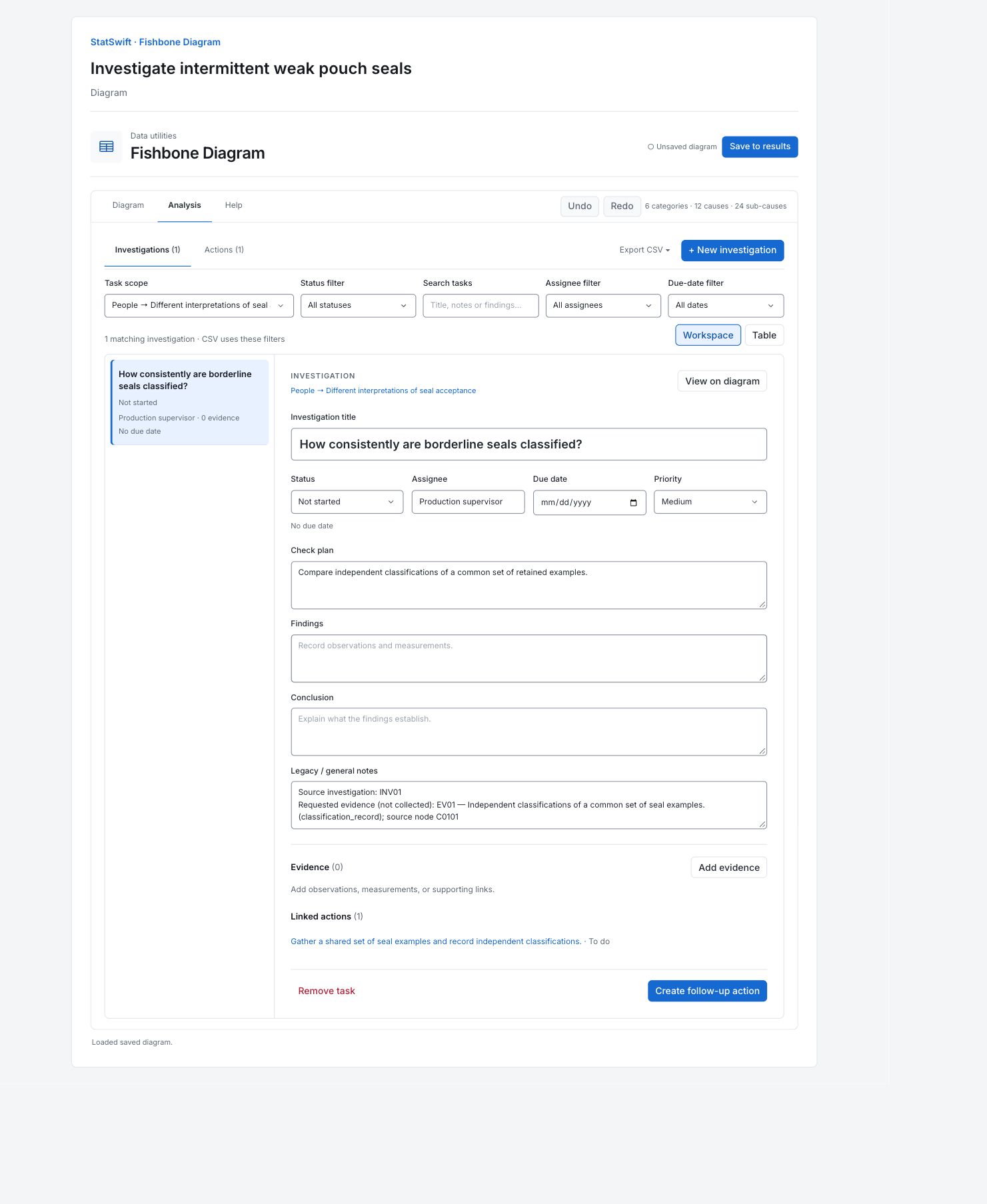
4. 保存到结果
选择 Save to results,保存一份独立的练习快照。编辑已保存的练习结果后,使用 Save changes 更新它,或使用 Save as new snapshot 保留另一个版本。
5. 解读结果
从问题入手
先阅读图头部的封口不牢问题。六条分支组织了 12 个可能原因及 24 个更具体的子原因。它们均为未经检验的假设,在图中的位置并不表示其可能性大小。

英文图表:包装袋间歇性封口不牢的六类可能解释。分支用于组织假设,尚无任何原因得到确认。 查看原尺寸图表 (在新标签页中打开) 阅读一项计划检查
在人员分支下打开“临界封口的分类一致性如何?”调查。其检查计划要求对同一组保留样例进行独立分类,负责人为生产主管。状态为未开始,调查发现和结论均为空。计划说明需要检查什么,目前尚无结果。
检查现有证据
此调查显示 Evidence (0)。其常规备注请求提供分类记录,并标为“尚未收集”。请求并非观测结果。讨论评论同样只是问题和建议,并非有证据支持的结论。
阅读关联行动
关联行动要求团队收集一组共用封口样例,并记录独立分类结果,状态为待办。此示例共包含六项计划调查和六项证据收集行动。它们均未确定原因,也不能说明封口不牢问题已解决。
选择下一项检查
商定如何对保留样例分类,收集证据,并在 Findings(调查发现)中记录观测到的情况。使用 Conclusion(结论)说明证据支持什么。只有调查发现提供支持时,才将 Status 更改为“已确认原因”(Confirmed cause)、“已排除”(Ruled out)或“无法定论”(Inconclusive)。将练习工作保存为独立结果。
更多详情:阅读各结果部分
完整结果表采用六位有效数字,与 Help 中一致。
调查与行动计划
此表包含全部 12 项任务:六项调查和六项关联行动。分支用于定位假设;类型用于区分检查和行动。任务说明工作内容,负责人给出负责角色,状态显示进度。备注保留源 ID,并明确标注尚未收集的证据。检查计划 / 目的给出计划检查或行动目的。首项调查的状态为未开始,关联行动的状态为待办。编辑器中的调查发现和结论均为空。
| 分支 | 类型 | 任务 | 负责人 | 状态 | 备注 | 检查计划 / 目的 |
|---|---|---|---|---|---|---|
| People → Different interpretations of seal acceptance | investigation | How consistently are borderline seals classified? | Production supervisor | Not started | Source investigation: INV01 Requested evidence (not collected): EV01 — Independent classifications of a common set of seal examples. (classification_record); source node C0101 | Compare independent classifications of a common set of retained examples. |
| People → Different interpretations of seal acceptance | action | Gather a shared set of seal examples and record independent classifications. | Production supervisor | To do | Source action: ACT01; investigation: INV01; node: C0101 | Follow-up / evidence gathering |
| Equipment → Uneven jaw contact | investigation | Does contact pressure vary across the jaw? | Maintenance technician | Not started | Source investigation: INV02 Requested evidence (not collected): EV02 — Jaw-contact check record showing position, settings, and check method. (contact_check_record); source node C0201 | Document contact distribution at fixed settings before making adjustments. |
| Equipment → Uneven jaw contact | action | Arrange a jaw-contact check and preserve the original check record. | Maintenance technician | To do | Source action: ACT02; investigation: INV02; node: C0201 | Follow-up / evidence gathering |
| Methods → Startup sequence may vary | investigation | Is the startup release sequence consistent? | Process engineer | Not started | Source investigation: INV03 Requested evidence (not collected): EV03 — Startup sequence, warm-up timing, and first-off sampling records. (startup_observation_log); source node C0301 | Compare recorded startup steps and timing for several changeovers. |
| Methods → Startup sequence may vary | action | Collect changeover records and document the sequence used during observed startups. | Process engineer | To do | Source action: ACT03; investigation: INV03; node: C0301 | Follow-up / evidence gathering |
| Materials → Sealing-layer properties may vary | investigation | Are film-lot properties comparable? | Materials engineer | Not started | Source investigation: INV04 Requested evidence (not collected): EV04 — Incoming material records and supplier declarations linked to film-lot identifiers. (material_lot_record); source node C0401 | Link lot identifiers with available incoming and supplier material records. |
| Materials → Sealing-layer properties may vary | action | Assemble lot-level material records and retain identifiers for sampled pouches. | Materials engineer | To do | Source action: ACT04; investigation: INV04; node: C0401 | Follow-up / evidence gathering |
| Measurement → Peel-test conditions may vary | investigation | Are peel-test conditions comparable? | Laboratory technician | Not started | Source investigation: INV05 Requested evidence (not collected): EV05 — Peel-test method revision, strip-width record, and pull-speed setting. (test_method_record); source node C0501 | Compare strip preparation, method revision, and pull-speed records. |
| Measurement → Peel-test conditions may vary | action | Collect test-method revisions and document strip preparation on a shared sample. | Laboratory technician | To do | Source action: ACT05; investigation: INV05; node: C0501 | Follow-up / evidence gathering |
| Environment → Local drafts may cool the sealing area | investigation | Does local airflow change near the jaw? | Facilities coordinator | Not started | Source investigation: INV06 Requested evidence (not collected): EV06 — Local airflow observations with door state and extraction settings. (airflow_observation_log); source node C0601 | Document airflow around the sealing area under routine door and extraction conditions. |
| Environment → Local drafts may cool the sealing area | action | Plan local airflow observations without changing normal production settings. | Facilities coordinator | To do | Source action: ACT06; investigation: INV06; node: C0601 | Follow-up / evidence gathering |
6. 创建报告
保留 Cause and effect diagram 和完整的 Investigation and action plan。该计划包含全部六项调查和六项行动。如需查看源层级结构、证据请求或评论,请一并保留配套的英文下载文件。编辑器中的 Export CSV 使用当前任务筛选条件;在 Task scope 中选择 All branches,可导出整个图中的任务。
在已完成的运行中选择 Add to report 。打开 Choose individual items and advanced options 以选择表格和图表,然后选择 Add to draft。隐藏的项目仍会保留在已保存的分析中。
为报告命名,并添加研究目的和您的解读。选择 Save,查看 Preview,然后使用 Export → Download HTML。以下示例包含全部已选内容,包括超出单屏显示范围的结果。