

Example: weak pouch seals
A team is investigating intermittent weak seals on accessory pouches. The example has six categories, 12 causes, 24 subcauses, six planned investigations and six follow-up actions. No cause has been established.
Download the hierarchy reference (CSV)This is the same example used in Help. Open a practice copy there to load the complete diagram and linked tasks. The CSVs describe the hierarchy, plans, evidence requests and comments; importing a CSV into a worksheet does not load the Fishbone project.
1. Open the practice diagram
In the sidebar, open Data utilities and choose Fishbone Diagram. On Help, find Investigate intermittent weak pouch seals and choose Open example in a practice copy. The practice editor is separate from your current diagram.
2. Select a possible cause
On Diagram, choose Outline. Select Different interpretations of seal acceptance, under People. Choose Fit selection to see that branch, then open Details in the inspector.
This label is a proposed explanation. Selecting it does not confirm it.
3. Open the investigation
In Details, under Investigations, open How consistently are borderline seals classified? The Analysis tab opens its editor.
Read Check plan and Assignee. Keep Status at Not started for this example. Findings and Conclusion are blank, and Evidence (0) shows that nothing has been attached. The requested record is labeled not collected in Legacy / general notes.
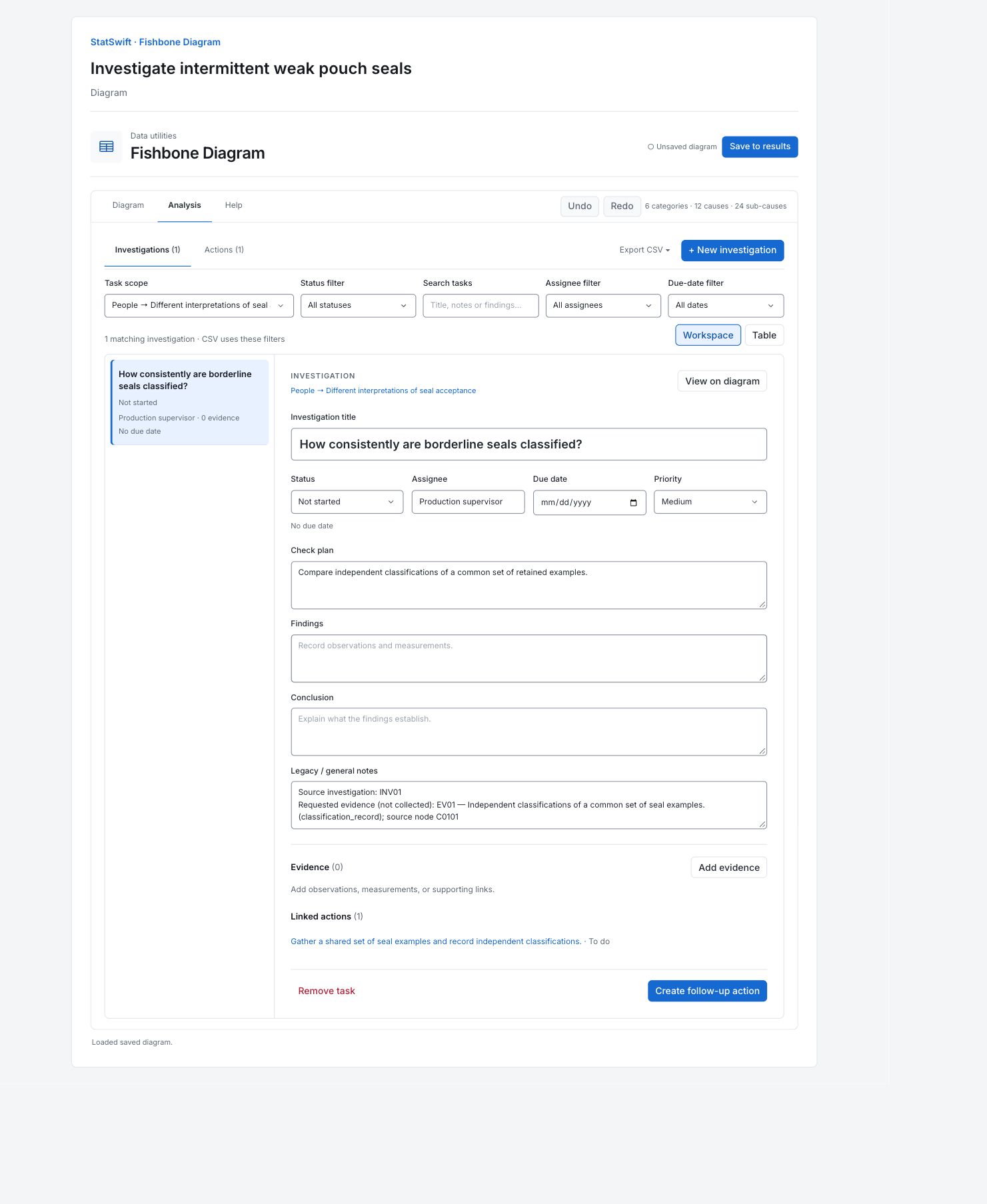
4. Save to results
Choose Save to results to keep an independent practice snapshot. After editing that saved practice result, use Save changes to update it or Save as new snapshot to keep another version.
5. Interpret results
Start with the problem
Read the weak-seal problem at the head of the diagram. The six branches organize 12 possible causes and 24 more specific subcauses. All are untested hypotheses. Their position on the diagram does not show how likely they are.

Six categories of possible explanations for intermittent weak pouch seals. These branches organize hypotheses; none is a confirmed cause. View full-size chart (opens in a new tab) Read one planned check
Open “How consistently are borderline seals classified?” under People. Its Check plan asks for independent classifications of the same retained examples. The Production supervisor is assigned to it. Status is Not started, and Findings and Conclusion are blank. The plan tells you what to check; it contains no result yet.
Check what evidence exists
This investigation shows Evidence (0). Its general notes request a classification record and label it “not collected”. A request is not an observation. The discussion comments also contain questions and suggestions, rather than a supported conclusion.
Read the linked action
The linked action asks the team to gather a shared set of seal examples and record independent classifications. It is To do. The example has six planned investigations and six evidence-gathering actions in total. None establishes a cause or shows that the weak seals have been resolved.
Choose the next check
Agree how to classify the retained examples, collect the evidence, and record what was observed in Findings. Use Conclusion to explain what that evidence supports. Change Status to Confirmed cause, Ruled out or Inconclusive only when the findings support it. Save the practice work to its own result.
More details: read each result section
Complete result tables use six significant digits, as in Help.
Investigation and action plan
The table contains all 12 tasks: six investigations and six linked actions. Branch locates the hypothesis; Type distinguishes a check from an action. Task describes the work, Owner gives the responsible role, and Status shows its progress. Notes retain source IDs and explicitly label evidence that has not been collected. Check plan / purpose gives either the planned check or the action’s purpose. The first investigation is Not started; its linked action is To do. Findings and Conclusion are blank in the editor.
| Branch | Type | Task | Owner | Status | Notes | Check plan / purpose |
|---|---|---|---|---|---|---|
| People → Different interpretations of seal acceptance | investigation | How consistently are borderline seals classified? | Production supervisor | Not started | Source investigation: INV01 Requested evidence (not collected): EV01 — Independent classifications of a common set of seal examples. (classification_record); source node C0101 | Compare independent classifications of a common set of retained examples. |
| People → Different interpretations of seal acceptance | action | Gather a shared set of seal examples and record independent classifications. | Production supervisor | To do | Source action: ACT01; investigation: INV01; node: C0101 | Follow-up / evidence gathering |
| Equipment → Uneven jaw contact | investigation | Does contact pressure vary across the jaw? | Maintenance technician | Not started | Source investigation: INV02 Requested evidence (not collected): EV02 — Jaw-contact check record showing position, settings, and check method. (contact_check_record); source node C0201 | Document contact distribution at fixed settings before making adjustments. |
| Equipment → Uneven jaw contact | action | Arrange a jaw-contact check and preserve the original check record. | Maintenance technician | To do | Source action: ACT02; investigation: INV02; node: C0201 | Follow-up / evidence gathering |
| Methods → Startup sequence may vary | investigation | Is the startup release sequence consistent? | Process engineer | Not started | Source investigation: INV03 Requested evidence (not collected): EV03 — Startup sequence, warm-up timing, and first-off sampling records. (startup_observation_log); source node C0301 | Compare recorded startup steps and timing for several changeovers. |
| Methods → Startup sequence may vary | action | Collect changeover records and document the sequence used during observed startups. | Process engineer | To do | Source action: ACT03; investigation: INV03; node: C0301 | Follow-up / evidence gathering |
| Materials → Sealing-layer properties may vary | investigation | Are film-lot properties comparable? | Materials engineer | Not started | Source investigation: INV04 Requested evidence (not collected): EV04 — Incoming material records and supplier declarations linked to film-lot identifiers. (material_lot_record); source node C0401 | Link lot identifiers with available incoming and supplier material records. |
| Materials → Sealing-layer properties may vary | action | Assemble lot-level material records and retain identifiers for sampled pouches. | Materials engineer | To do | Source action: ACT04; investigation: INV04; node: C0401 | Follow-up / evidence gathering |
| Measurement → Peel-test conditions may vary | investigation | Are peel-test conditions comparable? | Laboratory technician | Not started | Source investigation: INV05 Requested evidence (not collected): EV05 — Peel-test method revision, strip-width record, and pull-speed setting. (test_method_record); source node C0501 | Compare strip preparation, method revision, and pull-speed records. |
| Measurement → Peel-test conditions may vary | action | Collect test-method revisions and document strip preparation on a shared sample. | Laboratory technician | To do | Source action: ACT05; investigation: INV05; node: C0501 | Follow-up / evidence gathering |
| Environment → Local drafts may cool the sealing area | investigation | Does local airflow change near the jaw? | Facilities coordinator | Not started | Source investigation: INV06 Requested evidence (not collected): EV06 — Local airflow observations with door state and extraction settings. (airflow_observation_log); source node C0601 | Document airflow around the sealing area under routine door and extraction conditions. |
| Environment → Local drafts may cool the sealing area | action | Plan local airflow observations without changing normal production settings. | Facilities coordinator | To do | Source action: ACT06; investigation: INV06; node: C0601 | Follow-up / evidence gathering |
6. Create a report
Keep the Cause and effect diagram and complete Investigation and action plan. The plan contains all six investigations and six actions. Include the supporting downloads when someone needs the source hierarchy, evidence requests or comments. In the editor, Export CSV uses the current task filters; choose All branches in Task scope to export tasks across the diagram.
Choose Add to report from the completed run. Open Choose individual items and advanced options to select tables and charts, then choose Add to draft. Hidden items stay in the saved analysis.
Name the report and add the purpose of the study and your interpretation. Choose Save, review Preview, then use Export → Download HTML. The example below contains the full selected content, including results beyond one screen.