

Example: sachet net mass
40 different sachets; one net-mass reading per sachet. The sachets were randomly sampled from one production lot and weighed after accounting for tare.
Download the example data (CSV)This is the same example used in Help. Import the CSV to follow the steps, or use Open example in a practice copy in Help to prefill the inputs.
1. Create the workspace
In the sidebar, open Basic Statistics and choose Means: One-Sample (t). Create an analysis, name it, select New blank worksheet, then choose Create analysis.
2. Import the example data
Download the CSV above and import it into the worksheet. Choose Comma as the delimiter, Dot as the decimal separator and First row contains column names.
3. Assign the input column
On Inputs, open Sample and select net_mass_g.
4. Set the comparison
Enter 100 in Hypothesized mean (μ₀) and 0.05 in Significance level (α). Choose Two-sided (≠) for Alternative hypothesis.
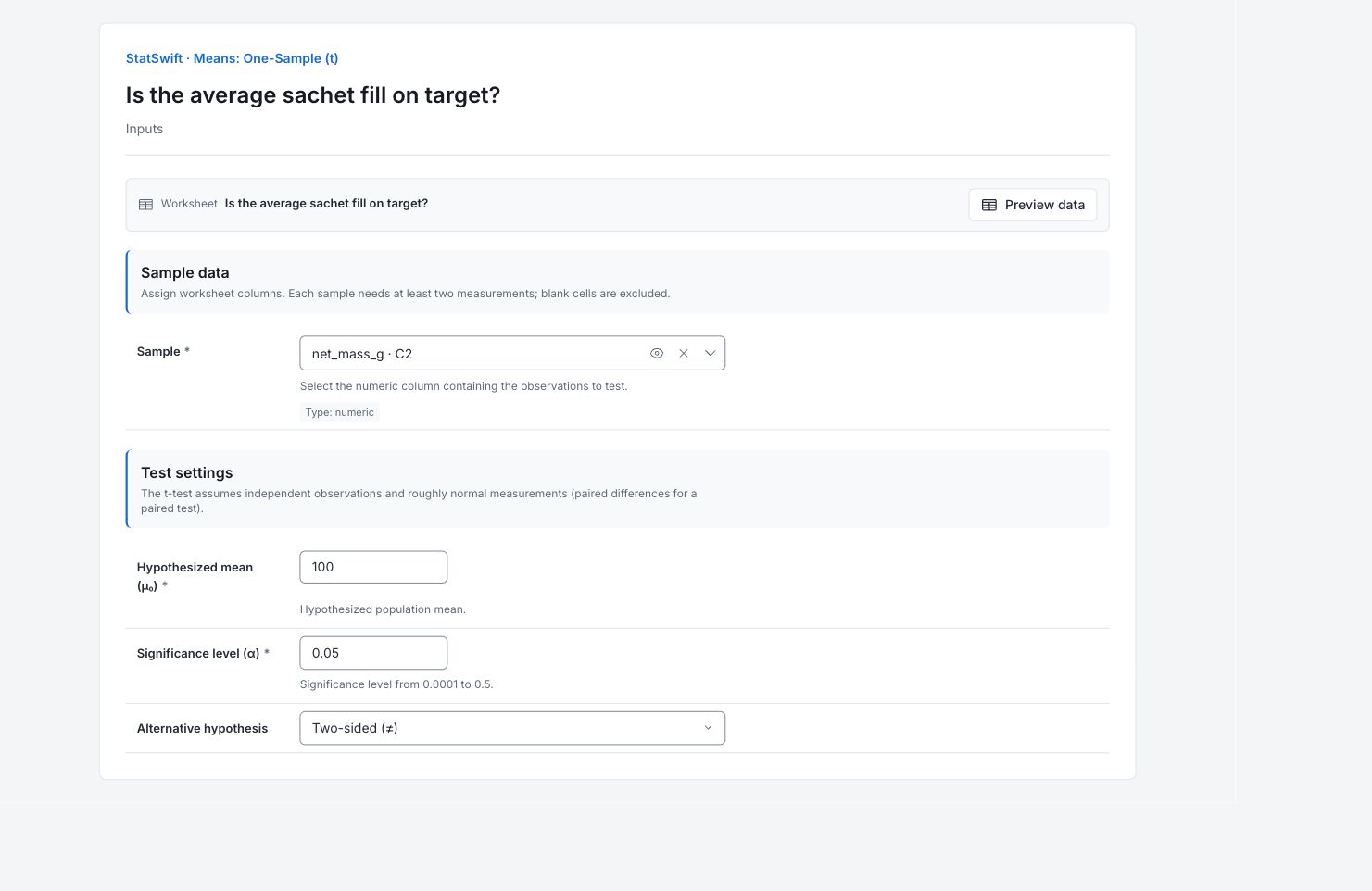
5. Run analysis
Choose Run analysis, then open Results.
6. Interpret results
Identify the question
Each of the 40 readings is the net mass of a different sachet. The test compares the population average with 100 g; it does not assess every sachet against a specification.
Read the estimated difference
The sachets average 100.582 g, or 0.582 g above the target. Mean difference is sample mean minus target, so a positive value means average overfill.
Read the interval and test
The 95% interval for mean minus target is 0.086–1.078 g. It stays above zero, and the two-sided p-value is 0.02253. There is evidence of average overfill at the 5% level, assuming independent sachets and a suitable t-test model. The interval describes the average excess, not individual masses.
Decide whether the excess matters
Compare the size and uncertainty of the excess with the agreed fill allowance and material cost. Check how the sachets were sampled before changing the filler.
More details: read each result section
Complete result tables use six significant digits, as in Help.
One-sample t-test
t statistic compares Mean difference with its Standard error. Degrees of freedom is 39, from 40 sachets. Target mean is 100 g. Alpha 0.05 and Alternative two-sided record the test; Confidence level is 95%. CI lower and CI upper bound mean minus target in g. The p-value tests an average equal to the target under the test assumptions; it is not the chance that the target is true.
| Statistic | Value |
|---|---|
| t statistic | 2.37565 |
| Degrees of freedom | 39 |
| p-value | 0.0225278 |
| Mean difference | 0.582 |
| Standard error | 0.244985 |
| Target mean (μ₀) | 100 |
| Alpha | 0.05 |
| Alternative | two-sided |
| Confidence level (%) | 95 |
| CI lower | 0.0864703 |
| CI upper | 1.07753 |
- Reject H₀ (μ = 100.0) at α=0.05 (p=0.0225)
- H₀: μ = 100.0
- H₁: μ ≠ 100.0
7. Create a report
Keep the complete One-sample t-test table, target, difference direction, confidence interval and sampling context. State that the interval concerns the mean, not individual sachet compliance.
Choose Add to report from the completed run. Open Choose individual items and advanced options to select tables and charts, then choose Add to draft. Hidden items stay in the saved analysis.
Name the report and add the purpose of the study and your interpretation. Choose Save, review Preview, then use Export → Download HTML. The example below contains the full selected content, including results beyond one screen.