

Example: adhesive dispense mass
Every 10 minutes, an assembly cell weighs one complete adhesive dispense. The example contains 120 checks from the same nozzle and adhesive grade.
Download the dispense-mass example (CSV)This is the same example used in Help. dispense_mass_g contains adhesive mass in grams, excluding the container. The supplied target is 8.000 g and the historical standard deviation is 0.050 g.
1. Create the workspace
In the sidebar, open Process control, choose CUSUM Chart, and name the analysis. Select New blank worksheet and Create analysis.
2. Import the data
On Worksheet, choose Import. Select the downloaded file or paste its contents. Set the delimiter to Comma, use Decimal dot, and check First row contains column names. Preview the import, then choose Import into worksheet. Keep the rows in collection order.
3. Assign the input columns
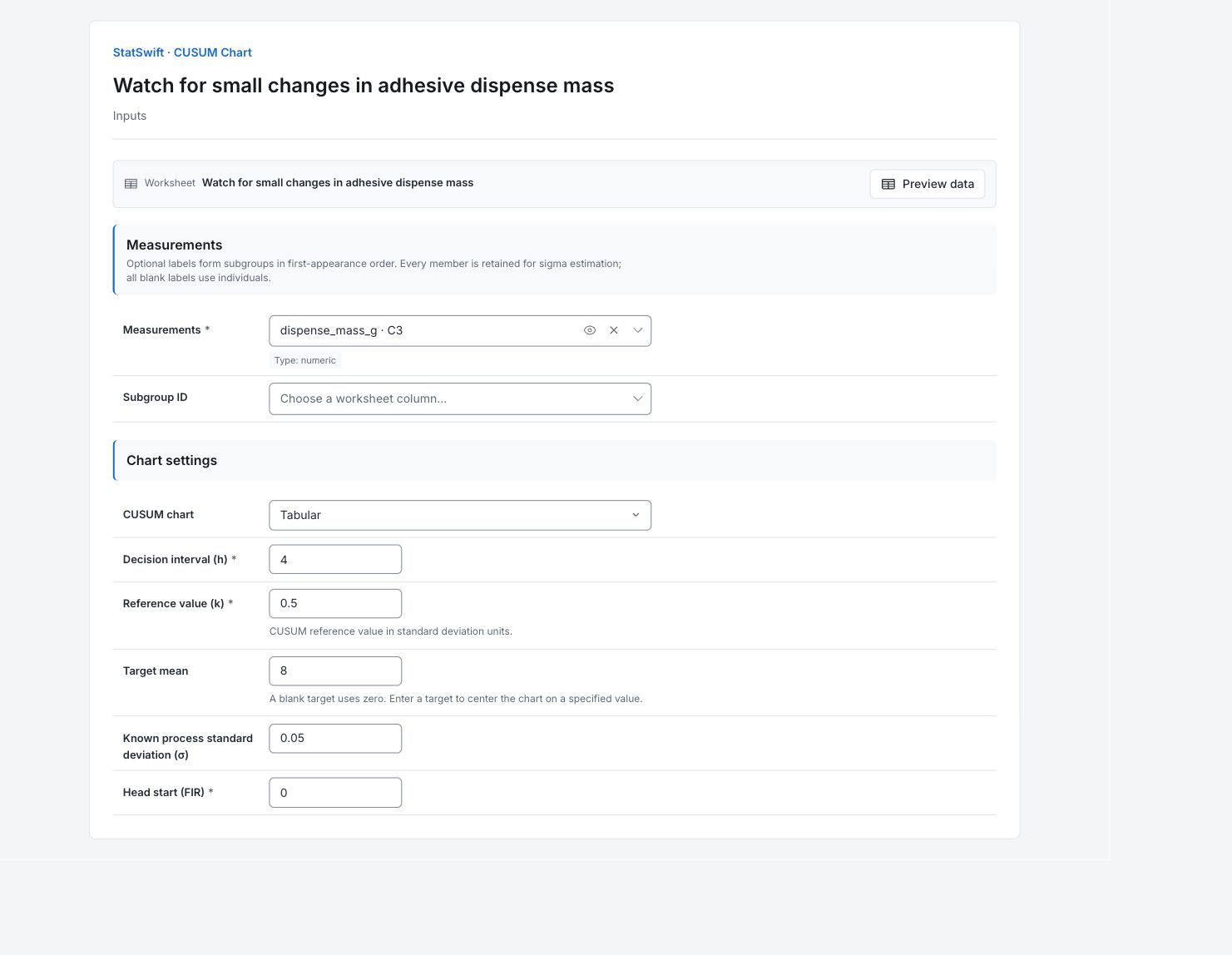
On Inputs, assign dispense_mass_g to Measurements, selecting it from the column picker. Leave Subgroup ID empty and keep the readings in collection order.
4. Set the target and CUSUM options
Choose Tabular under CUSUM chart. Enter 4 in Decision interval (h) and 0.5 in Reference value (k). Enter 8.000 in Target mean and 0.050 in Known process standard deviation (σ); both use grams. Set Head start (FIR) to 0.
The supplied standard deviation is used directly, so no estimation method is needed for this example. Reference value (k) is the allowance applied before deviations accumulate. Head start (FIR) is the starting accumulation; 0 starts without a head start.
5. Run analysis
Choose Run analysis, then open Results.
6. Interpret results
Understand the two lines
The upper and lower CUSUM accumulate departures above and below the supplied 8 g target. A line crossing its decision boundary reflects several readings, so check what happened before the crossing.
Find the first crossing
The lower CUSUM first crosses at observation 69, also flags 70, and stays beyond the boundary from 73 through 120. The upper CUSUM does not cross. The readings have built up evidence of a downward departure from the target.

Upper and lower cumulative departures in grams, with decision boundaries at ±0.200 g. View full-size chart (opens in a new tab) Check the reference and boundaries
The target is 8.000 g and the supplied standard deviation is 0.050 g. With h = 4, the decision boundaries are ±0.200 g. These are boundaries for accumulated departures, not acceptance limits for individual dispenses. The 50 signal entries describe an ongoing departure, not 50 separate defective dispenses.
Decide what to investigate
Trace the dispense and operating records around observation 69, including the earlier readings that contribute to accumulation. Record what you find. Keep product acceptance decisions separate from the CUSUM signal; the chart does not identify the cause.
More details: read each result section
Complete result tables use six significant digits, as in Help.
CUSUM summary
Known sigma is 0.050 g, reference k is 0.5 and decision interval h is 4, with no head start. The tabular chart displays cumulative deviations in grams, so its decision boundaries are ±0.200 g (h × sigma). The sample mean is about 7.9718 g; it does not replace the supplied target.
| Statistic / setting | Value |
|---|---|
| Observations / subgroups | 120 |
| Chart mode | tabular |
| k | 0.5 |
| h | 4 |
| Target | 8 |
| Target source | provided |
| Mean | 7.97178 |
| Mean source | estimated |
| Sigma | 0.05 |
| Sigma source | provided |
| FIR head-start | 0 |
Tabular CUSUM values and limits
Each row shows the source reading and accumulated upper/lower CUSUM. Values are in grams. Trace the lower accumulation before observation 69; the observed sample mean does not replace the supplied target.
| Observation / subgroup | Label | Subgroup size | Value | Standardized value | Point sigma | CUSUM+ | CUSUM− | Upper limit | Lower limit | Upper signals | Lower signals |
|---|---|---|---|---|---|---|---|---|---|---|---|
| 1 | — | 1 | 8.088 | 1.76 | 0.05 | 0.063 | 0 | 0.2 | -0.2 | None | None |
| 2 | — | 1 | 7.974 | -0.52 | 0.05 | 0.012 | -0.001 | 0.2 | -0.2 | None | None |
| 3 | — | 1 | 8.041 | 0.82 | 0.05 | 0.028 | 0 | 0.2 | -0.2 | None | None |
| 4 | — | 1 | 8.048 | 0.96 | 0.05 | 0.051 | 0 | 0.2 | -0.2 | None | None |
| 5 | — | 1 | 7.929 | -1.42 | 0.05 | 0 | -0.046 | 0.2 | -0.2 | None | None |
| 6 | — | 1 | 7.988 | -0.24 | 0.05 | 0 | -0.033 | 0.2 | -0.2 | None | None |
| 7 | — | 1 | 7.977 | -0.46 | 0.05 | 0 | -0.031 | 0.2 | -0.2 | None | None |
| 8 | — | 1 | 7.95 | -1 | 0.05 | 0 | -0.056 | 0.2 | -0.2 | None | None |
| 9 | — | 1 | 8.006 | 0.12 | 0.05 | 0 | -0.025 | 0.2 | -0.2 | None | None |
| 10 | — | 1 | 7.937 | -1.26 | 0.05 | 0 | -0.063 | 0.2 | -0.2 | None | None |
| 11 | — | 1 | 8.018 | 0.36 | 0.05 | 0 | -0.02 | 0.2 | -0.2 | None | None |
| 12 | — | 1 | 8.002 | 0.04 | 0.05 | 0 | 0 | 0.2 | -0.2 | None | None |
| 13 | — | 1 | 7.957 | -0.86 | 0.05 | 0 | -0.018 | 0.2 | -0.2 | None | None |
| 14 | — | 1 | 7.963 | -0.74 | 0.05 | 0 | -0.03 | 0.2 | -0.2 | None | None |
| 15 | — | 1 | 8.041 | 0.82 | 0.05 | 0.016 | 0 | 0.2 | -0.2 | None | None |
| 16 | — | 1 | 7.979 | -0.42 | 0.05 | 0 | 0 | 0.2 | -0.2 | None | None |
| 17 | — | 1 | 7.982 | -0.36 | 0.05 | 0 | 0 | 0.2 | -0.2 | None | None |
| 18 | — | 1 | 8.004 | 0.08 | 0.05 | 0 | 0 | 0.2 | -0.2 | None | None |
| 19 | — | 1 | 7.991 | -0.18 | 0.05 | 0 | 0 | 0.2 | -0.2 | None | None |
| 20 | — | 1 | 8.042 | 0.84 | 0.05 | 0.017 | 0 | 0.2 | -0.2 | None | None |
| 21 | — | 1 | 8.039 | 0.78 | 0.05 | 0.031 | 0 | 0.2 | -0.2 | None | None |
| 22 | — | 1 | 8.032 | 0.64 | 0.05 | 0.038 | 0 | 0.2 | -0.2 | None | None |
| 23 | — | 1 | 7.983 | -0.34 | 0.05 | 0 | 0 | 0.2 | -0.2 | None | None |
| 24 | — | 1 | 7.97 | -0.6 | 0.05 | 0 | -0.005 | 0.2 | -0.2 | None | None |
| 25 | — | 1 | 7.976 | -0.48 | 0.05 | 0 | -0.004 | 0.2 | -0.2 | None | None |
| 26 | — | 1 | 8.01 | 0.2 | 0.05 | 0 | 0 | 0.2 | -0.2 | None | None |
| 27 | — | 1 | 7.911 | -1.78 | 0.05 | 0 | -0.064 | 0.2 | -0.2 | None | None |
| 28 | — | 1 | 8.049 | 0.98 | 0.05 | 0.024 | 0 | 0.2 | -0.2 | None | None |
| 29 | — | 1 | 7.991 | -0.18 | 0.05 | 0 | 0 | 0.2 | -0.2 | None | None |
| 30 | — | 1 | 7.896 | -2.08 | 0.05 | 0 | -0.079 | 0.2 | -0.2 | None | None |
| 31 | — | 1 | 8.014 | 0.28 | 0.05 | 0 | -0.04 | 0.2 | -0.2 | None | None |
| 32 | — | 1 | 7.965 | -0.7 | 0.05 | 0 | -0.05 | 0.2 | -0.2 | None | None |
| 33 | — | 1 | 8.013 | 0.26 | 0.05 | 0 | -0.012 | 0.2 | -0.2 | None | None |
| 34 | — | 1 | 7.97 | -0.6 | 0.05 | 0 | -0.017 | 0.2 | -0.2 | None | None |
| 35 | — | 1 | 8.012 | 0.24 | 0.05 | 0 | 0 | 0.2 | -0.2 | None | None |
| 36 | — | 1 | 7.98 | -0.4 | 0.05 | 0 | 0 | 0.2 | -0.2 | None | None |
| 37 | — | 1 | 7.929 | -1.42 | 0.05 | 0 | -0.046 | 0.2 | -0.2 | None | None |
| 38 | — | 1 | 7.98 | -0.4 | 0.05 | 0 | -0.041 | 0.2 | -0.2 | None | None |
| 39 | — | 1 | 7.963 | -0.74 | 0.05 | 0 | -0.053 | 0.2 | -0.2 | None | None |
| 40 | — | 1 | 7.969 | -0.62 | 0.05 | 0 | -0.059 | 0.2 | -0.2 | None | None |
| 41 | — | 1 | 7.997 | -0.06 | 0.05 | 0 | -0.037 | 0.2 | -0.2 | None | None |
| 42 | — | 1 | 7.946 | -1.08 | 0.05 | 0 | -0.066 | 0.2 | -0.2 | None | None |
| 43 | — | 1 | 7.997 | -0.06 | 0.05 | 0 | -0.044 | 0.2 | -0.2 | None | None |
| 44 | — | 1 | 8.074 | 1.48 | 0.05 | 0.049 | 0 | 0.2 | -0.2 | None | None |
| 45 | — | 1 | 7.957 | -0.86 | 0.05 | 0 | -0.018 | 0.2 | -0.2 | None | None |
| 46 | — | 1 | 8.091 | 1.82 | 0.05 | 0.066 | 0 | 0.2 | -0.2 | None | None |
| 47 | — | 1 | 7.846 | -3.08 | 0.05 | 0 | -0.129 | 0.2 | -0.2 | None | None |
| 48 | — | 1 | 8.076 | 1.52 | 0.05 | 0.051 | -0.028 | 0.2 | -0.2 | None | None |
| 49 | — | 1 | 7.901 | -1.98 | 0.05 | 0 | -0.102 | 0.2 | -0.2 | None | None |
| 50 | — | 1 | 8.031 | 0.62 | 0.05 | 0.006 | -0.046 | 0.2 | -0.2 | None | None |
| 51 | — | 1 | 8.094 | 1.88 | 0.05 | 0.075 | 0 | 0.2 | -0.2 | None | None |
| 52 | — | 1 | 7.975 | -0.5 | 0.05 | 0.025 | -3.53884e-16 | 0.2 | -0.2 | None | None |
| 53 | — | 1 | 7.954 | -0.92 | 0.05 | 0 | -0.021 | 0.2 | -0.2 | None | None |
| 54 | — | 1 | 7.979 | -0.42 | 0.05 | 0 | -0.017 | 0.2 | -0.2 | None | None |
| 55 | — | 1 | 8.067 | 1.34 | 0.05 | 0.042 | 0 | 0.2 | -0.2 | None | None |
| 56 | — | 1 | 8.006 | 0.12 | 0.05 | 0.023 | 0 | 0.2 | -0.2 | None | None |
| 57 | — | 1 | 8.002 | 0.04 | 0.05 | 1.06165e-15 | 0 | 0.2 | -0.2 | None | None |
| 58 | — | 1 | 7.935 | -1.3 | 0.05 | 0 | -0.04 | 0.2 | -0.2 | None | None |
| 59 | — | 1 | 8.066 | 1.32 | 0.05 | 0.041 | 0 | 0.2 | -0.2 | None | None |
| 60 | — | 1 | 8.062 | 1.24 | 0.05 | 0.078 | 0 | 0.2 | -0.2 | None | None |
| 61 | — | 1 | 7.929 | -1.42 | 0.05 | 0 | -0.046 | 0.2 | -0.2 | None | None |
| 62 | — | 1 | 7.983 | -0.34 | 0.05 | 0 | -0.038 | 0.2 | -0.2 | None | None |
| 63 | — | 1 | 7.938 | -1.24 | 0.05 | 0 | -0.075 | 0.2 | -0.2 | None | None |
| 64 | — | 1 | 7.947 | -1.06 | 0.05 | 0 | -0.103 | 0.2 | -0.2 | None | None |
| 65 | — | 1 | 7.997 | -0.06 | 0.05 | 0 | -0.081 | 0.2 | -0.2 | None | None |
| 66 | — | 1 | 7.962 | -0.76 | 0.05 | 0 | -0.094 | 0.2 | -0.2 | None | None |
| 67 | — | 1 | 7.939 | -1.22 | 0.05 | 0 | -0.13 | 0.2 | -0.2 | None | None |
| 68 | — | 1 | 7.979 | -0.42 | 0.05 | 0 | -0.126 | 0.2 | -0.2 | None | None |
| 69 | — | 1 | 7.884 | -2.32 | 0.05 | 0 | -0.217 | 0.2 | -0.2 | None | Beyond decision interval |
| 70 | — | 1 | 7.979 | -0.42 | 0.05 | 0 | -0.213 | 0.2 | -0.2 | None | Beyond decision interval |
| 71 | — | 1 | 7.995 | -0.1 | 0.05 | 0 | -0.193 | 0.2 | -0.2 | None | None |
| 72 | — | 1 | 7.976 | -0.48 | 0.05 | 0 | -0.192 | 0.2 | -0.2 | None | None |
| 73 | — | 1 | 7.903 | -1.94 | 0.05 | 0 | -0.264 | 0.2 | -0.2 | None | Beyond decision interval |
| 74 | — | 1 | 7.999 | -0.02 | 0.05 | 0 | -0.24 | 0.2 | -0.2 | None | Beyond decision interval |
| 75 | — | 1 | 7.894 | -2.12 | 0.05 | 0 | -0.321 | 0.2 | -0.2 | None | Beyond decision interval |
| 76 | — | 1 | 7.919 | -1.62 | 0.05 | 0 | -0.377 | 0.2 | -0.2 | None | Beyond decision interval |
| 77 | — | 1 | 7.862 | -2.76 | 0.05 | 0 | -0.49 | 0.2 | -0.2 | None | Beyond decision interval |
| 78 | — | 1 | 7.948 | -1.04 | 0.05 | 0 | -0.517 | 0.2 | -0.2 | None | Beyond decision interval |
| 79 | — | 1 | 7.967 | -0.66 | 0.05 | 0 | -0.525 | 0.2 | -0.2 | None | Beyond decision interval |
| 80 | — | 1 | 8.094 | 1.88 | 0.05 | 0.069 | -0.406 | 0.2 | -0.2 | None | Beyond decision interval |
| 81 | — | 1 | 7.906 | -1.88 | 0.05 | 0 | -0.475 | 0.2 | -0.2 | None | Beyond decision interval |
| 82 | — | 1 | 7.952 | -0.96 | 0.05 | 0 | -0.498 | 0.2 | -0.2 | None | Beyond decision interval |
| 83 | — | 1 | 8.001 | 0.02 | 0.05 | 0 | -0.472 | 0.2 | -0.2 | None | Beyond decision interval |
| 84 | — | 1 | 7.935 | -1.3 | 0.05 | 0 | -0.512 | 0.2 | -0.2 | None | Beyond decision interval |
| 85 | — | 1 | 8.042 | 0.84 | 0.05 | 0.017 | -0.445 | 0.2 | -0.2 | None | Beyond decision interval |
| 86 | — | 1 | 7.979 | -0.42 | 0.05 | 0 | -0.441 | 0.2 | -0.2 | None | Beyond decision interval |
| 87 | — | 1 | 7.936 | -1.28 | 0.05 | 0 | -0.48 | 0.2 | -0.2 | None | Beyond decision interval |
| 88 | — | 1 | 7.921 | -1.58 | 0.05 | 0 | -0.534 | 0.2 | -0.2 | None | Beyond decision interval |
| 89 | — | 1 | 8.002 | 0.04 | 0.05 | 0 | -0.507 | 0.2 | -0.2 | None | Beyond decision interval |
| 90 | — | 1 | 7.901 | -1.98 | 0.05 | 0 | -0.581 | 0.2 | -0.2 | None | Beyond decision interval |
| 91 | — | 1 | 8.071 | 1.42 | 0.05 | 0.046 | -0.485 | 0.2 | -0.2 | None | Beyond decision interval |
| 92 | — | 1 | 7.89 | -2.2 | 0.05 | 0 | -0.57 | 0.2 | -0.2 | None | Beyond decision interval |
| 93 | — | 1 | 7.922 | -1.56 | 0.05 | 0 | -0.623 | 0.2 | -0.2 | None | Beyond decision interval |
| 94 | — | 1 | 7.96 | -0.8 | 0.05 | 0 | -0.638 | 0.2 | -0.2 | None | Beyond decision interval |
| 95 | — | 1 | 7.939 | -1.22 | 0.05 | 0 | -0.674 | 0.2 | -0.2 | None | Beyond decision interval |
| 96 | — | 1 | 7.81 | -3.8 | 0.05 | 0 | -0.839 | 0.2 | -0.2 | None | Beyond decision interval |
| 97 | — | 1 | 7.911 | -1.78 | 0.05 | 0 | -0.903 | 0.2 | -0.2 | None | Beyond decision interval |
| 98 | — | 1 | 7.933 | -1.34 | 0.05 | 0 | -0.945 | 0.2 | -0.2 | None | Beyond decision interval |
| 99 | — | 1 | 7.956 | -0.88 | 0.05 | 0 | -0.964 | 0.2 | -0.2 | None | Beyond decision interval |
| 100 | — | 1 | 7.912 | -1.76 | 0.05 | 0 | -1.027 | 0.2 | -0.2 | None | Beyond decision interval |
| 101 | — | 1 | 7.944 | -1.12 | 0.05 | 0 | -1.058 | 0.2 | -0.2 | None | Beyond decision interval |
| 102 | — | 1 | 7.926 | -1.48 | 0.05 | 0 | -1.107 | 0.2 | -0.2 | None | Beyond decision interval |
| 103 | — | 1 | 7.972 | -0.56 | 0.05 | 0 | -1.11 | 0.2 | -0.2 | None | Beyond decision interval |
| 104 | — | 1 | 7.924 | -1.52 | 0.05 | 0 | -1.161 | 0.2 | -0.2 | None | Beyond decision interval |
| 105 | — | 1 | 7.97 | -0.6 | 0.05 | 0 | -1.166 | 0.2 | -0.2 | None | Beyond decision interval |
| 106 | — | 1 | 7.899 | -2.02 | 0.05 | 0 | -1.242 | 0.2 | -0.2 | None | Beyond decision interval |
| 107 | — | 1 | 7.97 | -0.6 | 0.05 | 0 | -1.247 | 0.2 | -0.2 | None | Beyond decision interval |
| 108 | — | 1 | 8.005 | 0.1 | 0.05 | 0 | -1.217 | 0.2 | -0.2 | None | Beyond decision interval |
| 109 | — | 1 | 8.002 | 0.04 | 0.05 | 0 | -1.19 | 0.2 | -0.2 | None | Beyond decision interval |
| 110 | — | 1 | 7.952 | -0.96 | 0.05 | 0 | -1.213 | 0.2 | -0.2 | None | Beyond decision interval |
| 111 | — | 1 | 7.941 | -1.18 | 0.05 | 0 | -1.247 | 0.2 | -0.2 | None | Beyond decision interval |
| 112 | — | 1 | 7.953 | -0.94 | 0.05 | 0 | -1.269 | 0.2 | -0.2 | None | Beyond decision interval |
| 113 | — | 1 | 7.986 | -0.28 | 0.05 | 0 | -1.258 | 0.2 | -0.2 | None | Beyond decision interval |
| 114 | — | 1 | 7.907 | -1.86 | 0.05 | 0 | -1.326 | 0.2 | -0.2 | None | Beyond decision interval |
| 115 | — | 1 | 7.932 | -1.36 | 0.05 | 0 | -1.369 | 0.2 | -0.2 | None | Beyond decision interval |
| 116 | — | 1 | 8.035 | 0.7 | 0.05 | 0.01 | -1.309 | 0.2 | -0.2 | None | Beyond decision interval |
| 117 | — | 1 | 7.866 | -2.68 | 0.05 | 0 | -1.418 | 0.2 | -0.2 | None | Beyond decision interval |
| 118 | — | 1 | 7.967 | -0.66 | 0.05 | 0 | -1.426 | 0.2 | -0.2 | None | Beyond decision interval |
| 119 | — | 1 | 7.928 | -1.44 | 0.05 | 0 | -1.473 | 0.2 | -0.2 | None | Beyond decision interval |
| 120 | — | 1 | 7.936 | -1.28 | 0.05 | 0 | -1.512 | 0.2 | -0.2 | None | Beyond decision interval |
Control chart signal details
The lower CUSUM first crosses at 69, also flags 70 and remains beyond the interval from 73 through 120. No upper crossing occurs. Consecutive rows describe accumulated evidence, rather than independent defective dispenses.
| Observation / subgroup | Chart | Rule |
|---|---|---|
| 101 | CUSUM- | Beyond decision interval |
| 102 | CUSUM- | Beyond decision interval |
| 103 | CUSUM- | Beyond decision interval |
| 104 | CUSUM- | Beyond decision interval |
| 105 | CUSUM- | Beyond decision interval |
| 106 | CUSUM- | Beyond decision interval |
| 107 | CUSUM- | Beyond decision interval |
| 108 | CUSUM- | Beyond decision interval |
| 109 | CUSUM- | Beyond decision interval |
| 110 | CUSUM- | Beyond decision interval |
| 111 | CUSUM- | Beyond decision interval |
| 112 | CUSUM- | Beyond decision interval |
| 113 | CUSUM- | Beyond decision interval |
| 114 | CUSUM- | Beyond decision interval |
| 115 | CUSUM- | Beyond decision interval |
| 116 | CUSUM- | Beyond decision interval |
| 117 | CUSUM- | Beyond decision interval |
| 118 | CUSUM- | Beyond decision interval |
| 119 | CUSUM- | Beyond decision interval |
| 120 | CUSUM- | Beyond decision interval |
| 69 | CUSUM- | Beyond decision interval |
| 70 | CUSUM- | Beyond decision interval |
| 73 | CUSUM- | Beyond decision interval |
| 74 | CUSUM- | Beyond decision interval |
| 75 | CUSUM- | Beyond decision interval |
| 76 | CUSUM- | Beyond decision interval |
| 77 | CUSUM- | Beyond decision interval |
| 78 | CUSUM- | Beyond decision interval |
| 79 | CUSUM- | Beyond decision interval |
| 80 | CUSUM- | Beyond decision interval |
| 81 | CUSUM- | Beyond decision interval |
| 82 | CUSUM- | Beyond decision interval |
| 83 | CUSUM- | Beyond decision interval |
| 84 | CUSUM- | Beyond decision interval |
| 85 | CUSUM- | Beyond decision interval |
| 86 | CUSUM- | Beyond decision interval |
| 87 | CUSUM- | Beyond decision interval |
| 88 | CUSUM- | Beyond decision interval |
| 89 | CUSUM- | Beyond decision interval |
| 90 | CUSUM- | Beyond decision interval |
| 91 | CUSUM- | Beyond decision interval |
| 92 | CUSUM- | Beyond decision interval |
| 93 | CUSUM- | Beyond decision interval |
| 94 | CUSUM- | Beyond decision interval |
| 95 | CUSUM- | Beyond decision interval |
| 96 | CUSUM- | Beyond decision interval |
| 97 | CUSUM- | Beyond decision interval |
| 98 | CUSUM- | Beyond decision interval |
| 99 | CUSUM- | Beyond decision interval |
| 100 | CUSUM- | Beyond decision interval |
- Signal observations are displayed starting at 1.
7. Create a report
Keep the Tabular CUSUM chart, CUSUM summary, Tabular CUSUM values and limits, and Control chart signal details. Record the target and historical standard deviation. Include your investigation around observation 69 and the readings leading up to it.
Choose Add to report from the completed run. Open Choose individual items and advanced options to select tables and charts, then choose Add to draft. Hidden items stay in the saved analysis.
Name the report and add the purpose of the study and your interpretation. Choose Save, review Preview, then use Export → Download HTML. The example below contains the full selected content, including results beyond one screen.