

Example: bench-test completion times
120 completed test jobs; one positive duration per job.
Download the example data (CSV)This is the same example used in Help. Import the CSV to follow the steps, or use Open example in a practice copy in Help to prefill the inputs.
1. Create the workspace
In the sidebar, open Basic Statistics and choose Distribution Fit Analysis. Create an analysis, name it, select New blank worksheet, then choose Create analysis.
2. Import the example data
Download the CSV above and import it into the worksheet. Choose Comma as the delimiter, Dot as the decimal separator and First row contains column names.
3. Assign the measurements
On Inputs, choose One measurement column for Data layout. Assign completion_time_min to Measurement column 1. Choose Fixed size for Subgroups defined by and enter 1 in Subgroup size.
4. Choose candidates and transformations
Under Distributions and transformations, choose Select all so all 16 of 16 candidates are selected. Keep their order.
Open Transformation options. Choose Optimal power for Box–Cox power and enter 0.1 in Johnson selection cutoff. Leave Store Box–Cox transformed data and Store Johnson transformed data unchecked.
5. Set plots and result tables
Open Plot options. Enter 95 in Confidence level (%), check Show confidence bounds, and choose Grouped panels for Probability plots. Open Results options, check Descriptive statistics, Goodness-of-fit tests and Parameter estimates, and leave Percentile tables unchecked.

6. Run analysis
Choose Run analysis, then open Results.
7. Interpret results
Identify the comparison
All 120 positive completion times are included, one per completed job. The mean is 19.597 minutes. Sixteen distributions and transformations are compared in their selected order; the tool does not choose a unique true family.
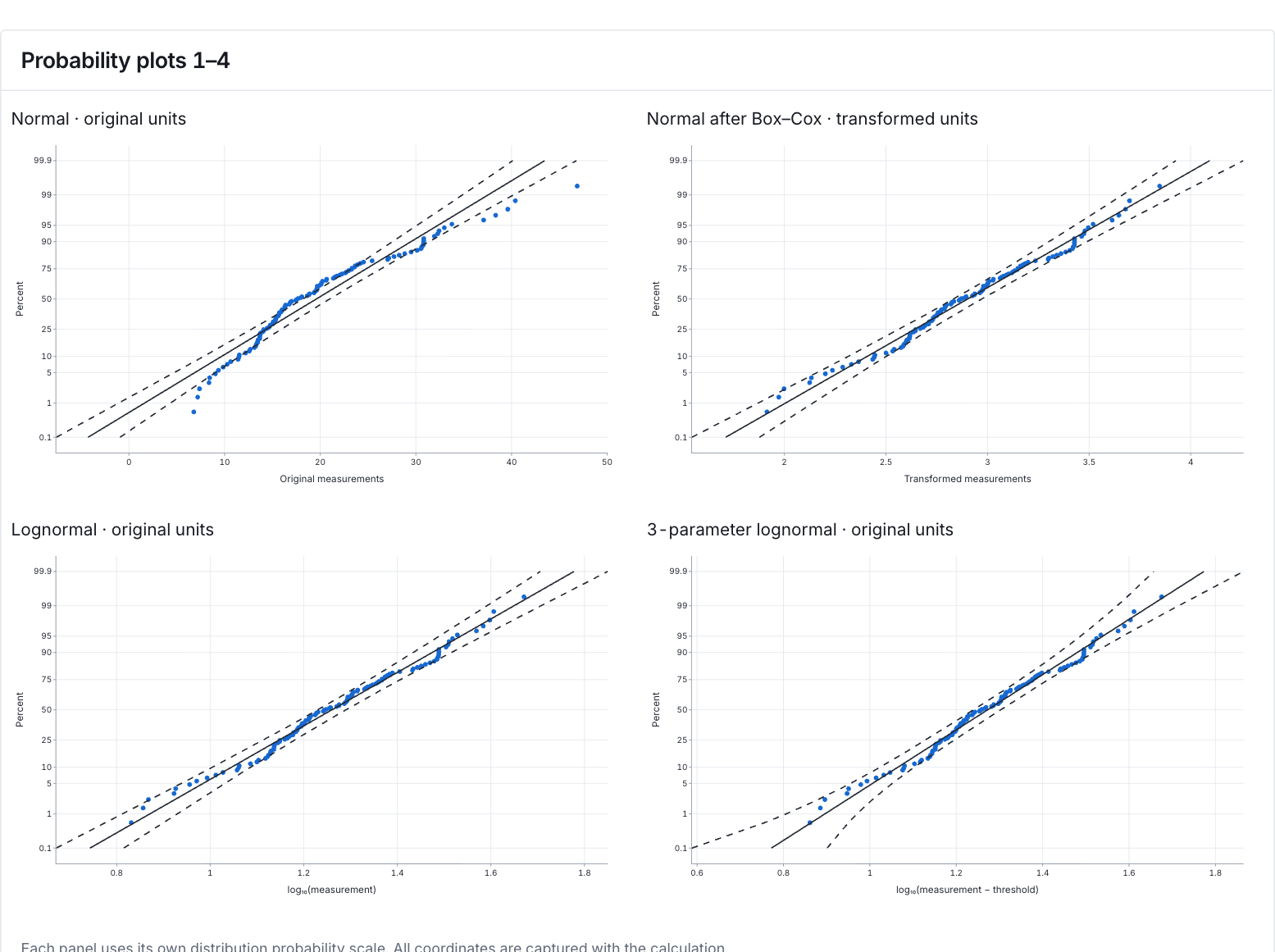
Compare the first four plots
The panels show Normal, Normal after Box–Cox, Lognormal and 3-parameter lognormal. Each point is an ordered duration on the panel’s stated scale. Look for a roughly straight pattern and inspect the tails and confidence bounds. The other 12 panels are in More details.
Probability plots 1–4 View full-size chart (opens in a new tab) Read the fit evidence
The Normal fit has AD = 2.7369 and p < 0.005, indicating a poor normal fit. Lognormal has p = 0.1514; loglogistic and largest extreme value are also not rejected at 0.05. Several models remain plausible. A higher p-value alone does not choose the best model.
Keep unavailable results and scales clear
The 3-parameter lognormal, gamma and loglogistic rows have unavailable AD p-values; unavailable does not mean a passing test. The 3-parameter Weibull row instead reports p≈0.0183, with its boundary-method qualification still pending. Box–Cox and Johnson fits use transformed units, not minutes.
Choose a model for the intended decision
Compare plausible models’ behavior at the durations that matter, particularly the long-duration tail. Keep the method notes and check predictive performance before using fitted percentiles for a service-time decision.
More details: read each result section
Complete result tables use six significant digits, as in Help.
Goodness-of-fit tests
Candidate identifies a distribution or transformed-normal fit. AD measures departure on its probability scale; AD p-value may be a number, a reporting bound or Unavailable. Read its cell note. Likelihood-ratio statistic and LRT p-value compare eligible nested families; they are not the AD goodness-of-fit test. Not applicable and Unavailable are not passing results. The 3-parameter Weibull AD p-value is numeric, about 0.0183, with boundary qualification pending; the 3-parameter lognormal, gamma and loglogistic values are unavailable.
| Candidate | AD | AD p-value | Likelihood-ratio statistic | LRT p-value |
|---|---|---|---|---|
| Normal | 2.73688 | < 0.005Stephens normal AD approximation; lower reporting bound 0.005 | — | Not applicable |
| Normal after Box–Cox | 0.552479 | 0.151353Stephens normal AD approximation; lower reporting bound 0.005 | — | Not applicable |
| Lognormal | 0.552479 | 0.151353Stephens normal AD approximation; lower reporting bound 0.005 | — | Not applicable |
| 3-parameter lognormal | 0.564131 | UnavailableAn AD probability is not available for this three-parameter family. | 0.0222193 | 0.881505Chi-square, 1 df; fitted maximum likelihoods |
| Exponential | 22.216 | < 0.003Stephens Table 4.12 exponential significance formulas, correction 1+0.6/n; native controls on both sides of 0.26, 0.51, 0.95 and 2.534 | — | Not applicable |
| 2-parameter exponential | 9.52934 | < 0.01Stephens Table 4.14, correction 1+5.4/n-11/n²; linear table interpolation | 99.8966 | 1.60565e-23Chi-square, 1 df; adjusted shifted-exponential likelihood |
| Weibull | 2.14725 | < 0.01Stephens extreme-value correction 1+0.2/sqrt(n); linear table interpolation | — | Not applicable |
| 3-parameter Weibull | 0.952225 | 0.0183026Lockhart–Stephens Table 1, Case 7; reciprocal-shape and probability interpolation; native boundary qualification pending | 14.422 | 0.000146086Chi-square, 1 df; fitted maximum likelihoods |
| Smallest extreme value | 6.55729 | < 0.01Stephens extreme-value correction 1+0.2/sqrt(n); linear table interpolation | — | Not applicable |
| Largest extreme value | 0.581117 | 0.141662Stephens extreme-value correction 1+0.2/sqrt(n); linear table interpolation | — | Not applicable |
| Gamma | 0.917041 | 0.0215001Stephens Table 4.21; first row below shape 1, linear shape/probability interpolation, asymptotic row above shape 20; broader boundary qualification pending | — | Not applicable |
| 3-parameter gamma | 0.664386 | UnavailableAn AD probability is not available for this three-parameter family. | 2.03791 | 0.15342Chi-square, 1 df; reported modified gamma likelihood |
| Logistic | 2.04259 | < 0.005Stephens logistic correction 1+0.25/n; linear table interpolation | — | Not applicable |
| Loglogistic | 0.524443 | 0.141019Stephens logistic correction 1+0.25/n; linear table interpolation | — | Not applicable |
| 3-parameter loglogistic | 0.471833 | UnavailableAn AD probability is not available for this three-parameter family. | 0.268154 | 0.604573Chi-square, 1 df; fitted maximum likelihoods |
| Normal after Johnson | 0.395435 | 0.366495Stephens normal AD approximation; lower reporting bound 0.005 | — | Not applicable |
- Candidates are shown in the specified order, without selecting a winning distribution.
- Likelihood-ratio tests compare shifted families with their unshifted versions. The shifted exponential uses its adjusted estimates; other families use their fitted maximum likelihoods.
Descriptive statistics
Observations is 120, Missing cells is 0 and Nonempty subgroups is 120. Mean, Median, Min and Max describe durations in minutes; Standard deviation describes their spread. Subgroup size 1 leaves the measurements individual.
Original measurements, pooled without averaging subgroups.
| Statistic | Value |
|---|---|
| Observations | 120 |
| Missing cells | 0 |
| Nonempty subgroups | 120 |
| Mean | 19.597 |
| Standard deviation | 7.72253 |
| Minimum | 6.78 |
| Median | 17.605 |
| Maximum | 46.86 |
| Skewness | 0.99684 |
| Excess kurtosis | 0.907451 |
Candidate outcomes
Status tells whether each candidate was computed or unavailable. Scale distinguishes original and transformed results. Explanation retains validation, convergence and method qualifications. All 16 outcomes are included; do not silently drop an unavailable result.
| Candidate | Status | Scale | Explanation |
|---|---|---|---|
| Normal | Computed | original | Checked against the validation dataset |
| Normal after Box–Cox | Computed | transformed | Checked against the validation dataset |
| Lognormal | Computed | original | Checked against the validation dataset |
| 3-parameter lognormal | Computed | original | Results may differ from other statistical software because threshold estimation and convergence methods vary. Estimates are not reported when a fit does not converge. |
| Exponential | Computed | original | Checked against the validation dataset |
| 2-parameter exponential | Computed | original | Checked against the validation dataset |
| Weibull | Computed | original | Checked against the validation dataset |
| 3-parameter Weibull | Computed | original | Results may differ from other statistical software because threshold estimation and convergence methods vary. Estimates are not reported when a fit does not converge. |
| Smallest extreme value | Computed | original | Checked against the validation dataset |
| Largest extreme value | Computed | original | Checked against the validation dataset |
| Gamma | Computed | original | Checked against the validation dataset |
| 3-parameter gamma | Computed | original | Results may differ from other statistical software because threshold estimation and convergence methods vary. Estimates are not reported when a fit does not converge. |
| Logistic | Computed | original | Checked against the validation dataset |
| Loglogistic | Computed | original | Checked against the validation dataset |
| 3-parameter loglogistic | Computed | original | Results may differ from other statistical software because threshold estimation and convergence methods vary. Estimates are not reported when a fit does not converge. |
| Normal after Johnson | Computed | transformed | Checked against the validation dataset |
Parameter estimates
Parameters belong to each candidate’s mathematical convention. Scale and Convention explain how to read them; lognormal location and scale concern ln(X − threshold), even though the model describes original durations. Transformed-normal parameters use transformed units. Keep threshold and covariance qualifications with any estimates.
| Candidate | Parameters | Scale | Convention |
|---|---|---|---|
| Normal | location = 19.597; scale = 7.72253 | original | Scale and shape use the mathematical reference conventions. |
| Normal after Box–Cox | location = 2.90216; scale = 0.385417 | transformed | Scale and shape use the mathematical reference conventions. |
| Lognormal | location = 2.90216; scale = 0.385417 | original | Location and scale refer to ln(X − threshold). |
| 3-parameter lognormal | location = 2.93063; scale = 0.372998; threshold = -0.489666 | original | Location and scale refer to ln(X − threshold). |
| Exponential | scale = 19.597 | original | Through-origin probability-plot regression initialization and log-scale Newton estimates, with relative stopping tolerance 1e−4 and absolute step tolerance 1e−6; the exact sample-mean likelihood estimate is retained separately. |
| 2-parameter exponential | scale = 12.9247; threshold = 6.67229 | original | Probability-plot regression initialization, alternating log-scale Newton updates and threshold = minimum − scale/n; joint parameter and likelihood stopping was checked against the validation dataset. The support-boundary likelihood estimate is retained separately. |
| Weibull | shape = 2.6814; scale = 22.0651 | original | Scale and shape use the mathematical reference conventions. |
| 3-parameter Weibull | shape = 1.79811; scale = 14.9711; threshold = 6.28336 | original | Scale and shape use the mathematical reference conventions. |
| Smallest extreme value | location = 23.7574; scale = 9.20238 | original | Scale and shape use the mathematical reference conventions. |
| Largest extreme value | location = 16.1294; scale = 5.91185 | original | Scale and shape use the mathematical reference conventions. |
| Gamma | shape = 6.99122; scale = 2.80309 | original | Greenwood–Durand initialization, relative Newton stopping at 1e−4, and linearized final scale update; exact likelihood estimates are retained separately. |
| 3-parameter gamma | shape = 3.99933; scale = 3.82201; threshold = 4.31151 | original | Finite conditional gamma estimation followed by threshold = minimum − gamma quantile at 1/(n+1); joint parameter and likelihood convergence. Shape and scale are retained from the preceding threshold step. |
| Logistic | location = 18.7606; scale = 4.22543 | original | Scale and shape use the mathematical reference conventions. |
| Loglogistic | location = 2.89811; scale = 0.217969 | original | Location and scale refer to ln(X − threshold). |
| 3-parameter loglogistic | location = 2.7846; scale = 0.244789; threshold = 1.88031 | original | Location and scale refer to ln(X − threshold). |
| Normal after Johnson | location = 0.00290881; scale = 1.00489 | transformed | Scale and shape use the mathematical reference conventions. |
Transformation details
Transformation, Family, parameters and Forward formula document the fitted transformations. Box–Cox uses ln(X) here; Johnson uses its stated SU formula. Neither transformed column is stored in this example. These formulas change the analysis scale, not the recorded durations.
| Transformation | Family | Transformation parameters | Forward formula |
|---|---|---|---|
| Normal after Box–Cox | Box–Cox | power = 0; optimal_power = 0.0480987 | ln(X) |
| Normal after Johnson | SU | gamma = -1.21067; eta = 1.31136; epsilon = 12.0096; lambda = 5.44783 | gamma + eta·asinh((X−epsilon)/lambda) |
- Normal parameters and percentiles after transformation are in transformed units.
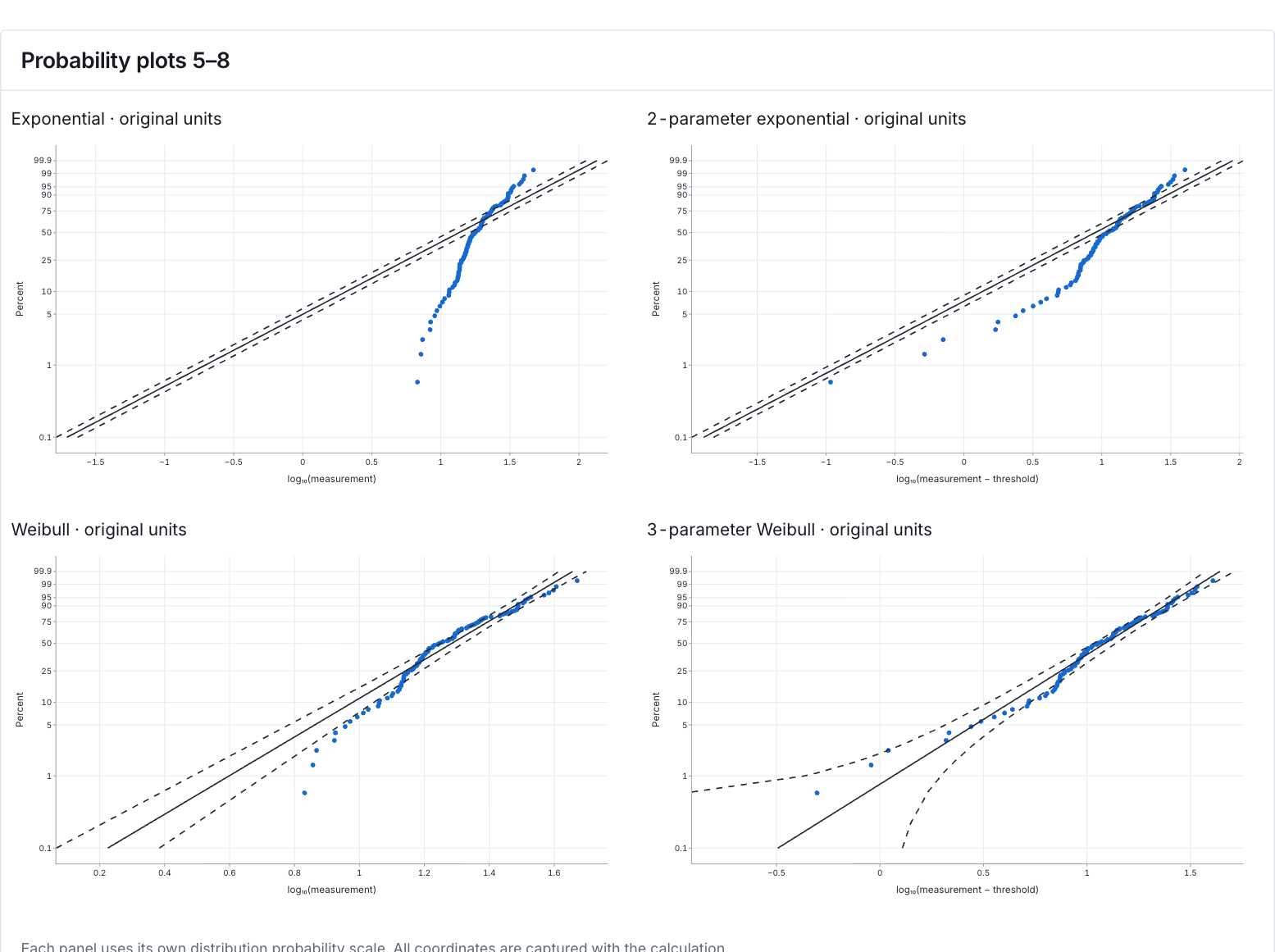
Probability plots 5–8
Compare the next four candidate probability plots using each panel’s own scale. Curvature and tail departures indicate where a fitted model may describe completion times poorly; retain any panel qualifications.
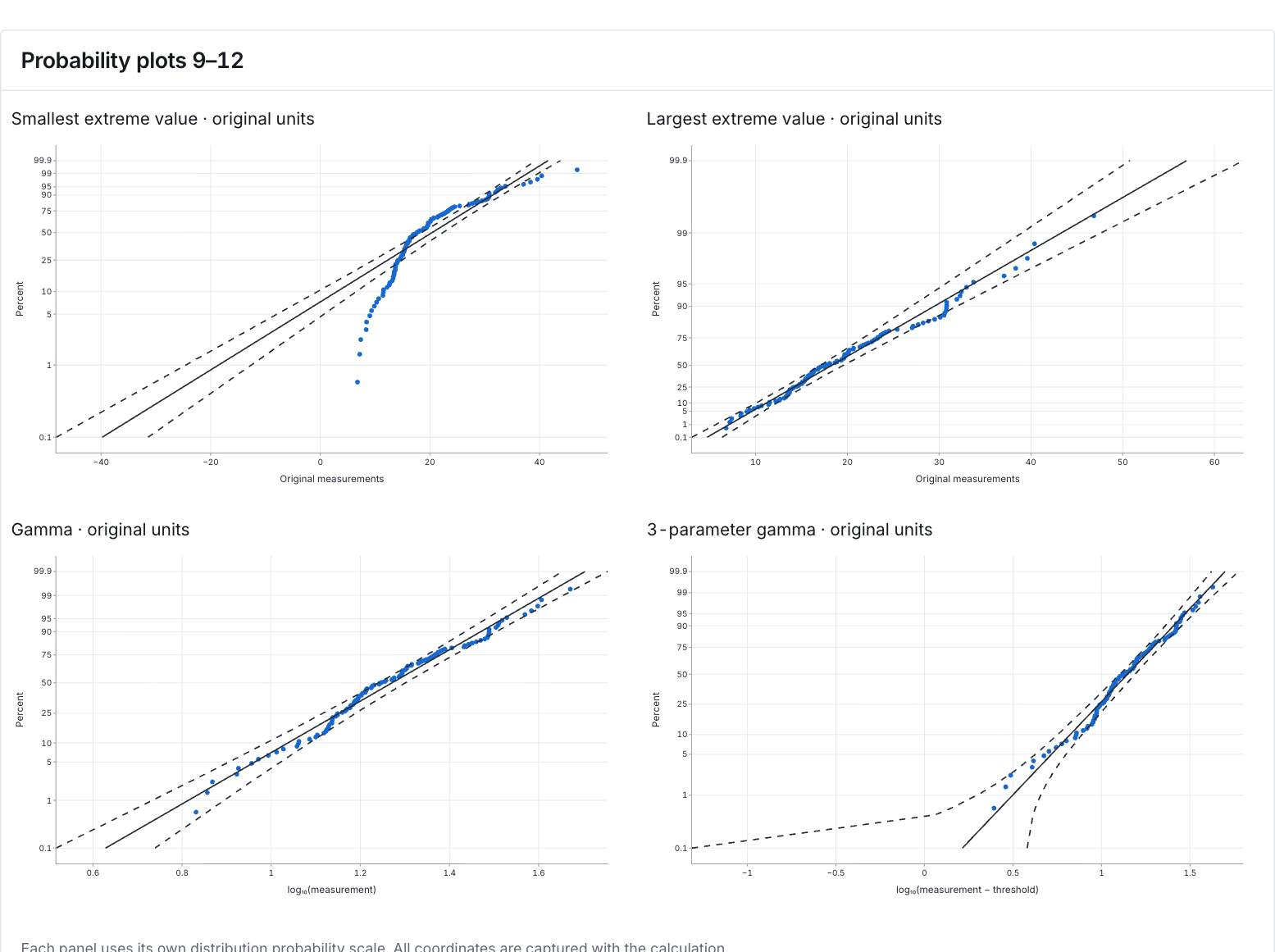
Probability plots 9–12
These probability plots extend the comparison to the next four configured candidates. Read their individual scales and long-duration tails rather than judging models from visual similarity alone.
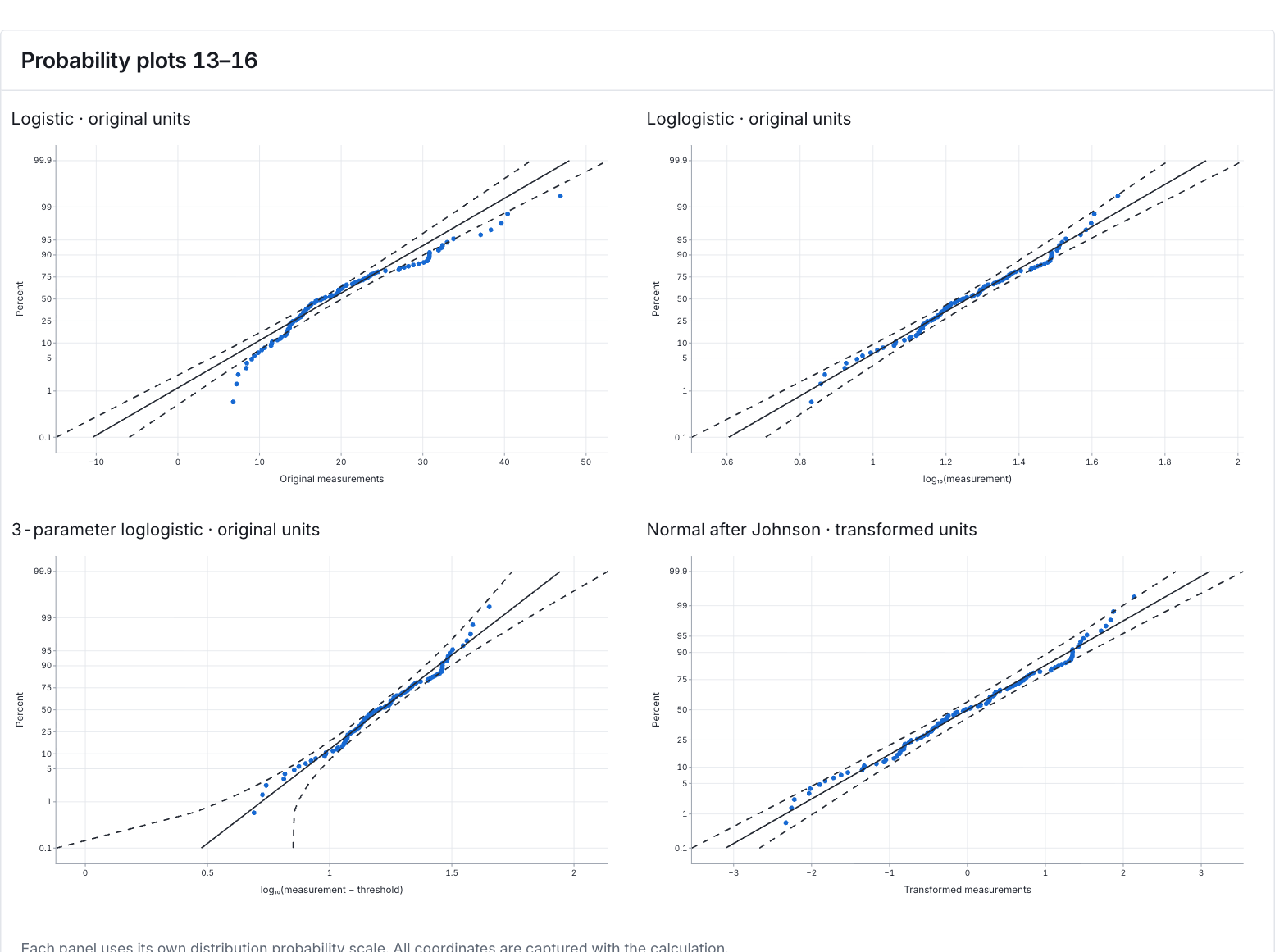
Probability plots 13–16
Read the remaining candidate probability plots, including transformed-normal fits, on their stated scales. A straight-looking pattern does not identify a unique true model or remove method limitations.
Three-parameter Weibull qualification
The saved Weibull AD p-value is 0.018302630915132106. Its recorded method is Lockhart–Stephens Table 1, Case 7, with reciprocal-shape and probability interpolation; native boundary qualification is pending. Retain that qualification when discussing evidence against this fit. It is not an unqualified, fully validated probability.
8. Create a report
Keep all Goodness-of-fit tests, Candidate outcomes, Parameter estimates, Transformation details, Descriptive statistics and all four grouped probability figures. Retain reporting bounds, unavailable probabilities and every method qualification, including conditional intervals for the shifted exponential.
Choose Add to report from the completed run. Open Choose individual items and advanced options to select tables and charts, then choose Add to draft. Hidden items stay in the saved analysis.
Name the report and add the purpose of the study and your interpretation. Choose Save, review Preview, then use Export → Download HTML. The example below contains the full selected content, including results beyond one screen.