

Example: firmware scan time
24 labels, each assessed once with each firmware version: 24 paired rows and 48 scan-time readings. Firmware reading order was balanced and randomized across labels.
Download the example data (CSV)This is the same example used in Help. Import the CSV to follow the steps, or use Open example in a practice copy in Help to prefill the inputs.
1. Create the workspace
In the sidebar, open Basic Statistics and choose Means: Two-Sample (t). Create an analysis, name it, select New blank worksheet, then choose Create analysis.
2. Import the example data
Download the CSV above and import it into the worksheet. Choose Comma as the delimiter, Dot as the decimal separator and First row contains column names.
3. Assign the input columns
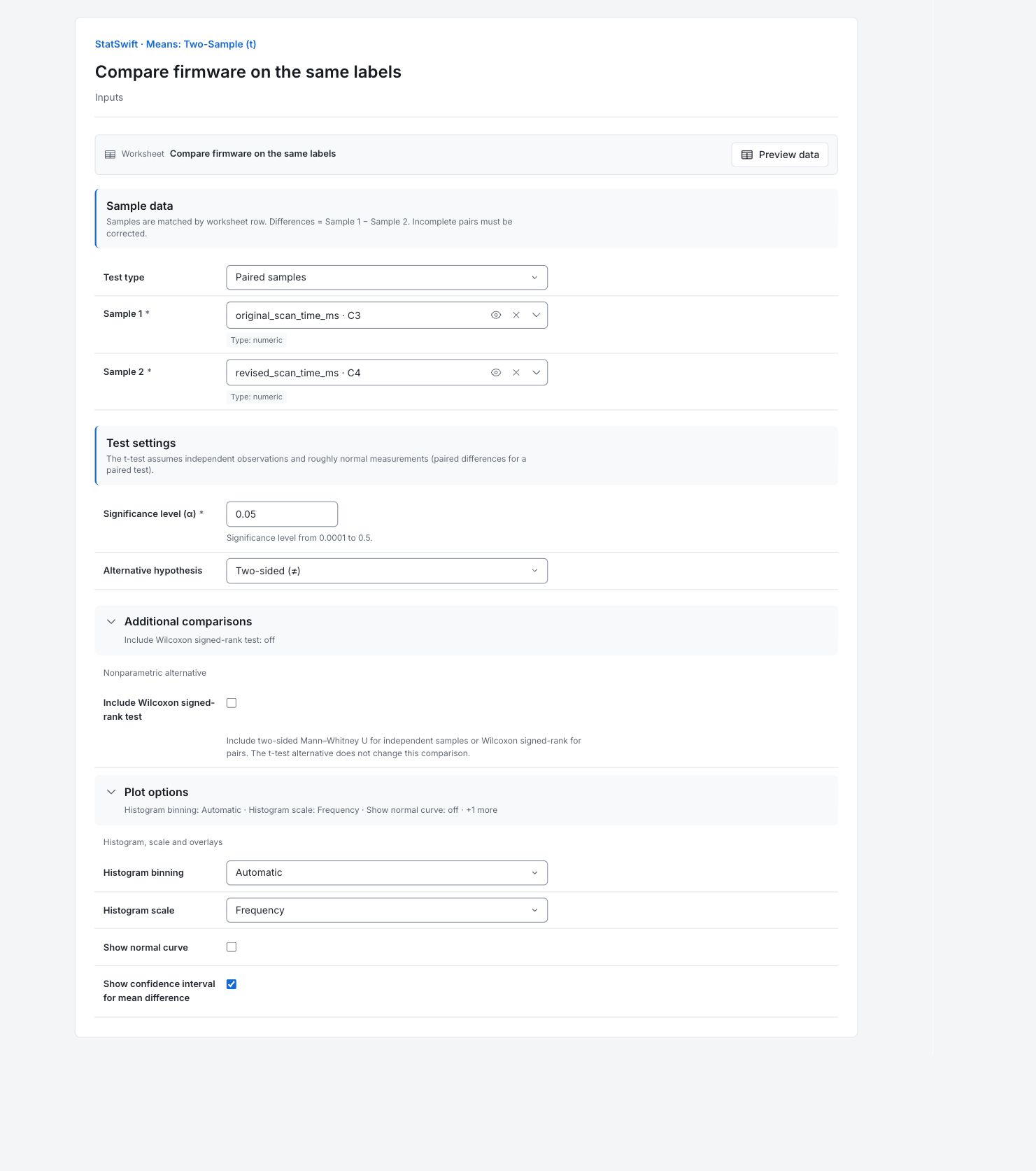
On Inputs, Choose Paired samples for Test type. Assign original_scan_time_ms to Sample 1 and revised_scan_time_ms to Sample 2. Each worksheet row must contain both readings for the same label. Keep the pair together when sorting.
4. Set the test and plots
Enter 0.05 in Significance level (α) and choose Two-sided (≠) for Alternative hypothesis. Open Additional comparisons and leave Include Wilcoxon signed-rank test unchecked.
Open Plot options. Set Histogram binning to Automatic and Histogram scale to Frequency. Leave Show normal curve unchecked and check Show confidence interval for mean difference.
5. Run analysis
Choose Run analysis, then open Results.
6. Interpret results
Keep the paired comparison clear
The same 24 labels were tested with both firmware versions. Differences are original minus revised scan time. A positive difference means the revision was faster on that label. Output labels Before and After mean original and revised firmware; they do not describe the chronological reading order.
Read the mean difference and interval
The average reduction is 19.35 ms. Its 95% interval is 15.05–23.64 ms, entirely above zero, with p = 2.813 × 10⁻⁹. The uncertainty comes from the 24 within-label differences, not the two separate sample spreads.

Difference confidence interval View full-size chart (opens in a new tab) Compare the sample shapes
The boxes show each sample’s middle half, with the median inside. Whiskers and fence flags describe the observations, not acceptance limits. For a paired test, these separate boxes do not show the spread of within-label differences.

Sample boxplots View full-size chart (opens in a new tab) Read the histogram
Bar heights count measurements in value intervals. Compare shape and spread, without treating the bars as confidence limits. For the paired test assumptions, check the within-label differences as well.

Sample histogram View full-size chart (opens in a new tab) Decide what the result supports
Compare the estimated 15–24 ms average improvement with the saving needed in the scanning workflow. Confirm it on representative labels and conditions.
More details: read each result section
Complete result tables use six significant digits, as in Help.
Paired t-test
Mean difference is Sample 1 minus Sample 2; Standard error measures its uncertainty. t statistic is difference divided by Standard error. Degrees of freedom, Alpha, Alternative, Method and Confidence level document the inference. CI lower and CI upper bound the population mean difference. Paired uncertainty uses within-label differences; degrees of freedom is 23.
| Statistic | Value |
|---|---|
| t statistic | 9.3244 |
| Degrees of freedom | 23 |
| p-value | 2.81325e-9 |
| Mean difference | 19.3458 |
| Standard error | 2.07475 |
| Alpha | 0.05 |
| Alternative | two-sided |
| Method | Paired t-test |
| Confidence level (%) | 95 |
| CI lower | 15.0539 |
| CI upper | 23.6378 |
- Reject H₀ (μ𝑑 = 0) at α=0.05 (p=2.81e-09)
- H₀: μ𝑑 = 0
- H₁: μ𝑑 ≠ 0
Sample summaries
n counts readings; Mean, Median, Min, Max and Range describe each sample. SD is sample spread, SE is uncertainty in its mean, and IQR is the middle-half spread. There are 24 complete pairs. Separate sample SE values are not the paired difference SE.
| Sample | n | Mean | SD | SE | Median | Min | Max | Range | IQR |
|---|---|---|---|---|---|---|---|---|---|
| Before | 24 | 281.213 | 36.2839 | 7.40641 | 274.45 | 216.9 | 349.5 | 132.6 | 50.775 |
| After | 24 | 261.867 | 39.2201 | 8.00576 | 258.7 | 176.1 | 330.3 | 154.2 | 63.75 |
Boxplot coordinates
Q1 and Q3 bound the middle half, with Median between them. IQR is Q3 minus Q1. Lower and Upper fences use 1.5 × IQR; whiskers end at the extreme observations inside the fences. These coordinates are not acceptance limits.
| Sample | Q1 | Median | Q3 | IQR | Lower fence | Upper fence | Lower whisker | Upper whisker |
|---|---|---|---|---|---|---|---|---|
| Before | 256.475 | 274.45 | 307.25 | 50.775 | 180.313 | 383.412 | 216.9 | 349.5 |
| After | 230.55 | 258.7 | 294.3 | 63.75 | 134.925 | 389.925 | 176.1 | 330.3 |
Boxplot flags
Each row would identify a Sample, Worksheet row and Value beyond a fence. This empty table means neither sample has fence flags. A flag would call for investigation, not automatic deletion.
| Sample | Worksheet row | Value |
|---|
No rows were returned for this section.
7. Create a report
Keep the complete Paired t-test, Sample summaries, boxplot coordinates and flags, difference interval, boxplots and histogram. State Sample 1 minus Sample 2 and the matching by label.
Choose Add to report from the completed run. Open Choose individual items and advanced options to select tables and charts, then choose Add to draft. Hidden items stay in the saved analysis.
Name the report and add the purpose of the study and your interpretation. Choose Save, review Preview, then use Export → Download HTML. The example below contains the full selected content, including results beyond one screen.