

Example: three spacer products
A machining cell alternates among three spacer products in 18 runs. Five parts are measured per run, giving 90 length measurements.
Download the spacer-length example (CSV)This is the same example used in Help. product_id identifies SP-25, SP-40 or SP-60; run_id identifies each production run; length_mm contains measured length in mm. Each product’s mean and standard deviation are estimated from these data.
1. Create the workspace
In the sidebar, open Process control, choose Z-MR Chart, and name the analysis. Select New blank worksheet and Create analysis.
2. Import the data
On Worksheet, choose Import. Select the downloaded file or paste its contents. Set the delimiter to Comma, use Decimal dot, and check First row contains column names. Preview the import, then choose Import into worksheet. Keep the rows in collection order.
3. Assign the input columns
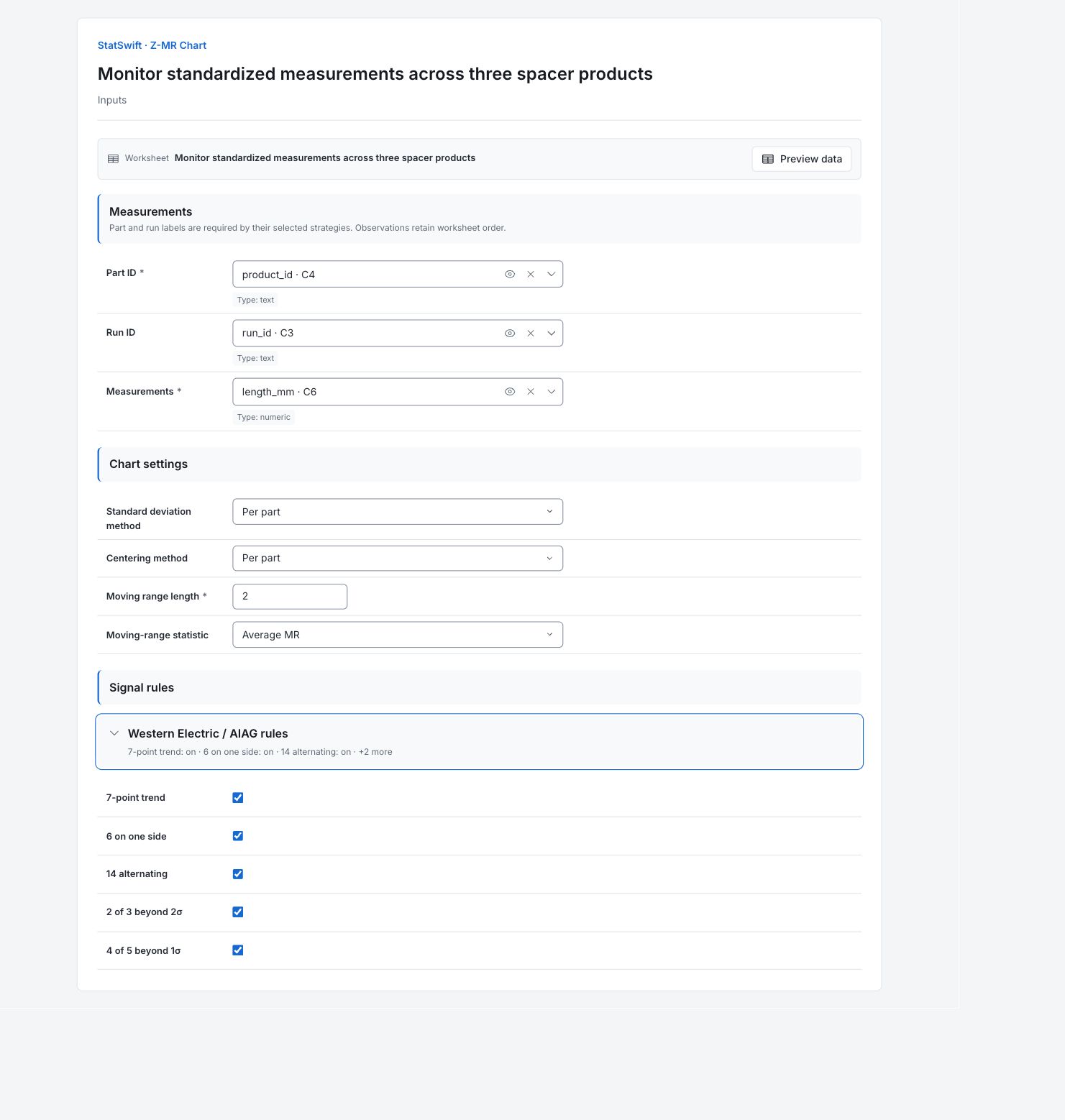
On Inputs, assign product_id to Part ID, run_id to Run ID, and length_mm to Measurements, selecting each from the column picker. Keep the complete sequence in collection order.
4. Set the product baselines
Choose Per part for both Standard deviation method and Centering method. Enter 2 in Moving range length and choose Average MR under Moving-range statistic.
Open Western Electric / AIAG rules. Leave all five optional rules On: 7-point trend, 6 on one side, 14 alternating, 2 of 3 beyond 2σ and 4 of 5 beyond 1σ.
5. Run analysis
Choose Run analysis, then open Results.
6. Interpret results
Understand the standardized scale
For each product, the app subtracts its estimated mean from each length and divides by its estimated standard deviation. The result is Z. A Z of 3 is three estimated standard deviations above that product’s mean; it is not 3 mm above target.
Check changes between neighbors
The moving-range chart shows changes between consecutive Z values. No points cross its upper limit of 3.685. The first reading has no moving range. Ranges continue across run boundaries, so also check product transitions.

Moving ranges of standardized measurements. Ranges continue across run boundaries. View full-size chart (opens in a new tab) Check the Z values
Observation 69 is product SP-40, run RUN14, sample 4, measuring 40.108 mm. Its Z crosses the upper limit of +3. Pattern rules also flag 25–31 and 63–70. Use product and run IDs to inspect the original records: a signal is relative to the estimated product baseline, not a failed length specification.

Standardized measurements for 90 parts. Z has no measurement unit. View full-size chart (opens in a new tab) Check the product baselines
The estimated means are 24.9965, 40.0030 and 60.0087 mm for SP-25, SP-40 and SP-60. Their estimated standard deviations are about 0.02204, 0.0324 and 0.06184 mm. These estimates use the current data, including the flagged readings.
Decide what to investigate
Check observation 69 against its product baseline and the neighboring run records. Review each product’s reference separately before ongoing monitoring. The charts locate unusual standardized behavior; they do not identify a shared cause across products.
More details: read each result section
Complete result tables use six significant digits, as in Help.
Mean and sigma breakdowns
Estimated means are 24.9965, 40.0030 and 60.0087 mm for SP-25, SP-40 and SP-60. Their sigmas are approximately 0.02204, 0.0324 and 0.06184 mm. These are estimates from the current observations, not historical reference parameters.
| Parameter | Part / run / pool | Estimate |
|---|---|---|
| Mean (μ) | SP-25 | 24.9965 |
| Mean (μ) | SP-40 | 40.003 |
| Mean (μ) | SP-60 | 60.0087 |
| Sigma (σ) | SP-25 | 0.0220408 |
| Sigma (σ) | SP-40 | 0.032404 |
| Sigma (σ) | SP-60 | 0.0618427 |
Z–MR summary
The 90 observations use per-part mean and sigma estimates with average moving ranges of length 2. Identity transform keeps the original measurements on their measured scale before standardization.
| Statistic / setting | Value |
|---|---|
| Observations | 90 |
| Mean strategy | by part |
| Sigma strategy | by part |
| Moving-range span | 2 |
| Moving-range statistic | mean |
| Transform | identity |
Z and moving-range limits
Z and MR of Z are dimensionless. A Z of 3 means three estimated product sigmas above that product’s mean; it does not mean 3 mm above target.
| Chart | CL | LCL | UCL | −1σ | +1σ | −2σ | +2σ |
|---|---|---|---|---|---|---|---|
| Z | 0 | -3 | 3 | -1 | 1 | -2 | 2 |
| MR of Z | 1.128 | 0 | 3.685 | — | — | — | — |
Standardized values and moving ranges
Each row connects an observation with its part, run, original measurement, standardized Z and moving range. Use these identities to trace observation 69 to its source row. Only the first MR is missing with length 2; ranges continue across run transitions.
| Observation | Part | Run | Original value | Z | MR of Z | Z signals | MR signals |
|---|---|---|---|---|---|---|---|
| 1 | SP-25 | RUN01 | 25.007 | 0.476388 | — | None | — |
| 2 | SP-25 | RUN01 | 24.945 | -2.33657 | 2.81296 | None | None |
| 3 | SP-25 | RUN01 | 25.007 | 0.476388 | 2.81296 | None | None |
| 4 | SP-25 | RUN01 | 24.994 | -0.113426 | 0.589814 | None | None |
| 5 | SP-25 | RUN01 | 25.015 | 0.839351 | 0.952777 | None | None |
| 6 | SP-40 | RUN02 | 39.982 | -0.648068 | 1.48742 | None | None |
| 7 | SP-40 | RUN02 | 40.019 | 0.493766 | 1.14183 | None | None |
| 8 | SP-40 | RUN02 | 39.975 | -0.864091 | 1.35786 | None | None |
| 9 | SP-40 | RUN02 | 40.003 | -2.19276e-13 | 0.864091 | None | None |
| 10 | SP-40 | RUN02 | 40.008 | 0.154302 | 0.154302 | None | None |
| 11 | SP-60 | RUN03 | 59.955 | -0.867792 | 1.02209 | None | None |
| 12 | SP-60 | RUN03 | 60.074 | 1.05644 | 1.92424 | None | None |
| 13 | SP-60 | RUN03 | 60.155 | 2.36622 | 1.30977 | None | None |
| 14 | SP-60 | RUN03 | 60.011 | 0.0377301 | 2.32849 | None | None |
| 15 | SP-60 | RUN03 | 59.922 | -1.4014 | 1.43913 | None | None |
| 16 | SP-25 | RUN04 | 25.021 | 1.11157 | 2.51298 | None | None |
| 17 | SP-25 | RUN04 | 24.985 | -0.521759 | 1.63333 | None | None |
| 18 | SP-25 | RUN04 | 25 | 0.158796 | 0.680555 | None | None |
| 19 | SP-25 | RUN04 | 24.987 | -0.431018 | 0.589814 | None | None |
| 20 | SP-25 | RUN04 | 25.043 | 2.10972 | 2.54074 | None | None |
| 21 | SP-40 | RUN05 | 40.023 | 0.617208 | 1.49251 | None | None |
| 22 | SP-40 | RUN05 | 39.941 | -1.91334 | 2.53055 | None | None |
| 23 | SP-40 | RUN05 | 39.988 | -0.462906 | 1.45044 | None | None |
| 24 | SP-40 | RUN05 | 40.046 | 1.327 | 1.7899 | None | None |
| 25 | SP-40 | RUN05 | 39.975 | -0.864091 | 2.19109 | 6 on one side | None |
| 26 | SP-60 | RUN06 | 60.002 | -0.1078 | 0.75629 | 6 on one side, 6 on one side | None |
| 27 | SP-60 | RUN06 | 59.97 | -0.625242 | 0.517441 | 6 on one side, 6 on one side | None |
| 28 | SP-60 | RUN06 | 59.989 | -0.318011 | 0.307231 | 6 on one side, 6 on one side | None |
| 29 | SP-60 | RUN06 | 60.001 | -0.12397 | 0.194041 | 6 on one side, 6 on one side | None |
| 30 | SP-60 | RUN06 | 59.982 | -0.431201 | 0.307231 | 6 on one side, 6 on one side | None |
| 31 | SP-25 | RUN07 | 24.98 | -0.74861 | 0.317409 | 6 on one side | None |
| 32 | SP-25 | RUN07 | 25.02 | 1.0662 | 1.81481 | None | None |
| 33 | SP-25 | RUN07 | 24.99 | -0.294907 | 1.36111 | None | None |
| 34 | SP-25 | RUN07 | 25.01 | 0.612499 | 0.907406 | None | None |
| 35 | SP-25 | RUN07 | 25.004 | 0.340277 | 0.272222 | None | None |
| 36 | SP-40 | RUN08 | 39.943 | -1.85162 | 2.1919 | None | None |
| 37 | SP-40 | RUN08 | 39.961 | -1.29614 | 0.555487 | None | None |
| 38 | SP-40 | RUN08 | 39.972 | -0.956672 | 0.339464 | None | None |
| 39 | SP-40 | RUN08 | 40.028 | 0.771509 | 1.72818 | None | None |
| 40 | SP-40 | RUN08 | 39.937 | -2.03678 | 2.80829 | None | None |
| 41 | SP-60 | RUN09 | 59.95 | -0.948643 | 1.08814 | None | None |
| 42 | SP-60 | RUN09 | 60.058 | 0.797722 | 1.74636 | None | None |
| 43 | SP-60 | RUN09 | 60.038 | 0.474321 | 0.323401 | None | None |
| 44 | SP-60 | RUN09 | 60.033 | 0.393471 | 0.0808502 | None | None |
| 45 | SP-60 | RUN09 | 60.011 | 0.0377301 | 0.355741 | None | None |
| 46 | SP-25 | RUN10 | 24.997 | 0.0226852 | 0.0150449 | None | None |
| 47 | SP-25 | RUN10 | 24.965 | -1.42917 | 1.45185 | None | None |
| 48 | SP-25 | RUN10 | 24.993 | -0.158796 | 1.27037 | None | None |
| 49 | SP-25 | RUN10 | 25.021 | 1.11157 | 1.27037 | None | None |
| 50 | SP-25 | RUN10 | 24.977 | -0.884721 | 1.99629 | None | None |
| 51 | SP-40 | RUN11 | 39.94 | -1.9442 | 1.05948 | None | None |
| 52 | SP-40 | RUN11 | 39.946 | -1.75904 | 0.185162 | None | None |
| 53 | SP-40 | RUN11 | 39.981 | -0.678928 | 1.08011 | None | None |
| 54 | SP-40 | RUN11 | 40.001 | -0.0617208 | 0.617208 | None | None |
| 55 | SP-40 | RUN11 | 40.043 | 1.23442 | 1.29614 | None | None |
| 56 | SP-60 | RUN12 | 60.025 | 0.264111 | 0.970304 | None | None |
| 57 | SP-60 | RUN12 | 59.972 | -0.592902 | 0.857012 | None | None |
| 58 | SP-60 | RUN12 | 60.107 | 1.59005 | 2.18296 | None | None |
| 59 | SP-60 | RUN12 | 60.016 | 0.11858 | 1.47147 | None | None |
| 60 | SP-60 | RUN12 | 59.864 | -2.33927 | 2.45785 | None | None |
| 61 | SP-25 | RUN13 | 24.979 | -0.793981 | 1.54529 | None | None |
| 62 | SP-25 | RUN13 | 24.994 | -0.113426 | 0.680555 | None | None |
| 63 | SP-25 | RUN13 | 25.014 | 0.793981 | 0.907406 | 6 on one side | None |
| 64 | SP-25 | RUN13 | 25.001 | 0.204166 | 0.589814 | 6 on one side, 6 on one side | None |
| 65 | SP-25 | RUN13 | 25.001 | 0.204166 | 0 | 6 on one side, 6 on one side, 6 on one side | None |
| 66 | SP-40 | RUN14 | 40.051 | 1.4813 | 1.27713 | 6 on one side, 6 on one side, 6 on one side, 4 of 5 beyond 1σ | None |
| 67 | SP-40 | RUN14 | 40.057 | 1.66646 | 0.185162 | 6 on one side, 6 on one side, 6 on one side, 4 of 5 beyond 1σ | None |
| 68 | SP-40 | RUN14 | 40.035 | 0.987532 | 0.678928 | 6 on one side, 6 on one side, 6 on one side | None |
| 69 | SP-40 | RUN14 | 40.108 | 3.24034 | 2.25281 | Beyond 3σ, 6 on one side, 6 on one side, 2 of 3 beyond 2σ, 2 of 3 beyond 2σ, 4 of 5 beyond 1σ | None |
| 70 | SP-40 | RUN14 | 40.092 | 2.74657 | 0.493766 | 6 on one side, 2 of 3 beyond 2σ, 2 of 3 beyond 2σ, 4 of 5 beyond 1σ | None |
| 71 | SP-60 | RUN15 | 59.994 | -0.237161 | 2.98373 | None | None |
| 72 | SP-60 | RUN15 | 60.004 | -0.0754602 | 0.1617 | None | None |
| 73 | SP-60 | RUN15 | 60.072 | 1.0241 | 1.09956 | None | None |
| 74 | SP-60 | RUN15 | 60.029 | 0.328791 | 0.695312 | None | None |
| 75 | SP-60 | RUN15 | 59.972 | -0.592902 | 0.921693 | None | None |
| 76 | SP-25 | RUN16 | 25 | 0.158796 | 0.751698 | None | None |
| 77 | SP-25 | RUN16 | 24.97 | -1.20231 | 1.36111 | None | None |
| 78 | SP-25 | RUN16 | 24.999 | 0.113426 | 1.31574 | None | None |
| 79 | SP-25 | RUN16 | 24.982 | -0.65787 | 0.771295 | None | None |
| 80 | SP-25 | RUN16 | 24.994 | -0.113426 | 0.544444 | None | None |
| 81 | SP-40 | RUN17 | 40.066 | 1.9442 | 2.05763 | None | None |
| 82 | SP-40 | RUN17 | 39.98 | -0.709789 | 2.65399 | None | None |
| 83 | SP-40 | RUN17 | 39.977 | -0.80237 | 0.0925811 | None | None |
| 84 | SP-40 | RUN17 | 40.036 | 1.01839 | 1.82076 | None | None |
| 85 | SP-40 | RUN17 | 39.976 | -0.83323 | 1.85162 | None | None |
| 86 | SP-60 | RUN18 | 59.924 | -1.36906 | 0.535834 | None | None |
| 87 | SP-60 | RUN18 | 60.104 | 1.54154 | 2.91061 | None | None |
| 88 | SP-60 | RUN18 | 60.113 | 1.68707 | 0.14553 | None | None |
| 89 | SP-60 | RUN18 | 59.925 | -1.35289 | 3.03997 | None | None |
| 90 | SP-60 | RUN18 | 59.988 | -0.334181 | 1.01871 | None | None |
- Initial moving ranges are missing until a complete window is available.
Control chart signal details
Each row identifies an observation, chart and triggered rule. Observation 69 crosses the Z upper limit; patterns also flag 25–31 and 63–70. Multiple entries can concern one observation. A Z signal is relative to the estimated product baseline, not a failed length specification.
| Observation / subgroup | Chart | Rule |
|---|---|---|
| 25 | Z | 6 on one side |
| 26 | Z | 6 on one side |
| 26 | Z | 6 on one side |
| 27 | Z | 6 on one side |
| 27 | Z | 6 on one side |
| 28 | Z | 6 on one side |
| 28 | Z | 6 on one side |
| 29 | Z | 6 on one side |
| 29 | Z | 6 on one side |
| 30 | Z | 6 on one side |
| 30 | Z | 6 on one side |
| 31 | Z | 6 on one side |
| 63 | Z | 6 on one side |
| 64 | Z | 6 on one side |
| 64 | Z | 6 on one side |
| 65 | Z | 6 on one side |
| 65 | Z | 6 on one side |
| 65 | Z | 6 on one side |
| 66 | Z | 4 of 5 beyond 1σ |
| 66 | Z | 6 on one side |
| 66 | Z | 6 on one side |
| 66 | Z | 6 on one side |
| 67 | Z | 4 of 5 beyond 1σ |
| 67 | Z | 6 on one side |
| 67 | Z | 6 on one side |
| 67 | Z | 6 on one side |
| 68 | Z | 6 on one side |
| 68 | Z | 6 on one side |
| 68 | Z | 6 on one side |
| 69 | Z | 2 of 3 beyond 2σ |
| 69 | Z | 2 of 3 beyond 2σ |
| 69 | Z | 4 of 5 beyond 1σ |
| 69 | Z | 6 on one side |
| 69 | Z | 6 on one side |
| 69 | Z | Beyond 3σ |
| 70 | Z | 2 of 3 beyond 2σ |
| 70 | Z | 2 of 3 beyond 2σ |
| 70 | Z | 4 of 5 beyond 1σ |
| 70 | Z | 6 on one side |
- Signal observations are displayed starting at 1.
7. Create a report
Keep Standardized individuals chart (Z) and Moving range of Z, together with the summary, Mean and sigma breakdowns, limits, standardized values and signal details. Record which product and run contain observation 69 and how each product baseline was estimated.
Choose Add to report from the completed run. Open Choose individual items and advanced options to select tables and charts, then choose Add to draft. Hidden items stay in the saved analysis.
Name the report and add the purpose of the study and your interpretation. Choose Save, review Preview, then use Export → Download HTML. The example below contains the full selected content, including results beyond one screen.