

Example: coating thickness
An inspector measures 12 consecutive metal covers every two hours. Dry-film thickness is measured at the same location on each cover.
Download the coating-thickness example (CSV)This Help example contains 360 measurements in 30 groups of 12 covers. subgroup_id identifies each group; coating_thickness_um contains thickness in µm. The other columns record collection order, time and position within the group.
1. Create the chart workspace
In the sidebar, open Process control, choose X̄–S Chart, and name the analysis. Select New blank worksheet and Create analysis.
2. Import the data
On Worksheet, choose Import. Select the downloaded file or paste its contents. Set the delimiter to Comma, use Decimal dot, and check First row contains column names. Preview the import, then choose Import into worksheet. Keep the rows in collection order.
3. Assign the input columns
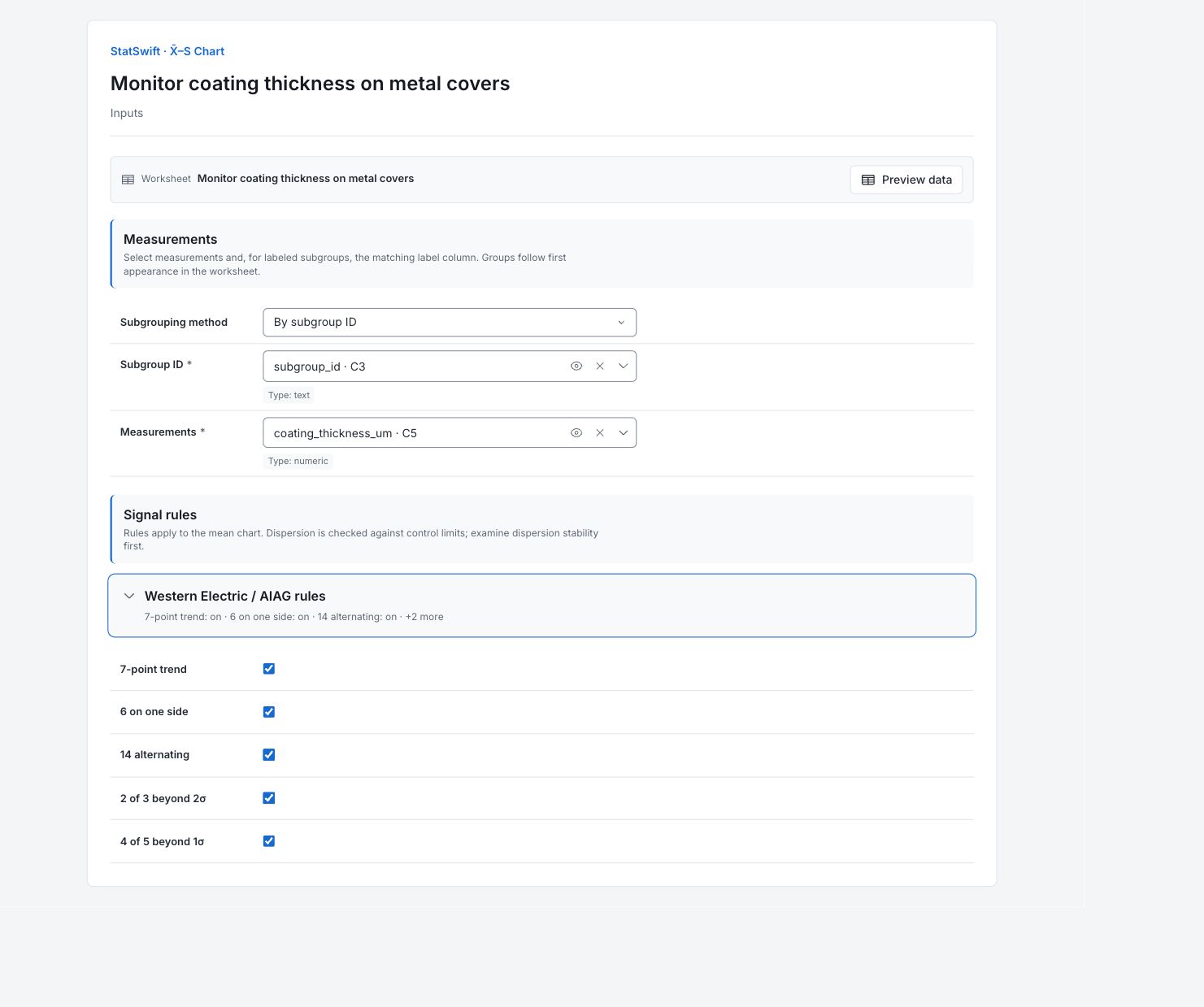
On Inputs, choose By subgroup ID. Assign subgroup_id to Subgroup ID and coating_thickness_um to Measurements, selecting each from the column picker. Each ID contains 12 covers, so the group sizes come from the data.
Open Western Electric / AIAG rules. Leave all five optional rules On: 7-point trend, 6 on one side, 14 alternating, 2 of 3 beyond 2σ and 4 of 5 beyond 1σ.
4. Run analysis
Choose Run analysis, then open Results.
5. Interpret results
Understand each point
Twelve covers were measured every two hours. Each mean-chart point is their average thickness. The S chart shows how much thickness varies within the same group, using standard deviation in µm.
Check the S chart first
Groups CS25 and CS30 (chart groups 25 and 30; returned indices 24 and 29) exceed the S upper limit of 4.358 µm. Their within-group thickness varies more than the chart expects. Investigate those measurements before treating the mean-chart limits as a stable reference.

Within-group standard deviation in µm for 30 groups of 12 covers. View full-size chart (opens in a new tab) Check the averages
No group average crosses the limits of 77.617–82.308 µm. Groups 8–13 are still highlighted because six averages in a row lie on the same side of the center line. A pattern can be flagged even when every point stays inside the limits.

Mean coating thickness in µm for the same 30 groups. View full-size chart (opens in a new tab) Decide what to investigate
Review all 12 readings in groups 25 and 30 and their measurement conditions. Then check the production records for the mean pattern across groups 8–13. The charts do not identify a cause. Keep the records of your investigation before reconsidering the limits.
More details: read each result section
Complete result tables use six significant digits, as in Help.
X̄–S summary
There are 30 groups with 12 measurements each. Eight rule entries comprise two S beyond-limit signals and six X̄ pattern flags. The within-subgroup sigma estimate is affected by the variation seen in this dataset.
| Statistic / setting | Value |
|---|---|
| Subgroups (k) | 30 |
| Grand mean (X̄̄) | 79.9628 |
| Average S | 2.6474 |
| Within-subgroup σ | 2.70818 |
| Signals | 8 |
| Subgrouping | By subgroup label |
| 7-point trend | On |
| 6 on one side | On |
| 14 alternating | On |
| 2 of 3 beyond 2σ | On |
| 4 of 5 beyond 1σ | On |
Control limits and zones
These limits are estimated from the complete study. They describe process behavior, not acceptable coating thickness.
| Statistic / setting | Value |
|---|---|
| X̄ CL | 79.9628 |
| X̄ LCL | 77.6172 |
| X̄ UCL | 82.3084 |
| S CL | 2.6474 |
| S LCL | 0.93718 |
| S UCL | 4.35762 |
| X̄ −1σ | 79.181 |
| X̄ +1σ | 80.7446 |
| X̄ −2σ | 78.3992 |
| X̄ +2σ | 81.5263 |
Subgroup means and dispersion
Each row gives the subgroup mean, S and rules on each chart. Returned index 0 is CS01; index 24 is CS25 and index 29 is CS30. Use the subgroup ID to find all twelve source readings. None means no rule was flagged, not proof of stability.
| Subgroup index (as returned) | X̄ | S | X̄ signals | S signals |
|---|---|---|---|---|
| 0 | 79.675 | 2.29193 | None | None |
| 1 | 80.2667 | 2.11288 | None | None |
| 2 | 79.1083 | 2.59386 | None | None |
| 3 | 80.2833 | 2.73391 | None | None |
| 4 | 80.175 | 1.98179 | None | None |
| 5 | 81.375 | 2.12523 | None | None |
| 6 | 80.0167 | 1.52961 | None | None |
| 7 | 79.6083 | 2.03981 | 6 on one side | None |
| 8 | 79.9583 | 2.27375 | 6 on one side | None |
| 9 | 79.8 | 2.97688 | 6 on one side | None |
| 10 | 79.8917 | 1.81782 | 6 on one side | None |
| 11 | 79.625 | 2.55134 | 6 on one side | None |
| 12 | 79.5833 | 2.62604 | 6 on one side | None |
| 13 | 81.8083 | 1.9247 | None | None |
| 14 | 81.1417 | 1.82331 | None | None |
| 15 | 78.95 | 2.09827 | None | None |
| 16 | 78.9 | 2.9542 | None | None |
| 17 | 79.7917 | 1.95376 | None | None |
| 18 | 80.4667 | 2.65889 | None | None |
| 19 | 80.0667 | 1.70791 | None | None |
| 20 | 79.85 | 3.10117 | None | None |
| 21 | 78.3917 | 2.33762 | None | None |
| 22 | 79.875 | 1.94708 | None | None |
| 23 | 80.3417 | 2.33217 | None | None |
| 24 | 79.0333 | 5.71097 | None | Beyond 3σ |
| 25 | 80.65 | 3.90629 | None | None |
| 26 | 79.0167 | 3.39434 | None | None |
| 27 | 80.4833 | 3.99746 | None | None |
| 28 | 80.5667 | 2.1931 | None | None |
| 29 | 80.1833 | 5.72599 | None | Beyond 3σ |
Control chart signal details
Rows identify the returned subgroup index, chart and rule. Indices start at 0: 7–12 refer to CS08–CS13 and 24/29 refer to CS25/CS30. Several rules can refer to one point. These eight rule entries are investigation signals, not counts of defective covers.
| Index (as returned) | Chart | Rule |
|---|---|---|
| 24 | S | Beyond 3σ |
| 29 | S | Beyond 3σ |
| 10 | X̄ | 6 on one side |
| 11 | X̄ | 6 on one side |
| 12 | X̄ | 6 on one side |
| 7 | X̄ | 6 on one side |
| 8 | X̄ | 6 on one side |
| 9 | X̄ | 6 on one side |
- Returned subgroup indices start at 0: indices 24 and 29 identify CS25 and CS30.
6. Create a report
Keep Mean chart (X̄) and Standard deviation chart (S), together with the summary, control limits, subgroup values and signal details. Record your investigation of groups 25 and 30 and the mean pattern across groups 8–13.
Choose Add to report from the completed run. Open Choose individual items and advanced options to select tables and charts, then choose Add to draft. Hidden items stay in the saved analysis.
Name the report and add the purpose of the study and your interpretation. Choose Save, review Preview, then use Export → Download HTML. The example below contains the full selected content, including results beyond one screen.