

Example: optical gauge
One technician measures five reference standards of 10, 30, 50, 70 and 90 mm. Each is measured 12 times, with standard order randomized in each round. The study has 60 readings.
Download the optical gauge example (CSV)This is the same example used in Help. reference_id identifies the standard, reference_mm contains its assigned length, and measured_length_mm contains the gauge reading. Both numeric columns use mm.
1. Create the analysis
In the sidebar, open Measurement systems, choose Linearity, and name the analysis. Select New blank worksheet and Create analysis.
2. Import the data
On Worksheet, choose Import. Select the downloaded file or paste its contents. Set the delimiter to Comma, use Decimal dot, and check First row contains column names. Preview the import, then choose Import into worksheet. Keep every row in its original order.
3. Assign the input columns
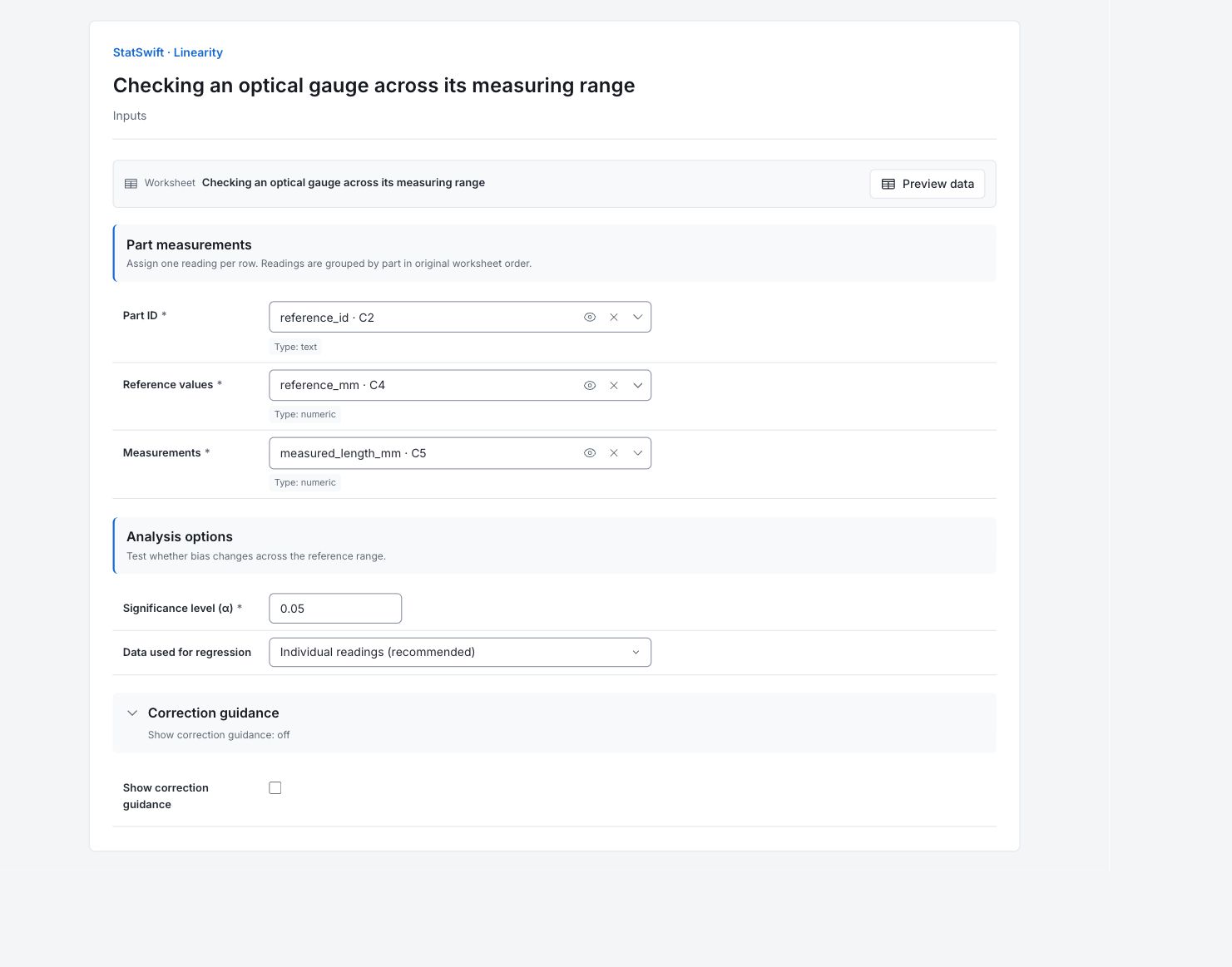
On Inputs, assign reference_id to Part ID, reference_mm to Reference values, and measured_length_mm to Measurements, selecting each from the column picker. Keep the reference and reading from the same row together.
4. Set the study options
Enter 0.05 in Significance level (α). In Data used for regression, choose Individual readings (recommended).
Open Correction guidance and leave Show correction guidance unchecked.
5. Run analysis
Choose Run analysis, then open Results.
6. Interpret results
Understand bias on the chart
Bias is the gauge reading minus the reference length. Positive bias means the gauge reads high; negative bias means it reads low. The chart compares bias across the five reference sizes.

Bias in mm against reference length in mm. The fitted band describes mean bias, not the spread of individual readings. View full-size chart (opens in a new tab) Look for a change with size
Mean bias rises from about −0.00642 mm at 10 mm to +0.03183 mm at 90 mm. The fitted line slopes upward. The shaded confidence band describes the fitted mean bias, not an interval containing every reading.
Read the fitted result
The slope is about 0.0004638 mm of bias per mm of reference. That is about +0.0371 mm across the 80 mm study span. The app reports REJECT under its linearity rule. The displayed zero slope p-value is numerical rounding, not an exact zero probability. REJECT means evidence of changing mean bias across the tested reference range; it is not a disposition to reject manufactured parts.
Check each reference level
Each standard has 12 readings. All five mean-bias confidence intervals exclude zero. Table rows follow first appearance in the randomized study, so use the Reference column to compare sizes.
Decide what to investigate
A single constant offset would not address the size trend. Review calibration and reference uncertainty across 10–90 mm. Validate any correction with separate measurements before using it, and do not extend this conclusion beyond the tested range.
More details: read each result section
Complete result tables use six significant digits, as in Help.
Linearity — summary
The slope is 0.0004638 mm of bias per mm of reference, or about +0.0371 mm across the 80 mm study span. R² is 0.8612 and the app reports REJECT under its linearity rule. The returned slope p-value rounds numerically to zero; interpret this as extremely small, not a mathematical probability of exactly zero.
| Statistic | Value |
|---|---|
| Parts | 5 |
| Regression mode | Individual readings |
| Repeatability SD | 0.00531522 |
| Slope | 0.00046375 |
| Intercept | -0.00985417 |
| Slope SE | 0.0000244498 |
| Intercept SE | 0.00140454 |
| t (slope) | 18.9674 |
| Degrees of freedom | 58 |
| p (slope) | 0 |
| R² | 0.861165 |
| Decision | REJECT |
- Slope is statistically significant and 0 is outside the confidence band at one or more references.
- Linearity not acceptable: slope is significant and 0 falls outside the confidence band at one or more reference values.
Linearity — per part
Every standard has 12 readings. All five mean-bias confidence intervals exclude zero, with negative bias at 10 mm and positive bias at 30–90 mm. Rows retain first-appearance order from the randomized study, not increasing reference size. Read the Reference column when comparing levels.
| Part | Reference | Readings | Mean measurement | Mean bias | 95% confidence interval — lower | 95% confidence interval — upper |
|---|---|---|---|---|---|---|
| L90 | 90 | 12 | 90.0318 | 0.0318333 | 0.0280227 | 0.0356439 |
| L30 | 30 | 12 | 30.0065 | 0.0065 | 0.00342888 | 0.00957112 |
| L50 | 50 | 12 | 50.012 | 0.012 | 0.00876024 | 0.0152398 |
| L10 | 10 | 12 | 9.99358 | -0.00641667 | -0.00958146 | -0.00325187 |
| L70 | 70 | 12 | 70.0228 | 0.02275 | 0.0192059 | 0.0262941 |
Regression predictions
Fitted bias and its confidence bounds describe the regression mean at the returned reference values. They are not prediction intervals for individual readings.
| Reference | Fitted bias | 95% confidence interval — lower | 95% confidence interval — upper |
|---|---|---|---|
| 90 | 0.0318833 | 0.0294857 | 0.034281 |
| 30 | 0.00405833 | 0.00236295 | 0.00575372 |
| 50 | 0.0133333 | 0.0119491 | 0.0147176 |
| 10 | -0.00521667 | -0.00761431 | -0.00281903 |
| 70 | 0.0226083 | 0.0209129 | 0.0243037 |
7. Create a report
Keep the bias chart, Linearity — summary, Linearity — per part and Regression predictions. Record the 10–90 mm reference range and the individual-reading model. Retain the model decision and the qualification about the displayed zero p-value.
Choose Add to report from the completed run. Open Choose individual items and advanced options to select tables and charts, then choose Add to draft. Hidden items stay in the saved analysis.
Name the report and add the purpose of the study and your interpretation. Choose Save, review Preview, then use Export → Download HTML. The example below contains the full selected content, including results beyond one screen.