

Example: label adhesion
19 independent runs: eight distinct half-fraction settings repeated twice, plus three center runs.
Download the recorded measurements (CSV)This is the same recorded example used in Help. The CSV contains factor settings and measured responses to import together. Use Open example in a practice copy in Help to prefill the settings.
1. Create the workspace
In the sidebar, open Design of Experiments and create an analysis. Name it, select New blank worksheet, then choose Create analysis.
2. Import the measurements
Download the example CSV above and import it into the worksheet. Choose Comma as the delimiter, Dot as the decimal separator and First row contains column names. Keep each row’s response, factor settings, point type and execution order together.
3. Choose the study and enter factors
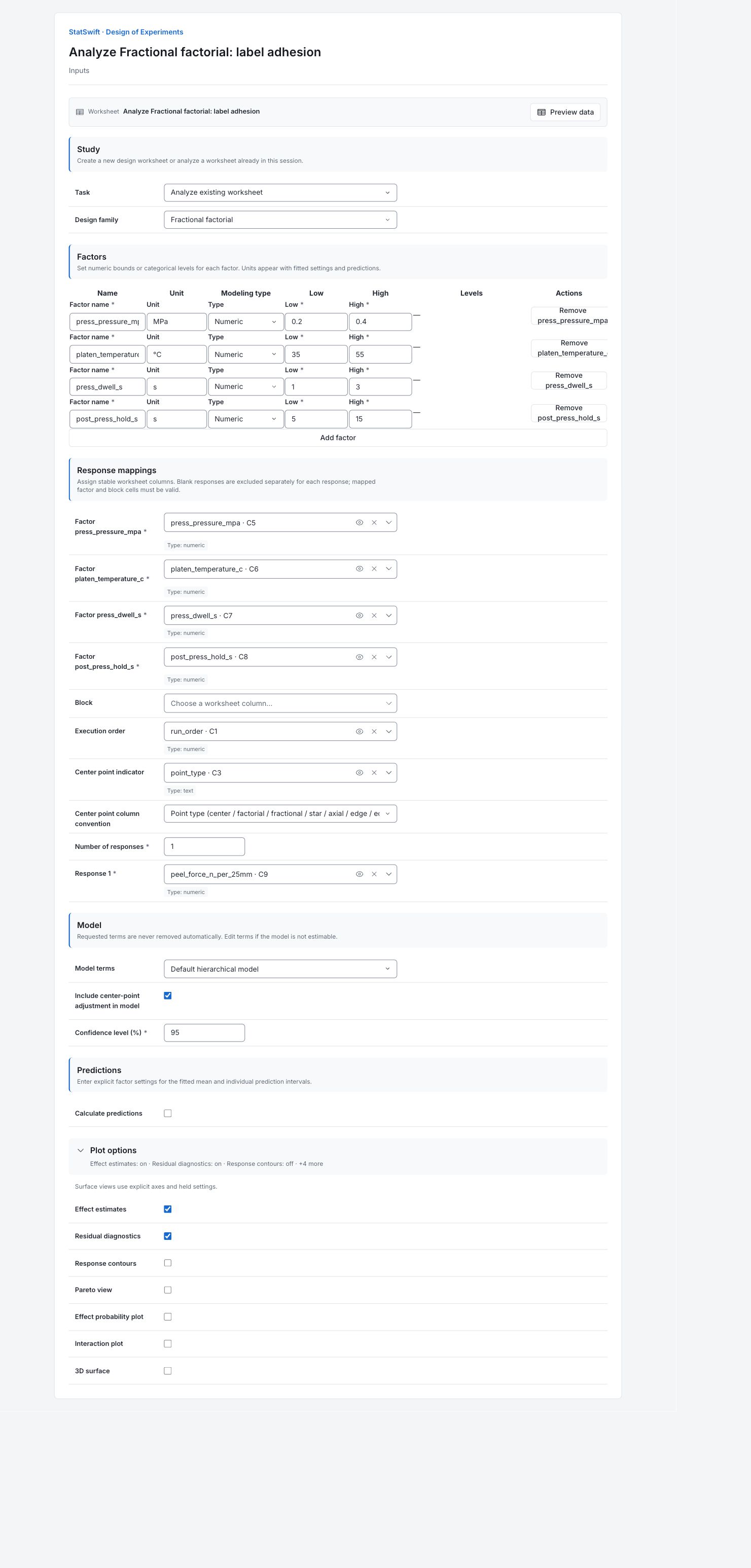
On Inputs, choose Analyze existing worksheet for Task and Fractional factorial for Design family.
Under Factors, use Add factor or remove a row until there are 4 factors. Keep this order and set Type to Numeric for each factor.
Enter the Factor name, Unit, Low and High values below.
| Factor | Factor name | Unit | Low | High |
|---|---|---|---|---|
| A | press_pressure_mpa | MPa | 0.2 | 0.4 |
| B | platen_temperature_c | °C | 35 | 55 |
| C | press_dwell_s | s | 1 | 3 |
| D | post_press_hold_s | s | 5 | 15 |
4. Assign the input columns
Under Response mappings, open each column picker and select the matching worksheet column.
| Worksheet column | Input field |
|---|---|
press_pressure_mpa | Factor press_pressure_mpa |
platen_temperature_c | Factor platen_temperature_c |
press_dwell_s | Factor press_dwell_s |
post_press_hold_s | Factor post_press_hold_s |
Assign peel_force_n_per_25mm to Response 1 and enter 1 in Number of responses. Assign run_order to Execution order and point_type to Center point indicator. For Center point column convention, choose Point type (center / factorial / fractional / star / axial / edge / edge_midpoint).
Leave Block unassigned; this recorded study is unblocked.
5. Set the model and plots
Under Model, choose Default hierarchical model for Model terms and enter 95 in Confidence level (%). Check Include center-point adjustment in model. Leave Calculate predictions unchecked.
Open Plot options. Check Effect estimates and Residual diagnostics. Leave Response contours unchecked. Leave Pareto view, Effect probability plot, Interaction plot and 3D surface unchecked.
6. Analyze worksheet
Choose Analyze worksheet, then open Results. This fits the recorded measurements; it does not generate or randomize a new run plan.
7. Interpret results
Start with the recorded runs
All 19 runs are included: eight half-fraction settings repeated twice, plus three center runs. The reduced plan cannot separate some effects: pressure × temperature is aliased with dwell × hold, meaning the same contrast could reflect either. This design is called resolution IV; main effects also share with three-factor interactions.
Check the lack of fit first
Lack of Fit has p = 0.0000169. The main-effect model misses a pattern beyond the variation seen in repeated runs. Investigate that pattern before relying on its effects or predictions. The center adjustment has p = 0.6678; that result does not cancel the detected lack of fit.
Read the effects with that limit in mind
The fitted high-minus-low effects are about +3.10 N per 25 mm for pressure, +2.41 for temperature, +1.25 for dwell and +0.70 for hold. The hold interval includes zero. These estimates come from the model with detected lack of fit. Main effects also share with three-factor interactions; repetition does not separate those effects.

Fitted high-minus-low effects with 95% confidence intervals. View full-size chart (opens in a new tab) Read a residual
A residual is the measured response minus the fitted value. Run 8 measured 16.50 N per 25 mm; the model fitted 15.36, leaving about +1.14 unexplained. This is the largest absolute raw residual. Look for curves, changing spread or unusual points.

Residuals in N per 25 mm against the fitted response. View full-size chart (opens in a new tab) Check the run sequence
Read the residuals in recorded execution order. Look for drift, cycles or an abrupt change, then check the corresponding experiment records. Keep unusual runs while investigating; a large residual alone is not a reason to delete a measurement.

Residuals in N per 25 mm in recorded execution order. View full-size chart (opens in a new tab) Plan what would resolve the uncertainty
The pairs below cannot be separated by repeating this same fraction. Use the matching fractional-design guide and plan additional settings if an individual interaction matters. Resolve the detected lack of fit before relying on predictions.
Interaction Aliased interaction Pressure × temperature Dwell × hold Pressure × dwell Temperature × hold Pressure × hold Temperature × dwell
More details: read each result section
Complete result tables use six significant digits, as in Help.
Model overview
Analyzed runs is 19; Missing runs is 0. DF counts the information available for the model and residual error. S is the residual standard deviation in N per 25 mm. R² describes variation fitted in these runs; adjusted R² accounts for model size. PRESS and predicted R² use leave-one-out prediction errors. A high R² does not establish model adequacy. Read the lack-of-fit test and residual plots.
| Statistic | Value |
|---|---|
| Response | peel_force_n_per_25mm |
| Analyzed runs | 19 |
| Missing responses | 0 |
| Model rank | 6 |
| Residual degrees of freedom | 13 |
| S | 0.881696 |
| R² | 0.873855 |
| Adjusted R² | 0.825338 |
| PRESS | 21.4293 |
| Predicted R² | 0.732517 |
| Confidence level | 0.95 |
| Lack of fit available | Yes |
Adjusted term ANOVA
Source names the model term or error component. Type distinguishes adjusted term tests from totals and error decomposition. DF is degrees of freedom; SS is sum of squares; MS is SS divided by DF. F compares variation with its error estimate; p-value measures evidence against the tested null assumption. Read Lack of Fit before relying on individual effects. A dash means a statistic is not applicable.
| Source | Type | DF | SS | MS | F | p-value |
|---|---|---|---|---|---|---|
| press_pressure_mpa | adjusted | 1 | 38.5331 | 38.5331 | 49.5674 | 0.00000879518 |
| platen_temperature_c | adjusted | 1 | 23.1602 | 23.1602 | 29.7923 | 0.000109671 |
| press_dwell_s | adjusted | 1 | 6.21256 | 6.21256 | 7.99158 | 0.0142741 |
| post_press_hold_s | adjusted | 1 | 1.95301 | 1.95301 | 2.51227 | 0.136978 |
| Center point | adjusted | 1 | 0.149842 | 0.149842 | 0.192751 | 0.667846 |
| Model | summary | 5 | 70.0086 | 14.0017 | 18.0113 | 0.0000194994 |
| Error | summary | 13 | 10.106 | 0.777387 | — | — |
| Total | summary | 18 | 80.1147 | 4.45081 | — | — |
| Pure Error | decomposition | 10 | 0.926817 | 0.0926817 | — | — |
| Lack of Fit | decomposition | 3 | 9.17922 | 3.05974 | 33.0134 | 0.0000168766 |
Coefficients
Term names a coded model term. Estimate is its fitted coefficient; SE measures uncertainty; t and p-value test a zero coefficient. CI low and CI high bound its 95% interval. Numeric low, midpoint and high settings are coded −1, 0 and +1. With interactions or squares, a main coefficient does not describe the change at every setting.
| Term | Estimate | SE | t | p-value | CI low | CI high |
|---|---|---|---|---|---|---|
| Intercept | 11.6369 | 0.220424 | 52.7932 | 1.48418e-16 | 11.1607 | 12.1131 |
| press_pressure_mpa | 1.55188 | 0.220424 | 7.04041 | 0.00000879518 | 1.07568 | 2.02807 |
| platen_temperature_c | 1.20313 | 0.220424 | 5.45823 | 0.000109671 | 0.726928 | 1.67932 |
| press_dwell_s | 0.623125 | 0.220424 | 2.82694 | 0.0142741 | 0.146928 | 1.09932 |
| post_press_hold_s | 0.349375 | 0.220424 | 1.58501 | 0.136978 | -0.126822 | 0.825572 |
| Center point | -0.243542 | 0.554721 | -0.439034 | 0.667846 | -1.44194 | 0.954861 |
Coefficient covariance
Read each row and column term together. Diagonal entries are the squared standard errors of the fitted coefficients. Off-diagonal entries describe shared estimation uncertainty. This matrix concerns model coefficients, not correlations between the measured factor columns.
| Column | Intercept | press_pressure_mpa | platen_temperature_c | press_dwell_s | post_press_hold_s | Center point |
|---|---|---|---|---|---|---|
| Intercept | 0.0485867 | 1.07884e-16 | 0 | -1.56752e-17 | 0 | -0.0485867 |
| press_pressure_mpa | 1.07884e-16 | 0.0485867 | -8.7234e-19 | -6.98991e-18 | -9.36289e-19 | -5.65637e-16 |
| platen_temperature_c | 0 | -8.76763e-19 | 0.0485867 | -6.68948e-18 | -3.78291e-18 | -7.39969e-20 |
| press_dwell_s | -1.56752e-17 | -6.83617e-18 | -6.68777e-18 | 0.0485867 | 2.57574e-18 | 8.36583e-17 |
| post_press_hold_s | 0 | -9.36289e-19 | -6.48001e-18 | 2.57574e-18 | 0.0485867 | 9.27176e-20 |
| Center point | -0.0485867 | -5.65637e-16 | -7.39969e-20 | 8.36583e-17 | 9.27176e-20 | 0.307716 |
Factorial effects
Effect is the fitted high-minus-low contrast. SE measures uncertainty, and CI low and CI high give its 95% interval. Standardized effect is the absolute effect divided by its SE. An interaction means a factor’s effect changes with another setting. In this half fraction, main effects share with three-factor interactions and paired two-factor interactions cannot be separated. Detected lack of fit also qualifies these estimates.
| Term | Effect | SE | CI low | CI high | Standardized effect |
|---|---|---|---|---|---|
| press_pressure_mpa | 3.10375 | 0.440848 | 2.15136 | 4.05614 | 7.04041 |
| platen_temperature_c | 2.40625 | 0.440848 | 1.45386 | 3.35864 | 5.45823 |
| press_dwell_s | 1.24625 | 0.440848 | 0.293856 | 2.19864 | 2.82694 |
| post_press_hold_s | 0.69875 | 0.440848 | -0.253644 | 1.65114 | 1.58501 |
Row diagnostics
Row ID identifies the worksheet row; Run order locates it in the experiment sequence. Status states whether it was analyzed. Observed is the measurement; Fit is the model value; Residual is Observed minus Fit. Standardized residual adjusts for residual variation and leverage. Leverage measures how unusual the model inputs are. All recorded rows are shown. Investigate an unusual row before changing or excluding it.
| Row ID | Run order | Status | Observed | Fit | Residual | Standardized residual | Leverage |
|---|---|---|---|---|---|---|---|
| help-doe-fractional-factorial-analysis-1 | 1 | Analyzed | 10.41 | 9.85438 | 0.555625 | 0.760023 | 0.3125 |
| help-doe-fractional-factorial-analysis-2 | 2 | Analyzed | 10.59 | 11.7119 | -1.12188 | -1.53458 | 0.3125 |
| help-doe-fractional-factorial-analysis-3 | 3 | Analyzed | 11.18 | 11.3933 | -0.213333 | -0.296337 | 0.333333 |
| help-doe-fractional-factorial-analysis-4 | 4 | Analyzed | 11.58 | 12.2594 | -0.679375 | -0.929297 | 0.3125 |
| help-doe-fractional-factorial-analysis-5 | 5 | Analyzed | 11.88 | 11.3933 | 0.486667 | 0.676018 | 0.333333 |
| help-doe-fractional-factorial-analysis-6 | 6 | Analyzed | 14.06 | 13.4194 | 0.640625 | 0.876292 | 0.3125 |
| help-doe-fractional-factorial-analysis-7 | 7 | Analyzed | 11.47 | 12.2594 | -0.789375 | -1.07976 | 0.3125 |
| help-doe-fractional-factorial-analysis-8 | 8 | Analyzed | 16.5 | 15.3644 | 1.13562 | 1.55339 | 0.3125 |
| help-doe-fractional-factorial-analysis-9 | 9 | Analyzed | 10.25 | 11.0144 | -0.764375 | -1.04557 | 0.3125 |
| help-doe-fractional-factorial-analysis-10 | 10 | Analyzed | 14.06 | 13.4194 | 0.640625 | 0.876292 | 0.3125 |
| help-doe-fractional-factorial-analysis-11 | 11 | Analyzed | 15.96 | 15.3644 | 0.595625 | 0.814738 | 0.3125 |
| help-doe-fractional-factorial-analysis-12 | 12 | Analyzed | 8.51 | 7.90938 | 0.600625 | 0.821577 | 0.3125 |
| help-doe-fractional-factorial-analysis-13 | 13 | Analyzed | 10.88 | 11.5619 | -0.681875 | -0.932717 | 0.3125 |
| help-doe-fractional-factorial-analysis-14 | 14 | Analyzed | 10.31 | 11.0144 | -0.704375 | -0.963494 | 0.3125 |
| help-doe-fractional-factorial-analysis-15 | 15 | Analyzed | 10.7 | 11.5619 | -0.861875 | -1.17893 | 0.3125 |
| help-doe-fractional-factorial-analysis-16 | 16 | Analyzed | 10.58 | 9.85438 | 0.725625 | 0.992561 | 0.3125 |
| help-doe-fractional-factorial-analysis-17 | 17 | Analyzed | 11.12 | 11.3933 | -0.273333 | -0.379682 | 0.333333 |
| help-doe-fractional-factorial-analysis-18 | 18 | Analyzed | 9.04 | 7.90938 | 1.13062 | 1.54655 | 0.3125 |
| help-doe-fractional-factorial-analysis-19 | 19 | Analyzed | 11.29 | 11.7119 | -0.421875 | -0.57707 | 0.3125 |
Factor coding
Factor names the input and Type its modeling type. Center and Scale translate numeric settings to coded values: (setting − center) / scale. Thus the midpoint is 0 and the entered low/high bounds are −1/+1. Levels / contrasts applies to categorical coding; a dash is not a missing numeric measurement. Keep the model-column, block and rank notes with this table.
| Factor | Type | Center | Scale | Levels / contrasts |
|---|---|---|---|---|
| press_pressure_mpa | numeric | 0.3 | 0.1 | — |
| platen_temperature_c | numeric | 45 | 10 | — |
| press_dwell_s | numeric | 2 | 1 | — |
| post_press_hold_s | numeric | 10 | 5 | — |
- Model columns: Intercept, press_pressure_mpa, platen_temperature_c, press_dwell_s, post_press_hold_s, Center point
- Rank tolerance: 1e-10
8. Create a report
Keep Model overview, Adjusted term ANOVA, Coefficients, Coefficient covariance, Row diagnostics and Factor coding, plus the Factorial effects table and effects and residual plots. Include the response units, factor settings, recorded run order and all model notes. State the detected lack of fit when sharing conclusions or predictions.
Choose Add to report from the completed run. Open Choose individual items and advanced options to select tables and charts, then choose Add to draft. Hidden items stay in the saved analysis.
Name the report and add the purpose of the study and your interpretation. Choose Save, review Preview, then use Export → Download HTML. The example below contains the full selected content, including results beyond one screen.