

Example: first-scan label readability
300 different cartons under standard printer settings: 282 labels readable on the first scan.
Download the reference counts (CSV)This is the same example used in Help. The CSV records reference counts for manual entry on Inputs; importing it does not configure the calculator. Use Open example in a practice copy in Help to prefill the counts.
1. Create the workspace
In the sidebar, open Basic Statistics and choose Proportions. Create an analysis, name it, select New blank worksheet, then choose Create analysis.
2. Enter the counts
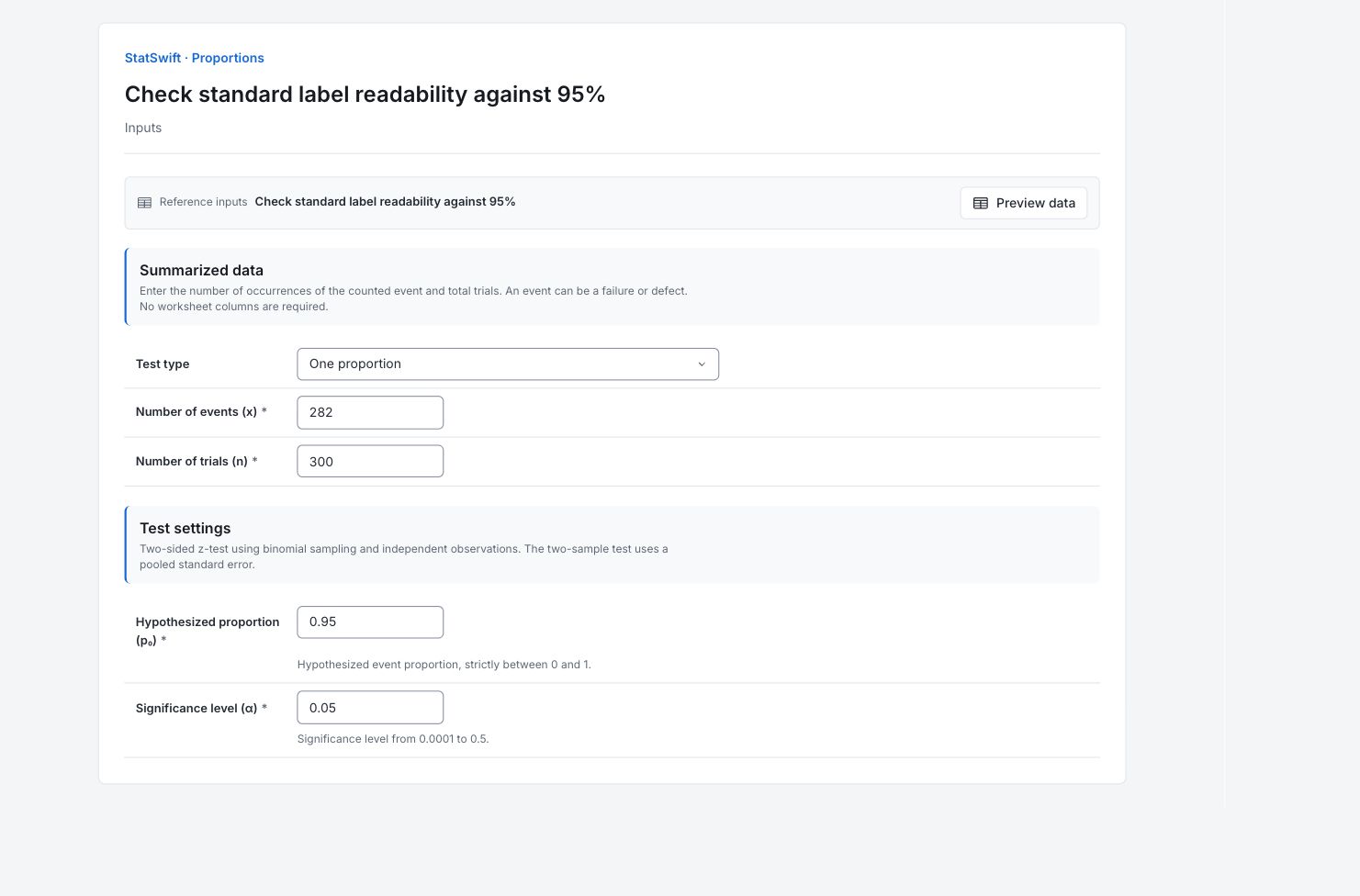
On Inputs, choose One proportion for Test type. Enter 282 in Number of events (x) and 300 in Number of trials (n). Enter 0.95 in Hypothesized proportion (p₀). Here an event means readable on the first scan, not an unreadable label. Enter whole counts; no worksheet columns are assigned.
3. Set the test
Enter 0.05 in Significance level (α). The test is two-sided. This run tests the readability proportion against 95%.
4. Run analysis
Choose Run analysis, then open Results.
5. Interpret results
Define the counted event
An event is a label readable on the first scan. Trials count different inspected cartons. This comparison uses only the standard-setting sample: 300 cartons.
Read the proportions
282 of 300 labels were readable: 94%. The sample is one percentage point below the 95% benchmark. That observed difference alone does not settle the population comparison.
Read the test
The two-sided p-value is 0.4268. This study does not establish a difference from 95% at the 5% level. It also does not certify that the 95% requirement has been met.
Decide how to use the result
Compare the estimated readability with the operational requirement and the cost of unreadable labels. Check sampling and scan conditions before attributing a change to printer settings.
More details: read each result section
Complete result tables use six significant digits, as in Help.
One-proportion z-test
z statistic standardizes the proportion comparison; p-value tests the stated null using the normal approximation. Alpha is 0.05 and Alternative two-sided. Sample proportions are fractions from the entered counts. Null proportion is the 0.95 benchmark; the z statistic is negative because the observed proportion is lower.
| Statistic | Value |
|---|---|
| z statistic | -0.794719 |
| p-value | 0.426777 |
| Alpha | 0.05 |
| Alternative | Two-sided |
| Null proportion (p₀) | 0.95 |
| Sample 1 proportion | 0.94 |
- No significant difference from 0.95 (p=0.427)
Summary counts
Successes count labels readable on the first scan; Trials count all inspected cartons in that sample. These are whole counts, not percentages. The samples use different cartons; no pairing or worksheet-column mapping is involved.
| Sample | Successes | Trials |
|---|---|---|
| Sample | 282 | 300 |
6. Create a report
Keep the complete One-proportion z-test and Summary counts, event definition and sample identities. State that a non-significant difference does not certify a benchmark.
Choose Add to report from the completed run. Open Choose individual items and advanced options to select tables and charts, then choose Add to draft. Hidden items stay in the saved analysis.
Name the report and add the purpose of the study and your interpretation. Choose Save, review Preview, then use Export → Download HTML. The example below contains the full selected content, including results beyond one screen.