

Example: drying batches
The example records 72 drying batches with mass, inlet moisture, ambient temperature and electricity measurements. Mass is in kg, moisture is wet-basis percent, temperature is in °C and electricity is in kWh.
Download the example data (CSV)This is the same example used in Help. The CSV contains the observations to import.
1. Create the analysis
In the sidebar, open Plots and create an analysis. Name it, select New blank worksheet, then choose Create analysis.
2. Import the data
On Worksheet, choose Import. Select the downloaded CSV or paste its contents. Set the delimiter to Comma, use Decimal dot, and check First row contains column names. Preview the import, then choose Import into worksheet.
3. Assign the input columns
On Inputs, choose Correlation matrix / heatmap in Chart type. Open the column picker for Variables.
Select batch_mass_kg, inlet_moisture_pct, ambient_temperature_c and electricity_kwh, in that order. Use the up and down arrows to correct the order if needed. Leave batch_id unselected.
4. Set the chart options
In Statistics, choose Pearson for Correlation method. The calculation uses rows that are complete across all four selected variables.
Open Labels and enter Summarize drying-variable relationships in Chart title.
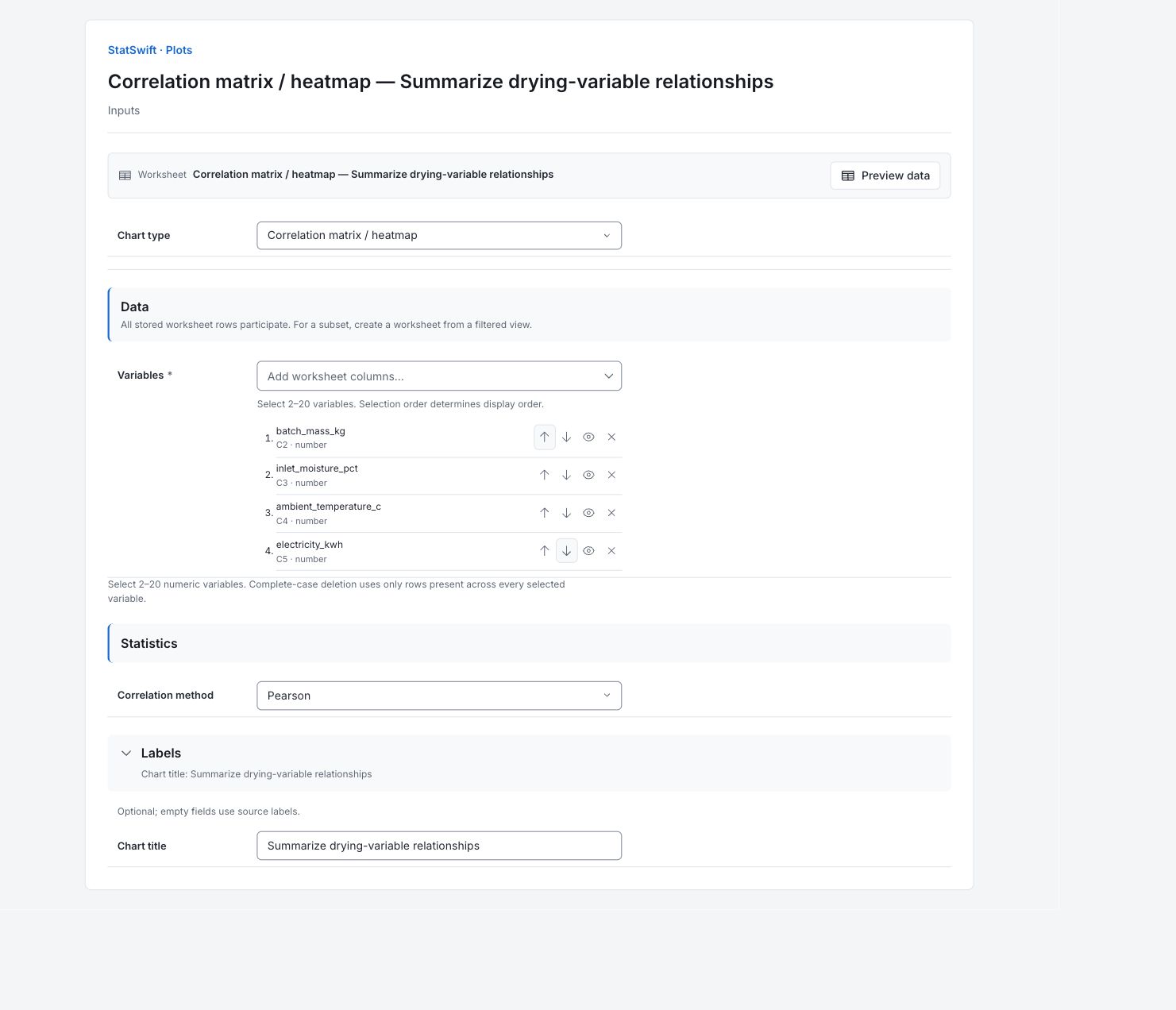
5. Create chart
Choose Create chart, then open Results. Check Data used before comparing the chart with this guide. All stored worksheet rows participate; sorting or filtering the worksheet does not change the analytical sample.
6. Interpret results
Read a coefficient
Find the intersection of two variables. A Pearson coefficient ranges from −1 to +1: the sign gives direction, and values nearer either end show a stronger linear association. The diagonal is 1, and the two halves repeat the same pairs.
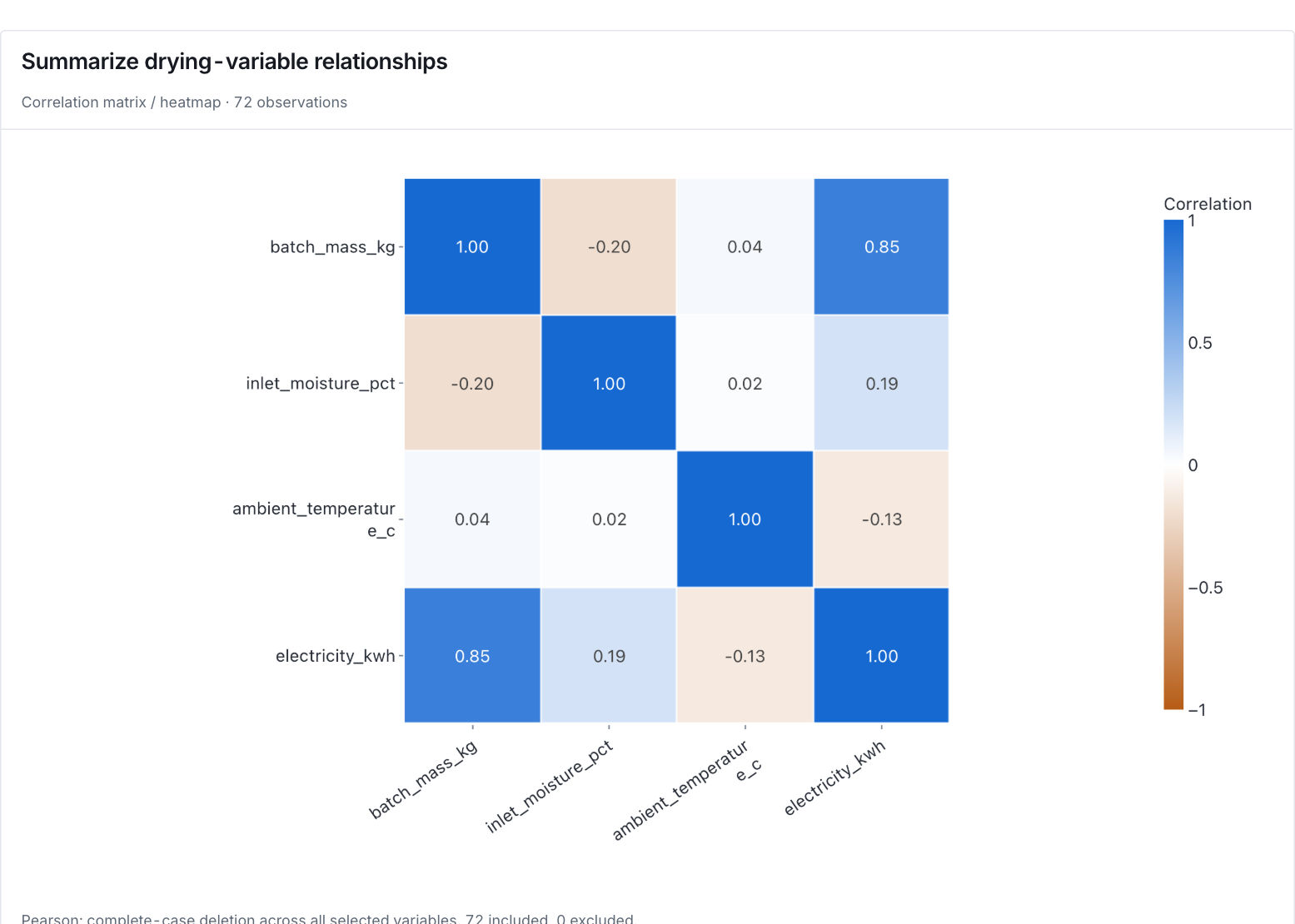
Pearson correlations for four measurements across the same 72 complete drying batches. View full-size chart (opens in a new tab) Compare electricity relationships
Mass and electricity have the strongest observed pairwise association here, r≈0.85. Electricity has weaker correlations with inlet moisture, about +0.19, and ambient temperature, about −0.13. All coefficients use the same 72 complete batches; the table retains full displayed precision.
Check the shape too
A small coefficient can hide a curved pattern. These are separate pairwise correlations; a weak one does not show that the variable is unimportant when several predictors are considered together.
Choose the next analysis
Inspect the scatterplot matrix and check batch records for unusual combinations. Use Regression to consider the predictors together. Correlation alone does not establish a cause.
More details: read each result section
Complete result tables use six significant digits, as in Help.
Data used
Worksheet rows is 72; Eligible observations across series is 72; Excluded observations is 0. All source rows are used. Check these counts and keep the example’s column assignments when comparing runs. Worksheet sorting and filters do not change the analytical sample.
All stored rows are considered in original order. Worksheet sorting and filters do not change the analytical sample.
| Worksheet rows | Eligible observations across series | Excluded observations |
|---|---|---|
| 72 | 72 | 0 |
Pearson coefficients
Read the coefficient where a row variable meets a column variable. All pairs use the same 72 complete batches. The diagonal is 1 and opposite halves repeat the same pairs. Coefficients describe separate linear associations; they do not adjust for other predictors.
| Variable | batch_mass_kg | inlet_moisture_pct | ambient_temperature_c | electricity_kwh |
|---|---|---|---|---|
| batch_mass_kg | 1 | -0.201984 | 0.0442099 | 0.850257 |
| inlet_moisture_pct | -0.201984 | 1 | 0.0201252 | 0.190834 |
| ambient_temperature_c | 0.0442099 | 0.0201252 | 1 | -0.134981 |
| electricity_kwh | 0.850257 | 0.190834 | -0.134981 | 1 |
Complete observations
Each row gives its original Worksheet row and all four aligned measurements. Units are kg, wet-basis percent, °C and kWh. These 72 complete rows form the shared sample. Keep all columns together when checking an unusual batch.
| Worksheet row | batch_mass_kg | inlet_moisture_pct | ambient_temperature_c | electricity_kwh |
|---|---|---|---|---|
| 1 | 99.8 | 9.6 | 15.4 | 73.02 |
| 2 | 188.3 | 11.45 | 16.2 | 109.31 |
| 3 | 97.4 | 12.19 | 24.9 | 76.87 |
| 4 | 111.3 | 8.46 | 21.1 | 77.35 |
| 5 | 217.1 | 6.35 | 26.1 | 98.12 |
| 6 | 132.1 | 13.29 | 18.5 | 87.75 |
| 7 | 84.1 | 7.84 | 22 | 70.39 |
| 8 | 187.9 | 9.98 | 17.2 | 113.74 |
| 9 | 98.9 | 10.49 | 21.4 | 75.35 |
| 10 | 187.3 | 7.79 | 18.3 | 106.9 |
| 11 | 185.4 | 8.02 | 21.3 | 99.69 |
| 12 | 208.5 | 9.37 | 27.7 | 104.56 |
| 13 | 157.9 | 10.88 | 22.6 | 95.97 |
| 14 | 109.4 | 12.37 | 18.4 | 78.58 |
| 15 | 141 | 8.96 | 27.9 | 70.91 |
| 16 | 92.1 | 11.93 | 15.2 | 83.65 |
| 17 | 135.5 | 11.12 | 26.2 | 78.93 |
| 18 | 136.1 | 13.47 | 23.1 | 95.62 |
| 19 | 165.8 | 8.89 | 25.4 | 86.15 |
| 20 | 147.3 | 13.34 | 27.3 | 92.84 |
| 21 | 203.4 | 10.5 | 15.2 | 108.69 |
| 22 | 174.1 | 6.33 | 17.2 | 88.03 |
| 23 | 134.9 | 12.78 | 16.2 | 103.2 |
| 24 | 97.5 | 8.48 | 24 | 64.03 |
| 25 | 108.4 | 11.21 | 24.8 | 73.39 |
| 26 | 131.8 | 10.79 | 16.6 | 91.5 |
| 27 | 150.5 | 11.83 | 21.9 | 97.24 |
| 28 | 177 | 13.57 | 22.4 | 116.1 |
| 29 | 123.6 | 13.35 | 24.2 | 98.15 |
| 30 | 93.3 | 13.19 | 23.6 | 79.33 |
| 31 | 193.5 | 12.51 | 21.4 | 111.51 |
| 32 | 116.2 | 9.92 | 18.5 | 80.12 |
| 33 | 162.2 | 11.23 | 27.3 | 95.18 |
| 34 | 131.9 | 6.96 | 21.9 | 82.87 |
| 35 | 109 | 12.14 | 22.7 | 84.86 |
| 36 | 80.4 | 11.91 | 26.6 | 61.39 |
| 37 | 123.8 | 9.12 | 16.2 | 84.37 |
| 38 | 165.3 | 7.06 | 27.7 | 79.15 |
| 39 | 80.1 | 6.99 | 16.2 | 64.21 |
| 40 | 104.5 | 11.42 | 23.7 | 75.82 |
| 41 | 94.4 | 12.75 | 26.8 | 84.76 |
| 42 | 88.6 | 7.54 | 22.3 | 55.44 |
| 43 | 123.1 | 7.59 | 25.1 | 65.89 |
| 44 | 206.1 | 8.75 | 25.9 | 107.41 |
| 45 | 135 | 6.85 | 21.5 | 79.37 |
| 46 | 193.5 | 10.55 | 22.6 | 100.21 |
| 47 | 184.6 | 9.9 | 22.3 | 104.05 |
| 48 | 107.9 | 12.45 | 26.9 | 80.17 |
| 49 | 186.8 | 8.23 | 22.9 | 86.27 |
| 50 | 131.5 | 13.39 | 25.6 | 89.52 |
| 51 | 209.5 | 9.41 | 27.3 | 103.99 |
| 52 | 179.8 | 6.64 | 21.8 | 97.26 |
| 53 | 104.7 | 8.48 | 21.1 | 72.93 |
| 54 | 168.1 | 6.05 | 23.5 | 85.16 |
| 55 | 193.4 | 8.19 | 17.8 | 99.42 |
| 56 | 122 | 7.3 | 26.4 | 73.27 |
| 57 | 171.6 | 10.7 | 21.4 | 103.89 |
| 58 | 110.5 | 10.63 | 21.3 | 83.06 |
| 59 | 200.1 | 9.12 | 25 | 109.7 |
| 60 | 147.4 | 11.72 | 18.7 | 89.14 |
| 61 | 148.3 | 10.9 | 25.5 | 93.93 |
| 62 | 118.7 | 7.83 | 24.5 | 70.1 |
| 63 | 107.8 | 12.35 | 27.2 | 80.28 |
| 64 | 107.1 | 13.39 | 20.5 | 79.01 |
| 65 | 103.4 | 9.07 | 20.3 | 72.92 |
| 66 | 175.1 | 10.71 | 19.2 | 98.54 |
| 67 | 83.4 | 12.27 | 20.3 | 67.83 |
| 68 | 192.6 | 11.74 | 25.9 | 102.09 |
| 69 | 207.9 | 8.36 | 25.2 | 106.33 |
| 70 | 208.4 | 12.52 | 21.8 | 112.93 |
| 71 | 91.8 | 10.57 | 26.8 | 66.22 |
| 72 | 176.1 | 10.55 | 19.6 | 107.84 |
7. Create a report
Keep the native chart and Data used, together with Pearson coefficients, Complete observations. Record the column assignments and chart options. Include the study context and any checks of unusual observations. Keep the chart’s units and the limitations described in the walkthrough.
Choose Add to report from the completed run. Open Choose individual items and advanced options to select tables and charts, then choose Add to draft. Hidden items stay in the saved analysis.
Name the report and add the purpose of the study and your interpretation. Choose Save, review Preview, then use Export → Download HTML. The example below contains the full selected content, including results beyond one screen.