

Example: spacer thickness
Three operators each measure the same 10 metal spacers twice with one ratchet micrometer. Each spacer is removed and repositioned before its next reading. The study has 60 measurements.
Download the spacer thickness example (CSV)This is the same example used in Help. part_id identifies each spacer, operator_id identifies its operator, trial identifies the round, and thickness_mm contains the readings in mm.
1. Create the analysis
In the sidebar, open Measurement systems, choose GRR (Average & Range), and name the analysis. Select New blank worksheet and Create analysis.
2. Import the data
On Worksheet, choose Import. Select the downloaded file or paste its contents. Set the delimiter to Comma, use Decimal dot, and check First row contains column names. Preview the import, then choose Import into worksheet. Keep all rows in their original order.
3. Assign the input columns
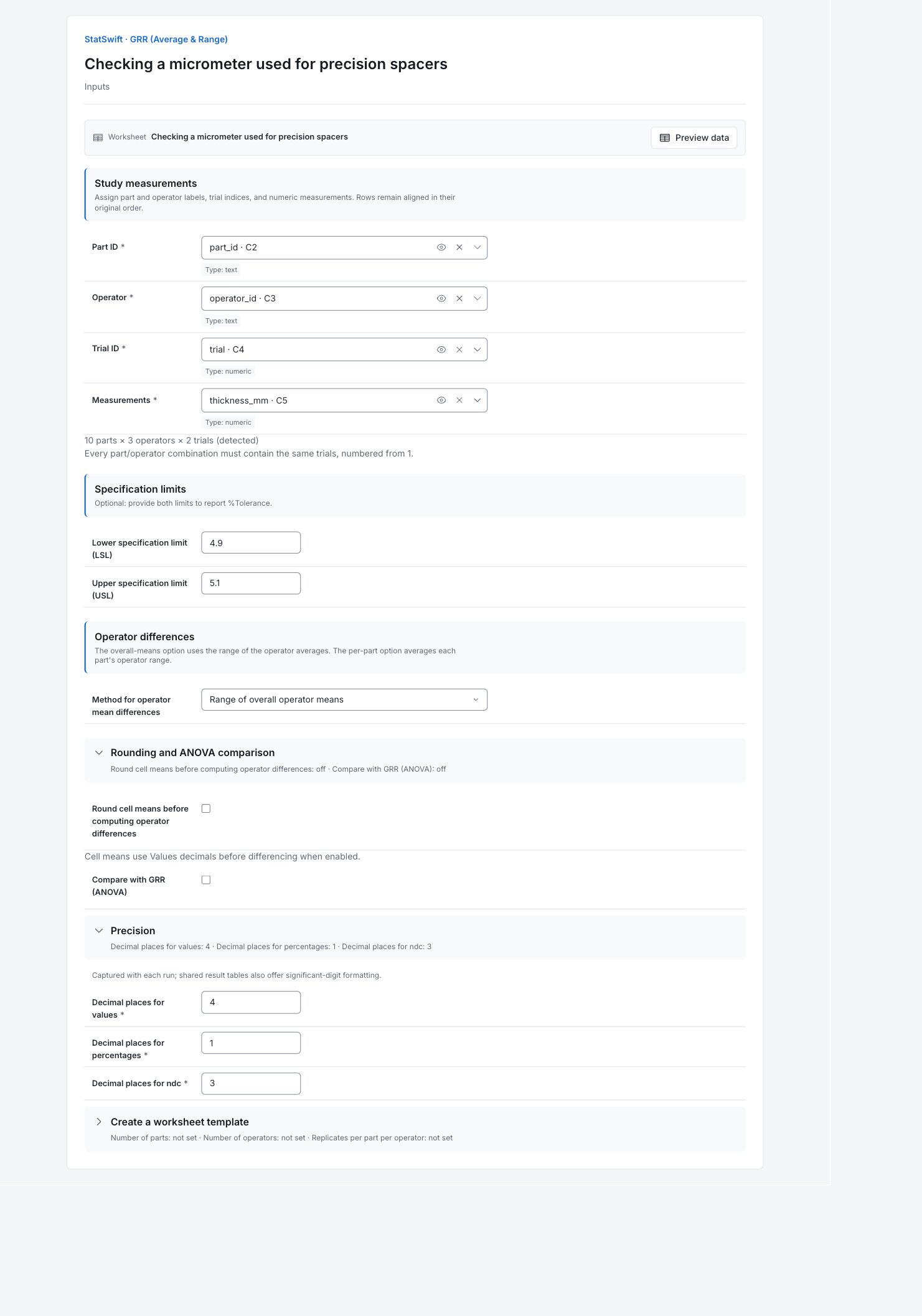
On Inputs, assign part_id to Part ID, operator_id to Operator, trial to Trial ID, and thickness_mm to Measurements, selecting each from the column picker.
Check that the app detects 10 parts × 3 operators × 2 trials. Each part must have both trials from each operator.
4. Set the study options
Enter 4.900 in Lower specification limit (LSL) and 5.100 in Upper specification limit (USL). In Method for operator mean differences, choose Range of overall operator means.
Open Rounding and ANOVA comparison. Leave Round cell means before computing operator differences and Compare with GRR (ANOVA) unchecked.
Open Precision. Enter 4 in Decimal places for values, 1 in Decimal places for percentages, and 3 in Decimal places for ndc. You do not need Create a worksheet template for this imported study.
5. Run analysis
Choose Run analysis, then open Results.
6. Interpret results
Understand the study
Each operator measures every spacer twice. The method uses the gap between repeated readings to estimate repeatability, then compares operator averages to estimate the operator component.
Separate the sources of scatter
EV≈0.002275 mm describes repeatability; AV≈0.001677 mm is the operator component. Together they give GRR≈0.002826 mm. These are standard deviations. Website tables use six significant digits; the native report uses the configured four decimal places and therefore looks more rounded.
Compare spread with the tolerance
The six-sigma GRR spread uses 8.5% of the 0.200 mm specification width. GRR is also 6.7% of total study variation. Neither value is a reject rate. They compare measurement spread with two different widths.
Read the discrimination result
Rounded NDC is 21: the study distinguishes several measurement levels among these spacers. The selected spacers span a wide range, which affects NDC and the study percentage. Part variation is about 127.1% of tolerance.
Choose the next check
Review how the micrometer is seated and used for repeated readings. This method does not estimate operator-by-part interaction. Use a crossed ANOVA study if operator differences seem to depend on the part.
More details: read each result section
Complete result tables use six significant digits, as in Help.
Measurement unit analysis
These components are standard deviations in mm. EV≈0.002275 is repeatability, AV≈0.001677 is the operator component, and GRR≈0.002826 combines them by root-sum-of-squares. This website table uses six significant digits. The captured native report uses the configured four decimal places; do not recompute components from its rounded entries.
| Component | Formula | Std dev (SD) |
|---|---|---|
| EV | R̄ × K₁ | 0.00227465 |
| AV | √max(0, (X̄_diff × K₂)² − EV²/(n × r)) | 0.00167707 |
| GRR | √(EV² + AV²) | 0.00282606 |
| PV | R_p × K₃ | 0.0423607 |
| TV | √(GRR² + PV²) | 0.0424548 |
- %GRR = 6.7%, ndc = 21 → acceptable
- Components are standard deviations; study variation is 6 × SD.
Percent of total variation and tolerance
GRR is approximately 6.7% of study variation and 8.5% of the 0.200 mm tolerance. These are SD/study-width ratios, not variance contributions. Part variation is about 127.1% of tolerance because the selected parts span a broad range; this alone is not a reject-rate estimate.
| Component | %StudyVar | %Tolerance |
|---|---|---|
| EV | 5.35781 | 6.82394 |
| AV | 3.95025 | 5.03122 |
| GRR | 6.65662 | 8.47817 |
| PV | 99.7782 | 127.082 |
| TV | 100 | 127.364 |
- %Tolerance = 100 × 6 × component SD / specification width.
Number of distinct categories
NDC is about 21.135, displayed as 21 after rounding. The app’s assessment labels this study acceptable under its reporting rule, but NDC and the percentage depend on the selected parts and do not establish performance for every future study.
| Metric | Value |
|---|---|
| NDC | 21.1349 |
| NDC (rounded) | 21 |
Intermediates
Average within-cell range is about 0.002567 mm and the automatic operator mean difference is 0.00335 mm. The automatic pair compares the smallest and largest overall operator means. Preserve the default pair and precision settings to reproduce the displayed values.
| Metric | Value |
|---|---|
| R̄ | 0.00256667 |
| X̄_diff | 0.00335 |
| R_p | 0.134667 |
Constants used
These constants convert the observed ranges into SD estimates for the detected 10-part, three-operator, two-trial design. Retain the app’s convention when reproducing the result.
| Constant | m | Requested g | Lookup column | Approximation | d₂ | Value |
|---|---|---|---|---|---|---|
| K1 | 2 | 30 | ∞ | Yes | 1.12838 | 0.886226 |
| K2 | 3 | 1 | 1 | No | 1.91155 | 0.523136 |
| K3 | 10 | 1 | 1 | No | 3.17905 | 0.314559 |
Constant conventions
Constants convert observed ranges into SD estimates for this study. K₁ uses the standard large-group d₂ value for pairs of repeat readings. The operator comparison uses the lowest and highest overall means, not a user-selected pair.
Original lookup notes: K₁ requested g=30; used standard d2 (∞ column) for m=2. X̄_diff auto pair used: op_min_idx=3, op_max_idx=2 (by overall mean).
7. Create a report
Keep Measurement unit analysis, Percent of total variation and tolerance, Number of distinct categories, Intermediates and Constants used. Record the 0.200 mm specification width and the operator-difference method. This method does not estimate operator-by-part interaction.
Choose Add to report from the completed run. Open Choose individual items and advanced options to select tables and charts, then choose Add to draft. Hidden items stay in the saved analysis.
Name the report and add the purpose of the study and your interpretation. Choose Save, review Preview, then use Export → Download HTML. The example below contains the full selected content, including results beyond one screen.