

Example: pressure indicator
One technician applies a 250.00 kPa reference pressure and records the indicator reading on 40 separate occasions during one controlled session.
Download the pressure-indicator example (CSV)This is the same example used in Help. measured_pressure_kpa contains the indicator readings. reference_kpa records the reference pressure for context; enter that fixed value separately on Inputs.
1. Create the analysis
In the sidebar, open Measurement systems, choose Bias, and name the analysis. Select New blank worksheet and Create analysis.
2. Import the data
On Worksheet, choose Import. Select the downloaded file or paste its contents. Set the delimiter to Comma, use Decimal dot, and check First row contains column names. Preview the import, then choose Import into worksheet. Keep every reading.
3. Assign the input column
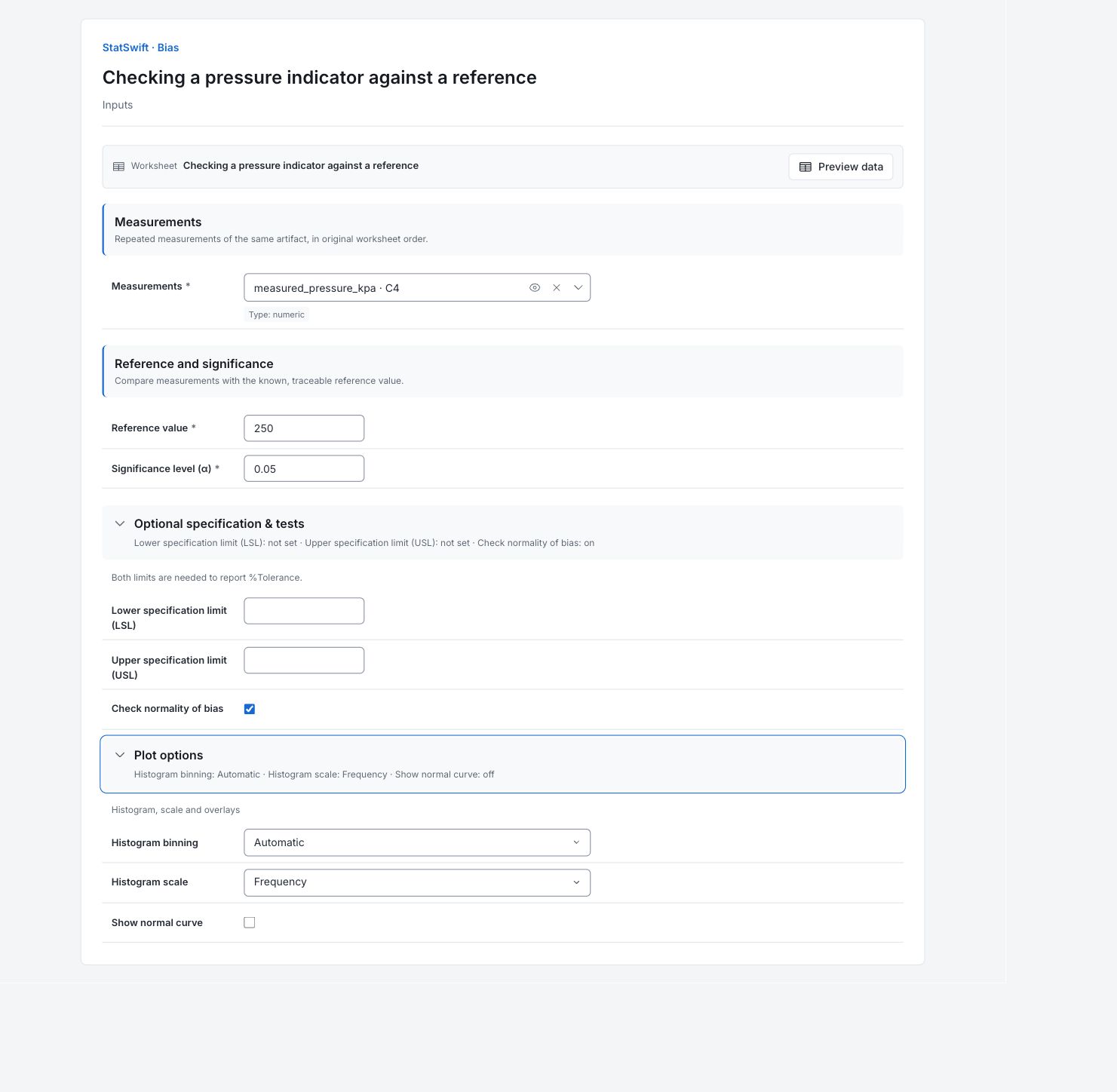
On Inputs, assign measured_pressure_kpa to Measurements, selecting it from the column picker.
4. Set the reference and options
Enter 250.00 in Reference value and 0.05 in Significance level (α). The pressure values use kPa.
Open Optional specification & tests. Leave Lower specification limit (LSL) and Upper specification limit (USL) blank. Leave Check normality of bias checked.
Open Plot options. Set Histogram binning to Automatic and Histogram scale to Frequency. Leave Show normal curve unchecked.
5. Run analysis
Choose Run analysis, then open Results.
6. Interpret results
Understand bias
Bias is the average reading minus the reference value. Positive bias means the indicator reads high; negative bias means it reads low. This study checks one pressure with one technician.
Compare offset and scatter
The mean reading is 250.1635 kPa, giving a bias of +0.1635 kPa. The histogram shows the 40 reading-minus-reference values. Their standard deviation is about 0.08075 kPa: the readings scatter, but their average is also shifted above zero.

40 bias values in kPa. Each is an indicator reading minus the 250.00 kPa reference. View full-size chart (opens in a new tab) Read the interval
The 95% confidence interval for mean bias is 0.1377–0.1893 kPa. It excludes zero, supporting a positive average offset under these study conditions. This does not define how much error is acceptable.
Read the normality result
The app reports Pass for the normality test. That does not prove normality, independent readings or an accurate reference. The normality p-value is unavailable; its blank value is not zero.
Decide what to check
Compare the offset with the allowable error for the indicator’s intended use. Check the reference, its uncertainty and the measurement conditions before deciding on recalibration or a correction. This study does not establish performance at other pressures.
More details: read each result section
Complete result tables use six significant digits, as in Help.
Bias summary
The mean pressure reading is 250.1635 kPa, a positive bias of 0.1635 kPa relative to 250.00 kPa. Its 95% confidence interval is 0.1377–0.1893 kPa and excludes zero; p ≈ 1.55 × 10⁻¹⁵ provides strong evidence of nonzero bias under this model. Statistical significance does not determine whether the offset is practically acceptable.
| Statistic | Value |
|---|---|
| Measurements (n) | 40 |
| Mean measurement | 250.163 |
| Mean bias | 0.1635 |
| Repeatability SD | 0.0807513 |
| SE(bias) | 0.0127679 |
| t | 12.8056 |
| Degrees of freedom | 39 |
| p-value | 1.55431e-15 |
| Confidence interval lower | 0.137674 |
| Confidence interval upper | 0.189326 |
- Confidence level: 95%.
- Bias is statistically significant; consider recalibration or applying a correction.
Normality of bias
The Anderson–Darling statistic is 0.2589, below the 0.726 critical value at α = 0.05, so the app reports Pass. This does not prove normality, independence or reference accuracy. The method does not return a numerical p-value here; a blank value is not zero.
| Statistic | Value |
|---|---|
| Method | Anderson-Darling |
| Statistic | 0.258906 |
| Alpha (as tested) | 0.05 |
| Critical value | 0.726 |
| p-value | — |
| Result | Pass |
Bias histogram sample summary
The histogram summary describes the 40 captured bias values, each measured pressure minus 250.00 kPa. Its scatter describes repeated-reading variation at this reference pressure.
| Statistic | Value |
|---|---|
| Count | 40 |
| Mean | 0.1635 |
| Standard deviation | 0.0807513 |
7. Create a report
Keep Bias summary, Normality of bias, the bias histogram and Bias histogram sample summary. Record the 250.00 kPa reference, its uncertainty and the measurement conditions. Explain whether the observed offset matters for the indicator’s intended use.
Choose Add to report from the completed run. Open Choose individual items and advanced options to select tables and charts, then choose Add to draft. Hidden items stay in the saved analysis.
Name the report and add the purpose of the study and your interpretation. Choose Save, review Preview, then use Export → Download HTML. The example below contains the full selected content, including results beyond one screen.