

Example: packaging stoppages per operating hour
96 stoppages during 210 operating hours, recorded across 30 non-overlapping periods.
Download the study reference (CSV)This is the same example used in Help. The CSV is a reference for the supplied study. Enter the checked summaries manually on Inputs; importing the CSV does not populate this calculator. Use Open example in a practice copy in Help to prefill the inputs.
1. Create the workspace
In the sidebar, open Basic Statistics and choose Confidence Intervals. Create an analysis, name it, select New blank worksheet, then choose Create analysis.
2. Choose the interval
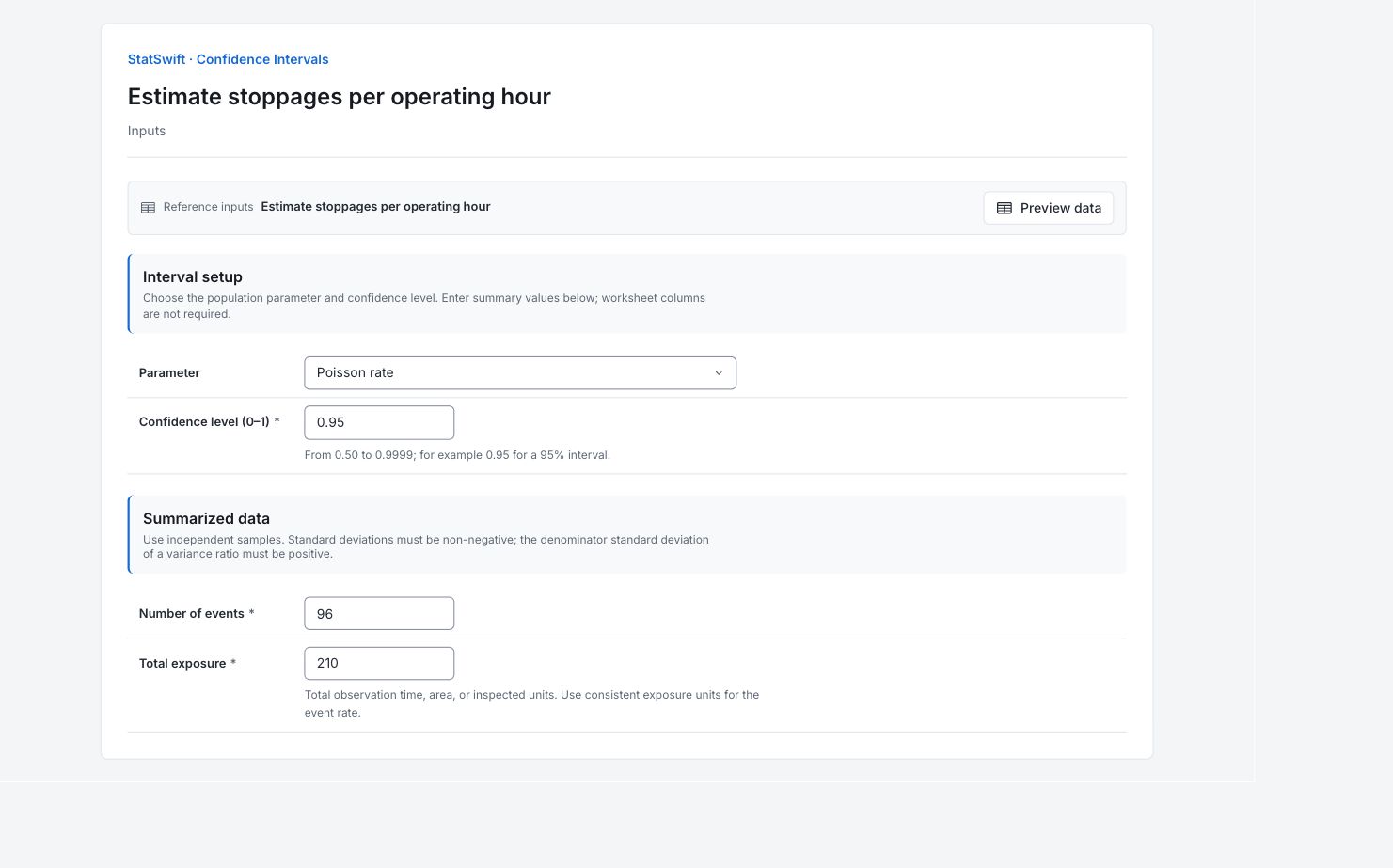
On Inputs, choose Poisson rate for Parameter. Enter 0.95 in Confidence level (0–1) for a 95% interval.
3. Enter the summaries
Under Summarized data, enter the following values. No worksheet columns are assigned.
Enter 96 in Number of events.
Enter 210 in Total exposure.
4. Run analysis
Choose Run analysis, then open Results.
5. Interpret results
Identify what the interval estimates
96 stoppages during 210 operating hours, recorded across 30 non-overlapping periods. The selected parameter is poisson rate.
Read the estimate and bounds
The estimated rate is 96/210 = 0.4571 stoppages per operating hour. The exact nominal 95% interval is 0.3703–0.5583 stoppages per hour.
Keep the interpretation clear
Total exposure is operating hours, not the number of periods. The interval assumes an appropriate Poisson event process; changing rates or clustered events can violate that model.
Use the uncertainty in the decision
Review the periods for changing conditions or clustered stoppages. Compare rates only with consistent exposure units and comparable operation.
More details: read each result section
Complete result tables use six significant digits, as in Help.
Confidence interval
Parameter names the population quantity. The nominal confidence level is 95%. Under the Poisson model, this exact count-based method has coverage at least that level; discrete counts can make it conservative. Estimate is the sample-based value; Lower bound and Upper bound mark its uncertainty. Method records the calculation. Total exposure is operating hours, not the number of periods. The interval assumes an appropriate Poisson event process; changing rates or clustered events can violate that model.
| Statistic | Value |
|---|---|
| Parameter | Poisson rate |
| Confidence level | 0.95 |
| Estimate | 0.457143 |
| Lower bound | 0.370287 |
| Upper bound | 0.55825 |
| Method | Exact (chi-square) |
6. Create a report
Keep the complete Confidence interval table, selected parameter, confidence level, method and entered summaries. Total exposure is operating hours, not the number of periods. The interval assumes an appropriate Poisson event process; changing rates or clustered events can violate that model.
Choose Add to report from the completed run. Open Choose individual items and advanced options to select tables and charts, then choose Add to draft. Hidden items stay in the saved analysis.
Name the report and add the purpose of the study and your interpretation. Choose Save, review Preview, then use Export → Download HTML. The example below contains the full selected content, including results beyond one screen.