

Example: shipping service and arrival condition
A 3 x 3 table of observed counts representing 600 different shipments.
Download the example data (CSV)This is the same example used in Help. Import the CSV to follow the steps, or use Open example in a practice copy in Help to prefill the inputs.
1. Create the workspace
In the sidebar, open Basic Statistics and choose Categorical: Independence (χ²). Create an analysis, name it, select New blank worksheet, then choose Create analysis.
2. Import the example data
Download the CSV above and import it into the worksheet. Choose Comma as the delimiter, Dot as the decimal separator and First row contains column names.
3. Assign the count columns
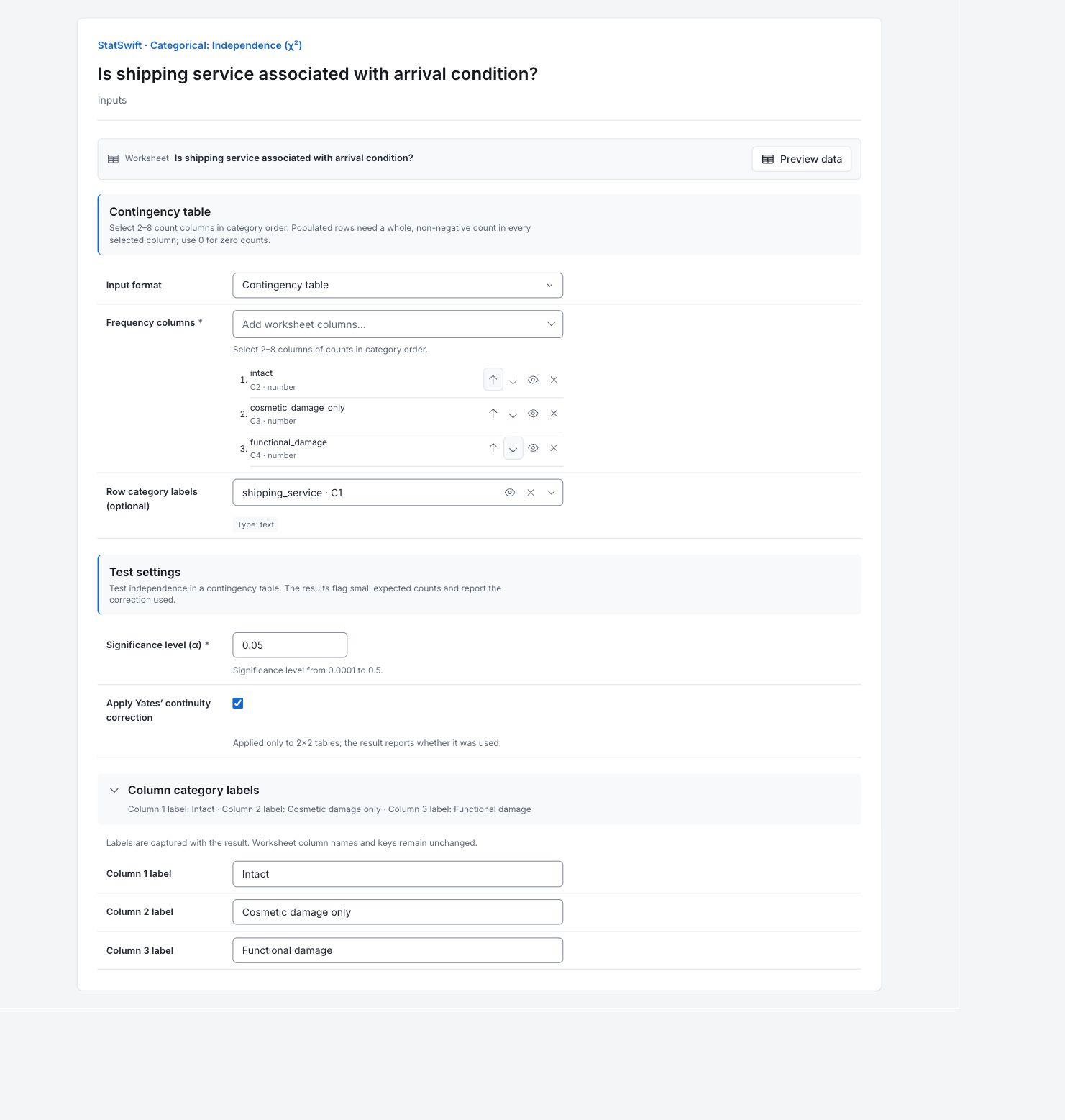
On Inputs, choose Contingency table for Input format. Open Frequency columns and select intact, cosmetic_damage_only and functional_damage in that order. Assign shipping_service to Row category labels (optional). The CSV is already a table of counts; do not count each table row as one shipment.
4. Set the test and category labels
Enter 0.05 in Significance level (α) and check Apply Yates’ continuity correction. Open Column category labels. Enter Intact in Column 1 label, Cosmetic damage only in Column 2 label and Functional damage in Column 3 label. Keep the saved checkbox setting to reproduce the example. It has no effect on this 3×3 table: Yates correction applies only to 2×2 tables.
5. Run analysis
Choose Run analysis, then open Results.
6. Interpret results
Read the observed counts
The three service rows and three condition columns represent 600 different shipments. Every shipment has one service and one mutually exclusive arrival condition. For example, Consolidated has 160 intact, 38 cosmetic-only and 22 functional-damage shipments.
Read the association test
χ² is 11.2614 with 4 degrees of freedom; p = 0.02378. There is evidence of an association at the 5% level. The smallest expected count is 14.7 and none is below 5. Yates correction was not used for this 3×3 table.
Compare observed with expected
Expected counts use the observed service and condition totals, assuming independence. Consolidated cosmetic-only damage is 38 observed versus 27.867 expected. These expected counts are a comparison model, not customer performance targets.
Locate the main differences
Consolidated cosmetic-only damage has a residual of about +1.92; Express cosmetic-only damage about −1.84. Positive means more than expected and negative fewer. Cosmetic-only damage is 38/220 Consolidated shipments (17.3%) versus 14/180 Express shipments (7.8%). These cells are not separate adjusted tests.
Investigate before changing policy
Check product mix, packaging and shipment conditions across services. This observational association does not establish that choosing a service causes damage.
More details: read each result section
Complete result tables use six significant digits, as in Help.
Chi-square independence test
χ² summarizes differences between observed and expected counts. Degrees of freedom is 4; p-value tests independence. Alpha is 0.05. Requested and Used Yates rows distinguish a setting from the correction actually applied. Expected-count checks describe suitability of the approximation; all expected counts here are at least 14.7.
| Statistic | Value |
|---|---|
| χ² statistic | 11.2614 |
| Degrees of freedom | 4 |
| p-value | 0.0237781 |
| Alpha | 0.05 |
| Yates correction requested | true |
| Yates correction used | false |
| Any expected count below 5 | false |
| Cells with expected count below 5 | 0 |
| Minimum expected count | 14.7 |
- Evidence of association (p=0.0238).
Observed counts
Each service row lists the observed counts in the three mutually exclusive arrival categories. All nine cells are included and sum to 600 shipments. Compare rates using each service’s own total, not raw damage counts alone.
| Row category | Intact | Cosmetic damage only | Functional damage |
|---|---|---|---|
| Standard | 160 | 24 | 16 |
| Express | 155 | 14 | 11 |
| Consolidated | 160 | 38 | 22 |
Expected counts
Expected count = service total × condition total / 600 under independence. These decimal values are model counts, not additional shipments or acceptance thresholds. Compare each cell with the same observed-count cell.
| Row category | Intact | Cosmetic damage only | Functional damage |
|---|---|---|---|
| Standard | 158.333 | 25.3333 | 16.3333 |
| Express | 142.5 | 22.8 | 14.7 |
| Consolidated | 174.167 | 27.8667 | 17.9667 |
Standardized residuals
Each residual is (observed − expected) / square root of expected. Its sign locates excesses and shortfalls, and magnitude helps locate contributions to the overall association. They are not separate multiplicity-adjusted cell tests.
| Row category | Intact | Cosmetic damage only | Functional damage |
|---|---|---|---|
| Standard | 0.132453 | -0.264906 | -0.0824786 |
| Express | 1.04713 | -1.84296 | -0.965035 |
| Consolidated | -1.07346 | 1.9196 | 0.951547 |
7. Create a report
Keep the Chi-square independence test, all Observed counts, Expected counts and Standardized residuals, category definitions and expected-count checks. State that Yates correction was requested but not used, and that association does not establish a cause.
Choose Add to report from the completed run. Open Choose individual items and advanced options to select tables and charts, then choose Add to draft. Hidden items stay in the saved analysis.
Name the report and add the purpose of the study and your interpretation. Choose Save, review Preview, then use Export → Download HTML. The example below contains the full selected content, including results beyond one screen.