

Example: valve bores
Three inspectors each measure the same 10 valve housings three times, removing and reseating the bore gauge between readings. The study has 90 measurements, with randomized part order and earlier readings hidden.
Download the valve bores example (CSV)This is the same example used in Help. bore_diameter_mm contains the readings in mm. This tool needs numeric IDs: part_number maps P01–P10 to 1–10, and operator_number maps A, B and C to 1, 2 and 3. trial identifies the three rounds.
1. Create the analysis
In the sidebar, open Measurement systems, choose GRR (ANOVA), and name the analysis. Select New blank worksheet and Create analysis.
2. Import the data
On Worksheet, choose Import. Select the downloaded file or paste its contents. Set the delimiter to Comma, use Decimal dot, and check First row contains column names. Preview the import, then choose Import into worksheet. Keep all rows in their original order.
3. Assign the input columns
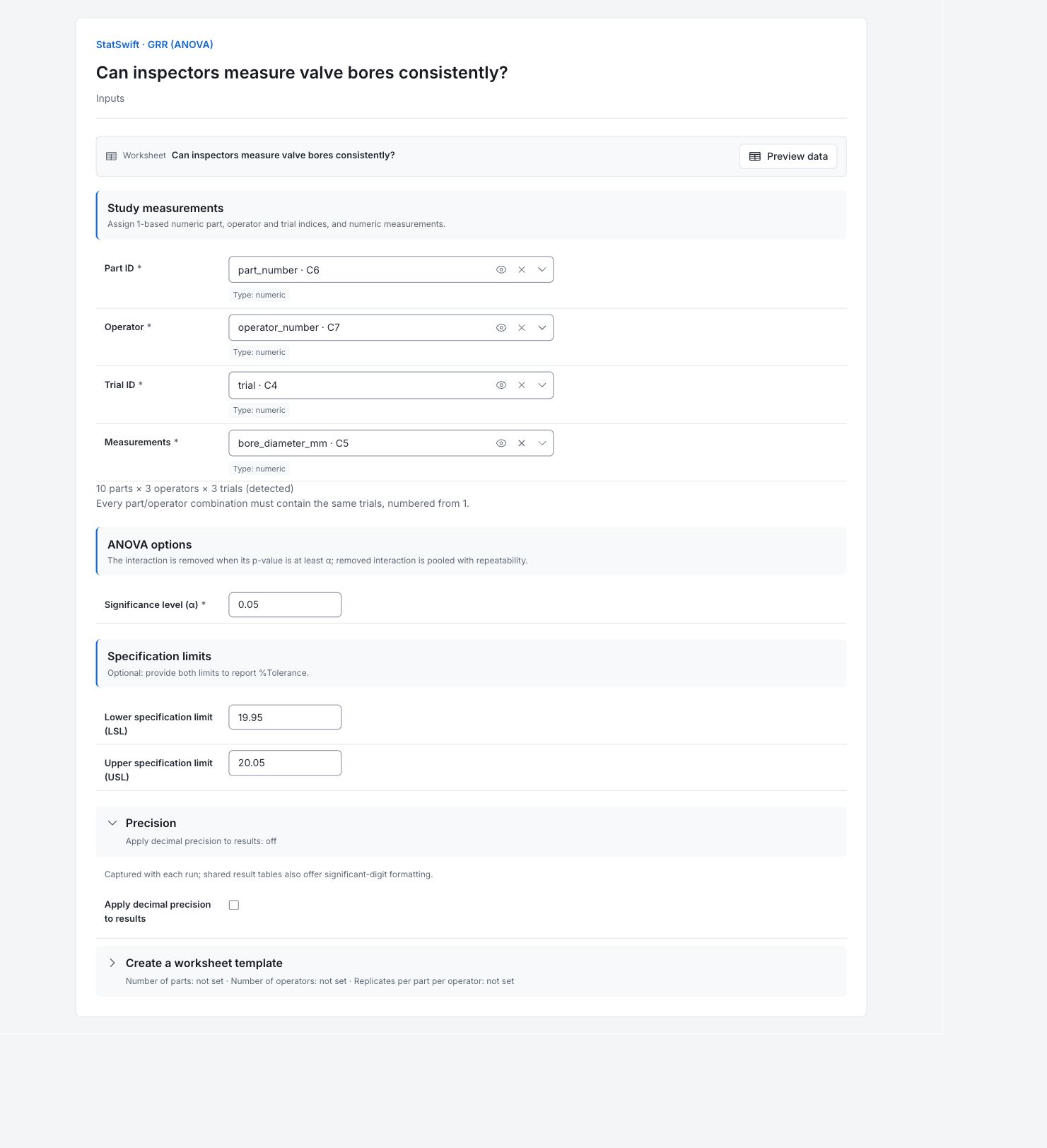
On Inputs, assign part_number to Part ID, operator_number to Operator, trial to Trial ID, and bore_diameter_mm to Measurements, selecting each from the column picker. Use the numeric ID columns.
Check that the app detects 10 parts × 3 operators × 3 trials. Each part must have all three trials from each operator.
4. Set the study options
Enter 0.05 in Significance level (α). Enter 19.950 in Lower specification limit (LSL) and 20.050 in Upper specification limit (USL). The specification width is 0.100 mm.
Open Precision and leave Apply decimal precision to results unchecked. The example already contains measurements; you do not need Create a worksheet template.
5. Run analysis
Choose Run analysis, then open Results.
6. Interpret results
Understand the study
Each inspector measures every housing three times. Differences between repeated readings show measurement scatter; differences between housings show part variation. The study compares both.
Read the measurement spread
EV is repeatability: scatter when the same inspector repeats a measurement. AV is reproducibility: variation associated with inspectors. GRR combines them. Here GRR is 0.01778 mm. These table values are six-sigma spreads, not standard deviations.

Study variation components in mm, shown as six-sigma spreads. These bars are not variance contributions. View full-size chart (opens in a new tab) Compare the two percentages
GRR is 12.90% of the total study spread and 17.78% of the 0.100 mm specification width. These use different comparisons. Neither is the percentage of rejected housings. The selected parts affect the study percentage.
Compare inspectors on each part
The lines show each inspector’s average for each housing. Inspector differences change from part to part. The interaction p-value is about 0.000479, below 0.05, so the app retains this effect. Part 1–10 means P01–P10; Operator 1/2/3 means A/B/C.

Mean bore diameter in mm for each inspector and part, based on three readings per cell. View full-size chart (opens in a new tab) Decide what to investigate
Compare technique and gauge positioning for parts where inspectors differ. The chart does not identify the cause. Integer NDC is 10: the gauge distinguishes several levels among these selected parts, but this does not establish suitability for every future use.
More details: read each result section
Complete result tables use six significant digits, as in Help.
Study variation components (6σ)
The table reports study variation (6σ), in mm. Repeatability EV is 0.01033 mm; reproducibility AV is 0.01446 mm; total GRR is 0.01778 mm. Part variation is much larger at 0.1366 mm. Do not read these values as standard deviations or percentages; divide a 6σ component by six to obtain its SD.
| Component | Study variation (6σ) |
|---|---|
| EV | 0.0103344 |
| AV | 0.0144637 |
| GRR | 0.0177764 |
| PV | 0.136598 |
| TV | 0.13775 |
- O×P significant; not pooled. %GRR (Study Var) = 12.9% NDC ≈ 10
Study assessment
GRR is 12.90% of total study variation and 17.78% of the 0.100 mm specification width. NDC is 10.835, with integer NDC 10. Study-variation percentages use SD ratios; variance contribution would use squared ratios (about 1.67% for total GRR here), so the percentages answer different questions. NDC also depends on the spread of the selected parts.
| Metric | Value |
|---|---|
| GRR (%StudyVar) | 12.9048 |
| GRR (%Tolerance) | 17.7764 |
| NDC | 10.8348 |
| NDC (integer) | 10 |
| Alpha | 0.05 |
| Operator × part pooled | No |
Two-way ANOVA with interaction
Operator × part has p ≈ 0.000479, below α = 0.05, so the app retains the interaction instead of pooling it with repeatability. Operator differences therefore need to be considered alongside part-specific differences. The operator p-value is about 0.000321; these tests do not identify why the differences occur.
| Source | SS | df | MS | F | p |
|---|---|---|---|---|---|
| Operator | 0.000241089 | 2 | 0.000120544 | 12.9997 | 0.000320941 |
| Part | 0.0420662 | 9 | 0.00467402 | 504.055 | 9.41451e-20 |
| O×P | 0.000166911 | 18 | 0.00000927284 | 3.12568 | 0.000479281 |
| Repeatability (Error) | 0.000178 | 60 | 0.00000296667 | — | — |
| Total | 0.0426522 | 89 | 0 | — | — |
- Full-model F and p values. Operator × part is pooled with repeatability when its p ≥ α.
Operator × part means
Each cell is an operator’s mean for one part across three trials. Compare operators within a part before comparing different parts.
| Operator | Part 1 | Part 2 | Part 3 | Part 4 | Part 5 | Part 6 | Part 7 | Part 8 | Part 9 | Part 10 |
|---|---|---|---|---|---|---|---|---|---|---|
| Operator 1 | 20.004 | 19.97 | 20.0207 | 19.9867 | 20.008 | 19.979 | 20.0287 | 19.9927 | 20.0167 | 19.9623 |
| Operator 2 | 20.003 | 19.9687 | 20.023 | 19.9853 | 20.011 | 19.9763 | 20.0323 | 19.9953 | 20.0173 | 19.9653 |
| Operator 3 | 20.0047 | 19.9723 | 20.028 | 19.988 | 20.0157 | 19.981 | 20.0297 | 20 | 20.02 | 19.9677 |
Marginal means
Overall operator and part means summarize the crossed study. Averaging across parts can conceal the retained operator-by-part interaction.
| Source | Mean |
|---|---|
| Overall | 19.9984 |
| Operator 1 | 19.9969 |
| Operator 2 | 19.9978 |
| Operator 3 | 20.0007 |
| Part 1 | 20.0039 |
| Part 2 | 19.9703 |
| Part 3 | 20.0239 |
| Part 4 | 19.9867 |
| Part 5 | 20.0116 |
| Part 6 | 19.9788 |
| Part 7 | 20.0302 |
| Part 8 | 19.996 |
| Part 9 | 20.018 |
| Part 10 | 19.9651 |
7. Create a report
Keep Study variation components (6σ), Study assessment, Two-way ANOVA with interaction, Operator × part means, Marginal means and both the component and cell-means charts. Record which numeric IDs represent each inspector and part, and retain the 0.100 mm specification width.
Choose Add to report from the completed run. Open Choose individual items and advanced options to select tables and charts, then choose Add to draft. Hidden items stay in the saved analysis.
Name the report and add the purpose of the study and your interpretation. Choose Save, review Preview, then use Export → Download HTML. The example below contains the full selected content, including results beyond one screen.