

Example: exactly two nonconforming labels
Inspect 25 labels. Assume each has a 4% chance of nonconformance, independently of the others.
Download the scenario reference (CSV)This is the same example used in Help. The CSV lists reference scenarios. Enter the selected scenario manually on Inputs; importing it does not configure this calculator. Use Open example in a practice copy in Help to prefill the inputs.
1. Create the workspace
In the sidebar, open Basic Statistics and choose Distributions. Create an analysis, name it, select New blank worksheet, then choose Create analysis.
2. Choose the calculation
On Inputs, choose Discrete for Distribution type, Binomial for Distribution, then Probability mass (PMF) for Calculation.
3. Enter the model
Enter 25 in Number of trials (n) and 0.04 in Success probability (p). Here a “success” means finding a nonconforming label.
4. Enter the question
Choose Single value for Value source. Enter 2 in Value (x). No worksheet columns are assigned.
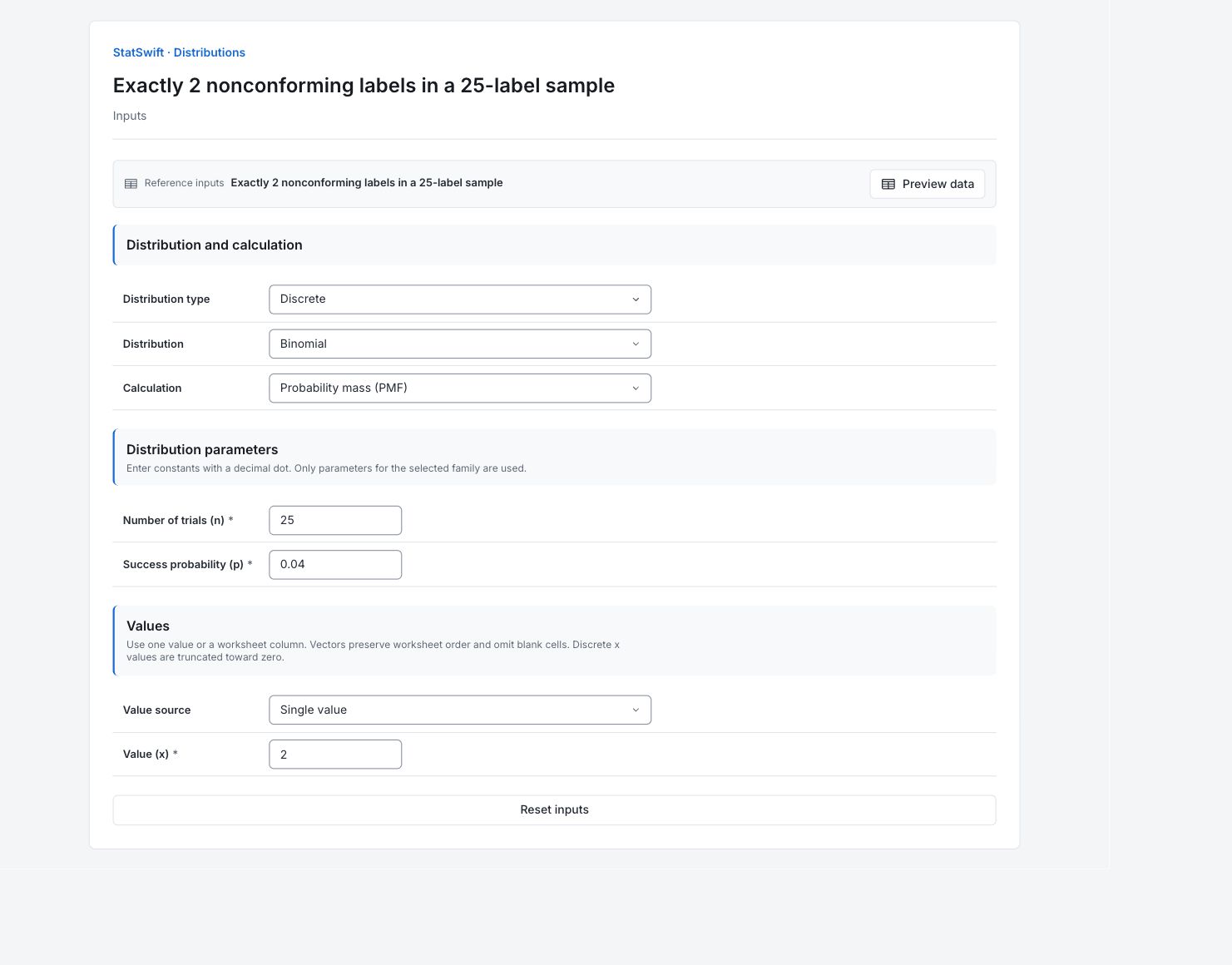
5. Run analysis
Choose Run analysis, then open Results.
6. Interpret results
Check the question
Inspect 25 labels. Assume each has a 4% chance of nonconformance, independently of the others.
Read the calculated value
The PMF is 0.187707, about 18.77%. Under this model, that is the chance of finding exactly two nonconforming labels among 25.
Understand what it means
Exactly two excludes counts of zero or one. For at most two, use the cumulative probability instead.
Use the model carefully
Check whether the same nonconformance probability and independence are reasonable for the labels being sampled. Batch clustering can make this model inappropriate.
More details: read each result section
Complete result tables use six significant digits, as in Help.
Distribution values
x is the count requested. PMF is P(X = x), the probability of exactly that count. Exactly two excludes counts of zero or one. For at most two, use the cumulative probability instead.
| x | PMF |
|---|---|
| 2 | 0.187707 |
Distribution summary
Type distinguishes continuous values from whole-number counts. Distribution names the model. Calculation records PMF (exact-count probability), PDF (density), CDF (cumulative probability) or ICDF (quantile). The remaining rows record the active parameters; they are assumptions entered on Inputs.
| Setting | Value |
|---|---|
| Type | Discrete |
| Distribution | Binomial |
| Calculation | PMF |
| Number of trials (n) | 25 |
| Success probability (p) | 0.04 |
- Binomial(n=25, p=0.04)
7. Create a report
Keep Distribution values (or the quantile table) and Distribution summary. State the model assumptions, time unit or count interval, and the question being answered. Exactly two excludes counts of zero or one. For at most two, use the cumulative probability instead.
Choose Add to report from the completed run. Open Choose individual items and advanced options to select tables and charts, then choose Add to draft. Hidden items stay in the saved analysis.
Name the report and add the purpose of the study and your interpretation. Choose Save, review Preview, then use Export → Download HTML. The example below contains the full selected content, including results beyond one screen.