

Example: Cell A seal-strength standard deviation
45 independent pouch-strength readings from Cell A; the reference CSV also contains Cell B readings.
Download the study reference (CSV)This is the same example used in Help. The CSV is a reference for the supplied study. Enter the checked summaries manually on Inputs; importing the CSV does not populate this calculator. Use Open example in a practice copy in Help to prefill the inputs.
1. Create the workspace
In the sidebar, open Basic Statistics and choose Confidence Intervals. Create an analysis, name it, select New blank worksheet, then choose Create analysis.
2. Choose the interval
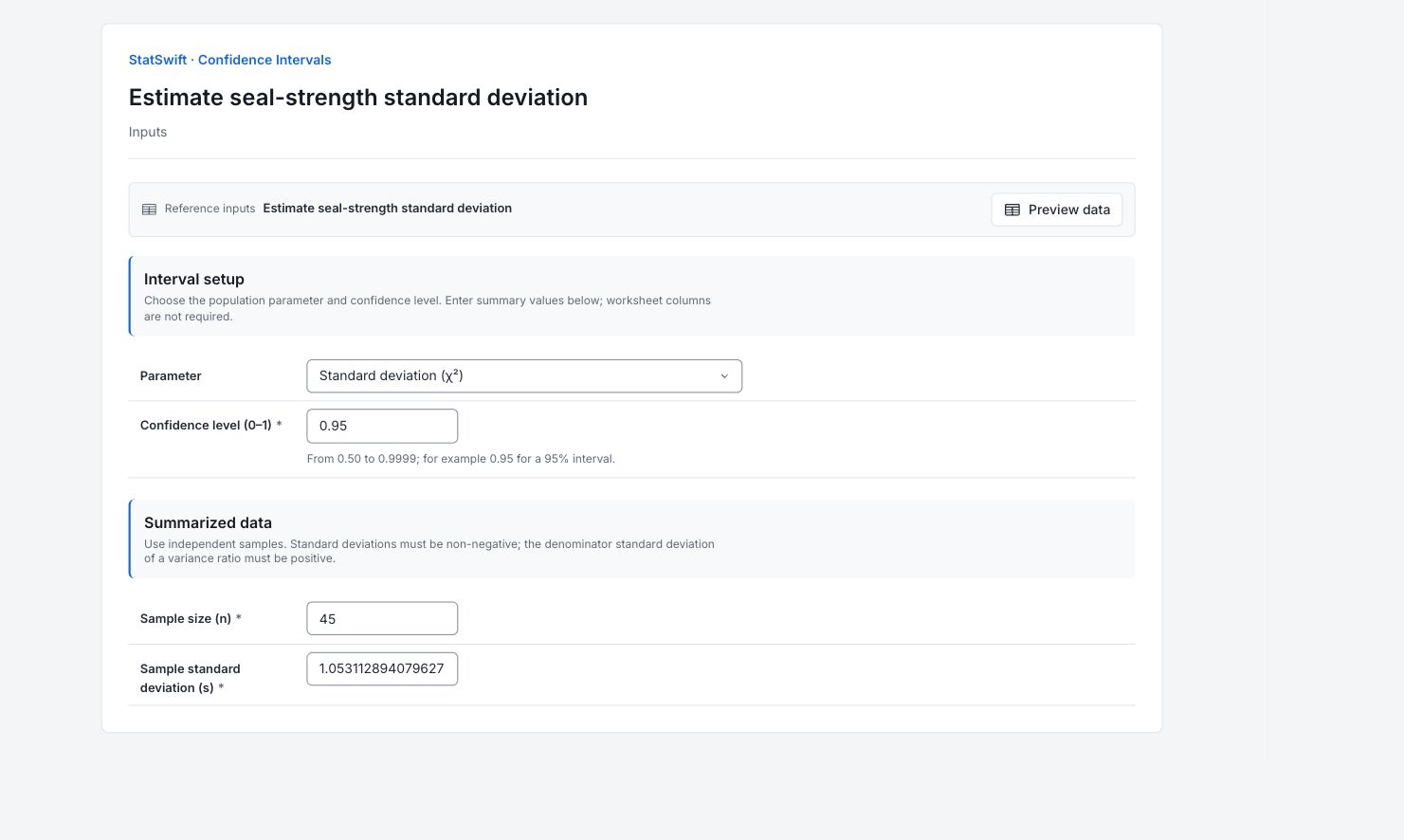
On Inputs, choose Standard deviation (χ²) for Parameter. Enter 0.95 in Confidence level (0–1) for a 95% interval.
3. Enter the summaries
Under Summarized data, enter the following values. Keep the full precision shown for standard deviations. No worksheet columns are assigned.
Enter 45 in Sample size (n).
Enter 1.053112894079627 in Sample standard deviation (s).
4. Run analysis
Choose Run analysis, then open Results.
5. Interpret results
Identify what the interval estimates
45 independent pouch-strength readings from Cell A; the reference CSV also contains Cell B readings. The selected parameter is standard deviation (χ²).
Read the estimate and bounds
The SD estimate is 1.0531 N, with a 95% interval of 0.8718–1.3303 N. Standard deviation describes spread between pouches.
Keep the interpretation clear
This chi-square interval assumes a normal population and independent observations. It concerns the population spread, not uncertainty in the mean or bounds for each pouch.
Use the uncertainty in the decision
Define the maximum population SD acceptable for your application. Compare that requirement with the whole 0.8718–1.3303 N interval: if the requirement lies inside it, the study leaves uncertainty about meeting it. The requirement must come from your application, not this example.
More details: read each result section
Complete result tables use six significant digits, as in Help.
Confidence interval
Parameter names the population quantity. Confidence level 0.95 means this interval method covers the fixed population parameter in 95% of repeated comparable samples under its assumptions. Estimate is the sample-based value; Lower bound and Upper bound mark its uncertainty. Method records the calculation. This chi-square interval assumes a normal population and independent observations. It concerns the population spread, not uncertainty in the mean or bounds for each pouch.
| Statistic | Value |
|---|---|
| Parameter | Standard deviation (χ²) |
| Confidence level | 0.95 |
| Estimate | 1.05311 |
| Lower bound | 0.871824 |
| Upper bound | 1.33029 |
| Method | chi-square |
6. Create a report
Keep the complete Confidence interval table, selected parameter, confidence level, method and entered summaries. This chi-square interval assumes a normal population and independent observations. It concerns the population spread, not uncertainty in the mean or bounds for each pouch.
Choose Add to report from the completed run. Open Choose individual items and advanced options to select tables and charts, then choose Add to draft. Hidden items stay in the saved analysis.
Name the report and add the purpose of the study and your interpretation. Choose Save, review Preview, then use Export → Download HTML. The example below contains the full selected content, including results beyond one screen.