

Example: two equal-size sachet-fill groups
Plan two independent fill groups with equal sample sizes. Detect a 1.5 g mean difference with common SD 4 g and 90% power. The reference scenario is adapted to equal allocation.
Download the planning reference (CSV)This is the same example used in Help. The CSV lists reference scenarios. Enter the selected planning values manually on Inputs; importing it does not configure this calculator. Use Open example in a practice copy in Help to prefill the inputs.
1. Create the workspace
In the sidebar, open Basic Statistics and choose Power & Sample Size. Create an analysis, name it, select New blank worksheet, then choose Create analysis.
2. Choose the study
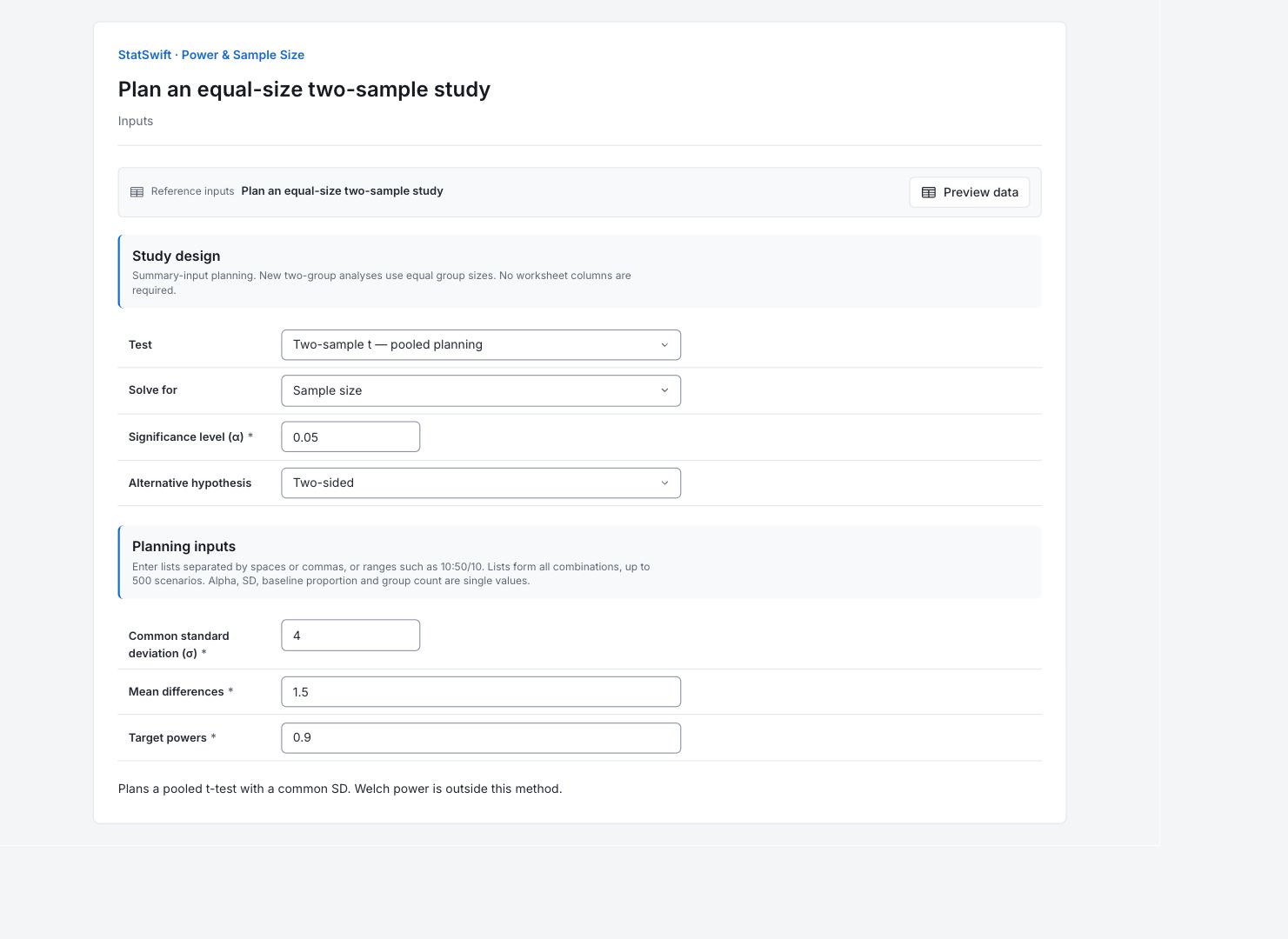
On Inputs, choose Two-sample t — pooled planning for Test and Sample size for Solve for. Enter 0.05 in Significance level (α) and choose Two-sided for Alternative hypothesis.
3. Enter the planning values
Enter one value in each field for this scenario. No worksheet columns are assigned.
Enter 4 in Common standard deviation (σ).
Enter 1.5 in Mean differences.
Enter 0.9 in Target powers.
4. Run analysis
Choose Run analysis, then open Results.
5. Interpret results
Check the planned study
Plan two independent fill groups with equal sample sizes. Detect a 1.5 g mean difference with common SD 4 g and 90% power. The reference scenario is adapted to equal allocation.
Read the calculated plan
Collect 151 observations per group, 302 total, under the stated common-SD and equal-allocation assumptions. Achieved power is about 90.11%; at 150 per group it is about 89.92%, below the 90% target.
Follow the power curve
The curve holds the sample size at 151 per group. Power reaches about 90% at a mean difference of +1.5 g or −1.5 g.

Power versus effect View full-size chart (opens in a new tab) Understand the assumptions
Power is the chance that the planned test detects the specified difference when that difference is real, under the entered assumptions. It is not the chance that a hypothesis is true and does not guarantee a significant result. This is pooled t-test planning for independent normal groups with a common SD and equal sizes. It does not plan a Welch test or unequal allocation.
Decide how to collect the sample
Confirm the common-SD assumption and the 1.5 g difference of interest. Reserve enough measurements for both groups and recalculate if their allocation or expected spread changes.
More details: read each result section
Complete result tables use six significant digits, as in Help.
Power and sample size scenarios
Scenario links this row to its input values. Branch records a solved effect direction; a dash means it is not applicable. Sample size is per group for two-group plans; Total observations counts both groups. Mean difference or Comparison proportion is the effect being planned. Target power is the request; Achieved power is the calculated result. Power at preceding size checks one fewer observation per group. DF is the t-test degrees of freedom, where applicable. Status and Details record whether the scenario was calculated. The plan requires 151 observations per group: 302 total. Achieved power is 0.901125. At 150 per group, it is 0.899225, below the 0.9 target.
| Scenario | Branch | Sample size per group | Total observations | Mean difference | Target power | Achieved power | Power at preceding size | DF | Status | Details |
|---|---|---|---|---|---|---|---|---|---|---|
| 1 | — | 151 | 302 | 1.5 | 0.9 | 0.901125 | 0.899225 | 300 | ok | — |
- Unavailable branches retain their status and input values. Pairs count two observations each. A preceding-size power is reported only when that size is valid.
Planning method
Method and Calibration identify the calculation used. Alpha 0.05 is the test significance level; Alternative two-sided includes both directions. Solve for names the quantity being calculated. Assumptions and Planning SD or Baseline proportion record what the result depends on. This is pooled t-test planning for independent normal groups with a common SD and equal sizes. It does not plan a Welch test or unequal allocation.
| Setting | Value |
|---|---|
| Method | Two-sample t |
| Calibration | pooled-noncentral-t-v1 |
| Alpha | 0.05 |
| Alternative | two-sided |
| Solve for | Sample size per group |
| Assumptions | Independent normal groups; common SD; equal sizes; pooled-test planning. |
| Planning SD | 4 |
- Results and curve points are captured with this run. Sample sizes are whole numbers; target power and achieved power are distinct.
Scenario input values
Scenario matches the numbered result row. Inputs records the active scenario values; these are planning assumptions, not observed measurements. Single-value inputs produce one scenario here.
| Scenario | Inputs |
|---|---|
| 1 | {"delta":1.5,"power":0.9} |
Captured power curve values
Each row gives a sample size, a mean difference or comparison proportion, and its calculated Power. These are all captured values behind the native chart. For two-group plans the size is per group. Read power between zero and one; 0.9 means 90%. The curve holds the sample size at 151 per group. Power reaches about 90% at a mean difference of +1.5 g or −1.5 g.
| Sample size per group | Mean difference | Power |
|---|---|---|
| 151 | -2.5 | 0.999723 |
| 151 | -2.41667 | 0.999468 |
| 151 | -2.33333 | 0.999007 |
| 151 | -2.25 | 0.998204 |
| 151 | -2.16667 | 0.996848 |
| 151 | -2.08333 | 0.99463 |
| 151 | -2 | 0.991121 |
| 151 | -1.91667 | 0.985745 |
| 151 | -1.83333 | 0.977771 |
| 151 | -1.75 | 0.966323 |
| 151 | -1.66667 | 0.950413 |
| 151 | -1.58333 | 0.929006 |
| 151 | -1.5 | 0.901125 |
| 151 | -1.41667 | 0.865972 |
| 151 | -1.33333 | 0.823066 |
| 151 | -1.25 | 0.77237 |
| 151 | -1.16667 | 0.714385 |
| 151 | -1.08333 | 0.650181 |
| 151 | -1 | 0.581368 |
| 151 | -0.916667 | 0.509975 |
| 151 | -0.833333 | 0.438283 |
| 151 | -0.75 | 0.368613 |
| 151 | -0.666667 | 0.303113 |
| 151 | -0.583333 | 0.243579 |
| 151 | -0.5 | 0.191333 |
| 151 | -0.416667 | 0.147189 |
| 151 | -0.333333 | 0.111485 |
| 151 | -0.25 | 0.08419 |
| 151 | -0.166667 | 0.0650492 |
| 151 | -0.0833333 | 0.0537382 |
| 151 | 0 | 0.05 |
| 151 | 0.0833333 | 0.0537382 |
| 151 | 0.166667 | 0.0650492 |
| 151 | 0.25 | 0.08419 |
| 151 | 0.333333 | 0.111485 |
| 151 | 0.416667 | 0.147189 |
| 151 | 0.5 | 0.191333 |
| 151 | 0.583333 | 0.243579 |
| 151 | 0.666667 | 0.303113 |
| 151 | 0.75 | 0.368613 |
| 151 | 0.833333 | 0.438283 |
| 151 | 0.916667 | 0.509975 |
| 151 | 1 | 0.581368 |
| 151 | 1.08333 | 0.650181 |
| 151 | 1.16667 | 0.714385 |
| 151 | 1.25 | 0.77237 |
| 151 | 1.33333 | 0.823066 |
| 151 | 1.41667 | 0.865972 |
| 151 | 1.5 | 0.901125 |
| 151 | 1.58333 | 0.929006 |
| 151 | 1.66667 | 0.950413 |
| 151 | 1.75 | 0.966323 |
| 151 | 1.83333 | 0.977771 |
| 151 | 1.91667 | 0.985745 |
| 151 | 2 | 0.991121 |
| 151 | 2.08333 | 0.99463 |
| 151 | 2.16667 | 0.996848 |
| 151 | 2.25 | 0.998204 |
| 151 | 2.33333 | 0.999007 |
| 151 | 2.41667 | 0.999468 |
| 151 | 2.5 | 0.999723 |
- All captured curves are included in this table and its CSV export; the plot shows at most 12 selected sample sizes.
6. Create a report
Keep Power and sample size scenarios, Planning method, Scenario input values, the native Power versus effect chart and its complete captured-values table. Record the difference worth detecting, planning spread or proportions, sample allocation and method. This is pooled t-test planning for independent normal groups with a common SD and equal sizes. It does not plan a Welch test or unequal allocation.
Choose Add to report from the completed run. Open Choose individual items and advanced options to select tables and charts, then choose Add to draft. Hidden items stay in the saved analysis.
Name the report and add the purpose of the study and your interpretation. Choose Save, review Preview, then use Export → Download HTML. The example below contains the full selected content, including results beyond one screen.