

Example: packing times by item count
The example records 90 orders from three packing zones. Packing time is in seconds; item count and parcel mass describe each order.
Download the example data (CSV)This is the same example used in Help. The CSV contains the observations to import.
1. Create the analysis
In the sidebar, open Plots and create an analysis. Name it, select New blank worksheet, then choose Create analysis.
2. Import the data
On Worksheet, choose Import. Select the downloaded CSV or paste its contents. Set the delimiter to Comma, use Decimal dot, and check First row contains column names. Preview the import, then choose Import into worksheet.
3. Assign the input columns
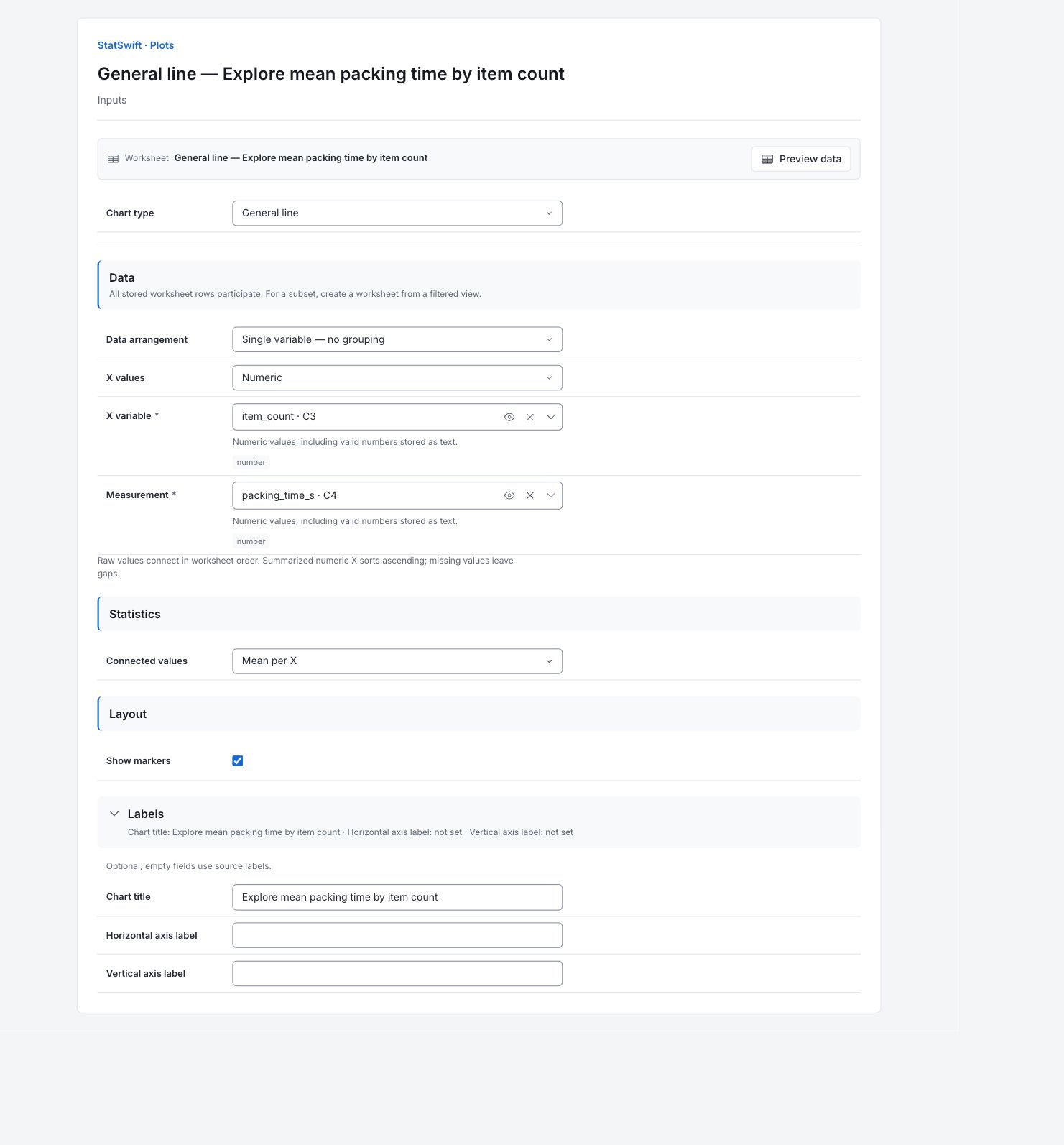
On Inputs, choose General line in Chart type. In Data arrangement, choose Single variable — no grouping. Set X values to Numeric.
Open the column picker for X variable and select item_count. For Measurement, select packing_time_s. The horizontal axis will show items per order, rather than time.
4. Set the chart options
In Statistics, choose Mean per X for Connected values. In Layout, check Show markers. Each point will summarize all orders with the same item count, across the three zones.
Open Labels and enter Explore mean packing time by item count in Chart title. Leave Horizontal axis label and Vertical axis label blank so the source labels are used.
5. Create chart
Choose Create chart, then open Results. Check Data used before comparing the chart with this guide. All stored worksheet rows participate; sorting or filtering the worksheet does not change the analytical sample.
6. Interpret results
Read the connected means
The horizontal axis is items per order, not time. Each point is mean packing time in seconds for orders with that item count, pooling all three zones. The line connects the means in numeric item-count order.

Mean packing time at each item count, pooling orders from all three zones. View full-size chart (opens in a new tab) Compare the times
The mean is 88.8 seconds for one-item orders (11 orders) and 202.75 seconds for twelve-item orders (6 orders). The ten-item mean is higher, 211.1 seconds (5 orders). Different numbers and mixes of orders support the points; the profile does not rise at every step.
Check how many orders support a point
First worksheet row in Connected values identifies one contributing source row, not the number of orders behind the point. Use Full source observations to count rows at each item count before comparing means.
Choose the next comparison
Compare similar orders within zones before making a staffing rule. Connecting means does not give a fitted prediction model or prove how much adding an item changes packing time.
More details: read each result section
Complete result tables use six significant digits, as in Help.
Data used
Worksheet rows is 90; Eligible observations across series is 90; Excluded observations is 0. All source rows are used. Check these counts and keep the example’s column assignments when comparing runs. Worksheet sorting and filters do not change the analytical sample.
All stored rows are considered in original order. Worksheet sorting and filters do not change the analytical sample.
| Worksheet rows | Eligible observations across series | Excluded observations |
|---|---|---|
| 90 | 90 | 0 |
Data summary
Series names the measurement or group. Valid and Missing give counts; Mean and Median describe the center. Sample SD describes spread. Minimum and Maximum are the observed ends; Q1 and Q3 enclose the middle half. These summaries describe the captured observations, not acceptance limits.
| Series | Valid | Missing | Mean | Sample SD | Minimum | Q1 | Median | Q3 | Maximum |
|---|---|---|---|---|---|---|---|---|---|
| packing_time_s | 90 | 0 | 150.572 | 45.2425 | 59.9 | 115.125 | 152.9 | 184.675 | 252.5 |
Connected values
Each row gives a numeric item_count and its mean packing_time_s in seconds. First worksheet row identifies the first contributing source row, not the number of orders averaged. For example, item count 1 has mean 88.8 seconds and first contributing worksheet row 10. Use Full source observations to count the supporting orders.
| Series | First worksheet row (0 = empty period) | item_count | packing_time_s |
|---|---|---|---|
| packing_time_s | 10 | 1 | 88.8 |
| packing_time_s | 1 | 2 | 87.7333 |
| packing_time_s | 8 | 3 | 116.944 |
| packing_time_s | 12 | 4 | 121.911 |
| packing_time_s | 35 | 5 | 130.75 |
| packing_time_s | 7 | 6 | 139.133 |
| packing_time_s | 24 | 7 | 161.483 |
| packing_time_s | 5 | 8 | 174.618 |
| packing_time_s | 11 | 9 | 187.12 |
| packing_time_s | 39 | 10 | 211.1 |
| packing_time_s | 3 | 11 | 202.78 |
| packing_time_s | 4 | 12 | 202.75 |
Full source observations
Series identifies the measurement or group and Worksheet row locates the source record. X and Y are the chart coordinates. X is item count and Y is the original packing time in seconds. These 90 rows support the 12 mean points.
| Series | Worksheet row | X | Y |
|---|---|---|---|
| packing_time_s | 1 | 2 | 81.2 |
| packing_time_s | 2 | 2 | 102.1 |
| packing_time_s | 3 | 11 | 212.5 |
| packing_time_s | 4 | 12 | 209.6 |
| packing_time_s | 5 | 8 | 229.8 |
| packing_time_s | 6 | 8 | 160.4 |
| packing_time_s | 7 | 6 | 178.8 |
| packing_time_s | 8 | 3 | 96.7 |
| packing_time_s | 9 | 6 | 147.2 |
| packing_time_s | 10 | 1 | 96.6 |
| packing_time_s | 11 | 9 | 219.9 |
| packing_time_s | 12 | 4 | 144.7 |
| packing_time_s | 13 | 9 | 153.4 |
| packing_time_s | 14 | 12 | 187 |
| packing_time_s | 15 | 9 | 179.6 |
| packing_time_s | 16 | 11 | 184 |
| packing_time_s | 17 | 4 | 116.8 |
| packing_time_s | 18 | 11 | 198.9 |
| packing_time_s | 19 | 4 | 92.3 |
| packing_time_s | 20 | 8 | 168.1 |
| packing_time_s | 21 | 1 | 59.9 |
| packing_time_s | 22 | 3 | 159.5 |
| packing_time_s | 23 | 1 | 93.9 |
| packing_time_s | 24 | 7 | 164.6 |
| packing_time_s | 25 | 6 | 132.5 |
| packing_time_s | 26 | 7 | 164.2 |
| packing_time_s | 27 | 4 | 105.4 |
| packing_time_s | 28 | 3 | 101 |
| packing_time_s | 29 | 4 | 174.1 |
| packing_time_s | 30 | 1 | 122.4 |
| packing_time_s | 31 | 6 | 121.5 |
| packing_time_s | 32 | 11 | 203.1 |
| packing_time_s | 33 | 11 | 191.2 |
| packing_time_s | 34 | 1 | 104.9 |
| packing_time_s | 35 | 5 | 108.9 |
| packing_time_s | 36 | 1 | 73.7 |
| packing_time_s | 37 | 9 | 191.7 |
| packing_time_s | 38 | 11 | 226 |
| packing_time_s | 39 | 10 | 178 |
| packing_time_s | 40 | 6 | 137.6 |
| packing_time_s | 41 | 7 | 181.3 |
| packing_time_s | 42 | 3 | 116.1 |
| packing_time_s | 43 | 1 | 78.5 |
| packing_time_s | 44 | 10 | 252.5 |
| packing_time_s | 45 | 12 | 215.8 |
| packing_time_s | 46 | 3 | 110.7 |
| packing_time_s | 47 | 8 | 174.8 |
| packing_time_s | 48 | 4 | 121.9 |
| packing_time_s | 49 | 6 | 141 |
| packing_time_s | 50 | 1 | 67.1 |
| packing_time_s | 51 | 10 | 201.1 |
| packing_time_s | 52 | 4 | 114.8 |
| packing_time_s | 53 | 11 | 214.9 |
| packing_time_s | 54 | 3 | 109.9 |
| packing_time_s | 55 | 12 | 184.6 |
| packing_time_s | 56 | 4 | 119 |
| packing_time_s | 57 | 8 | 181.1 |
| packing_time_s | 58 | 8 | 158.8 |
| packing_time_s | 59 | 8 | 169.5 |
| packing_time_s | 60 | 5 | 128.1 |
| packing_time_s | 61 | 1 | 81.7 |
| packing_time_s | 62 | 12 | 207.7 |
| packing_time_s | 63 | 6 | 155.2 |
| packing_time_s | 64 | 9 | 191 |
| packing_time_s | 65 | 5 | 127.1 |
| packing_time_s | 66 | 8 | 184.7 |
| packing_time_s | 67 | 5 | 122.8 |
| packing_time_s | 68 | 11 | 222.8 |
| packing_time_s | 69 | 10 | 196 |
| packing_time_s | 70 | 6 | 118.3 |
| packing_time_s | 71 | 10 | 227.9 |
| packing_time_s | 72 | 4 | 108.2 |
| packing_time_s | 73 | 8 | 148 |
| packing_time_s | 74 | 7 | 157.8 |
| packing_time_s | 75 | 7 | 152.4 |
| packing_time_s | 76 | 5 | 155.6 |
| packing_time_s | 77 | 3 | 89.2 |
| packing_time_s | 78 | 2 | 79.9 |
| packing_time_s | 79 | 5 | 142 |
| packing_time_s | 80 | 1 | 95.5 |
| packing_time_s | 81 | 8 | 187.8 |
| packing_time_s | 82 | 3 | 124.7 |
| packing_time_s | 83 | 11 | 174.1 |
| packing_time_s | 84 | 7 | 148.6 |
| packing_time_s | 85 | 8 | 157.8 |
| packing_time_s | 86 | 12 | 211.8 |
| packing_time_s | 87 | 6 | 120.1 |
| packing_time_s | 88 | 3 | 144.7 |
| packing_time_s | 89 | 11 | 200.3 |
| packing_time_s | 90 | 1 | 102.6 |
7. Create a report
Keep the native chart and Data used, together with Data summary, Connected values, Full source observations. Record the column assignments and chart options. Include the study context and any checks of unusual observations. Keep the chart’s units and the limitations described in the walkthrough.
Choose Add to report from the completed run. Open Choose individual items and advanced options to select tables and charts, then choose Add to draft. Hidden items stay in the saved analysis.
Name the report and add the purpose of the study and your interpretation. Choose Save, review Preview, then use Export → Download HTML. The example below contains the full selected content, including results beyond one screen.