

Example: clip width
Two inspectors independently measure the same 10 molded clips once each with a digital caliper. They cannot see one another’s readings. The study has 20 measurements.
Download the clip width example (CSV)This is the same example used in Help. part_id identifies the clip, operator_id identifies the inspector, trial is 1 for every row, and clip_width_mm contains the readings in mm. There are no repeated readings by one inspector on one clip.
1. Create the analysis
In the sidebar, open Measurement systems, choose GRR (Range), and name the analysis. Select New blank worksheet and Create analysis.
2. Import the data
On Worksheet, choose Import. Select the downloaded file or paste its contents. Set the delimiter to Comma, use Decimal dot, and check First row contains column names. Preview the import, then choose Import into worksheet. Keep all rows in their original order.
3. Assign the input columns
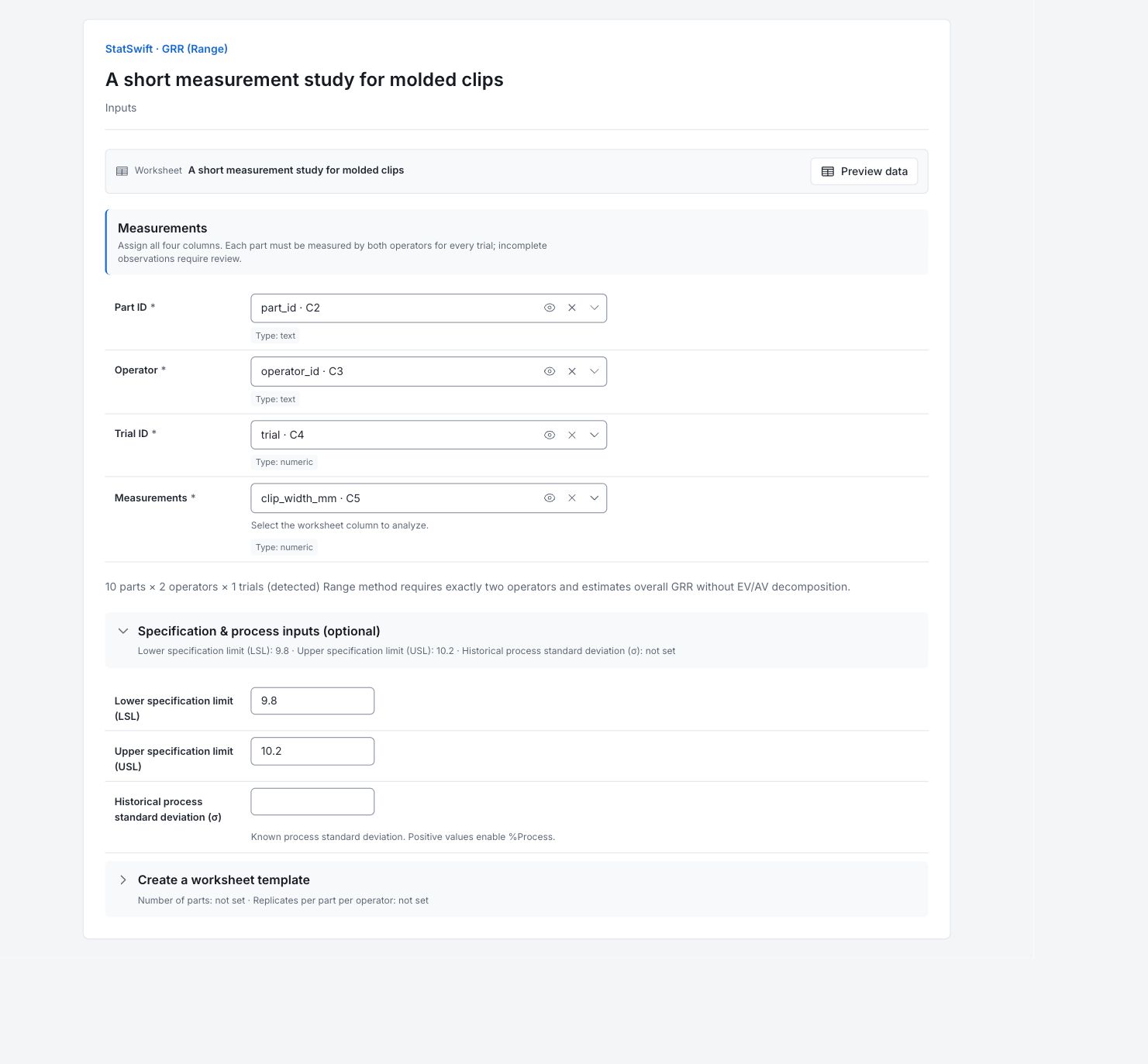
On Inputs, assign part_id to Part ID, operator_id to Operator, trial to Trial ID, and clip_width_mm to Measurements, selecting each from the column picker.
Check that the app detects 10 parts × 2 operators × 1 trial. Each clip must have a reading from both inspectors.
4. Set the study options
Open Specification & process inputs (optional). Enter 9.800 in Lower specification limit (LSL) and 10.200 in Upper specification limit (USL). Leave Historical process standard deviation (σ) blank. The specification width is 0.400 mm.
You do not need Create a worksheet template for this imported study.
5. Run analysis
Choose Run analysis, then open Results.
6. Interpret results
Understand each pair
Each clip has two readings, one from each inspector. The range is the gap between those readings. The average gap across the 10 clips is 0.016 mm.
Read the overall estimate
GRR sigma is about 0.01379 mm. This is an estimate of overall measurement standard deviation from the paired readings. It does not separate the gauge’s repeatability from differences between inspectors.
Compare with specification width
The estimated six-sigma measurement spread uses 20.69% of the 0.400 mm specification width. This is not the percentage of clips rejected. No historical process standard deviation was supplied, so %Process is unavailable.
Plan a fuller study
Each inspector measures each clip once. Collect genuine repeated readings from each inspector on each clip to study repeatability, reproducibility and differences that depend on the part.
More details: read each result section
Complete result tables use six significant digits, as in Help.
Measurement unit analysis
The estimated overall GRR sigma is 0.01379 mm. With one reading per inspector for each clip, there is no within-inspector replication. This estimate cannot separate repeatability from reproducibility or isolate operator-by-part interaction.
GRR = R̄ / d₂. The range method estimates overall gauge variation without EV/AV decomposition.
| Statistic | Value |
|---|---|
| GRR (σ) | 0.0137914 |
Relative measurement variation (%)
The estimated six-sigma measurement spread uses 20.69% of the 0.40 mm tolerance. This is a proportion of specification width, not the percentage of clips that fail inspection. No process sigma was supplied, so no %Process value is expected.
%Tolerance = 100 × 6 × component SD / specification width.
| Statistic | Value |
|---|---|
| %Tolerance | 20.6872 |
Range and d₂ lookup
The average range between the two readings of each clip is 0.016 mm. The app uses d₂ = 1.1601 for m = 2 and g = 10, giving GRR = R̄ / d₂. Do not substitute a different d₂ table convention and expect identical output.
| Statistic | Value |
|---|---|
| Average range (R̄) | 0.016 |
| d₂ (m = 2) | 1.16014 |
| Requested g (parts) | 10 |
| Lookup column | 10 |
| Approximate lookup | No |
7. Create a report
Keep Measurement unit analysis, Relative measurement variation (%) and Range and d₂ lookup. Record that each inspector measured each clip once, and that no historical process standard deviation was supplied.
Choose Add to report from the completed run. Open Choose individual items and advanced options to select tables and charts, then choose Add to draft. Hidden items stay in the saved analysis.
Name the report and add the purpose of the study and your interpretation. Choose Save, review Preview, then use Export → Download HTML. The example below contains the full selected content, including results beyond one screen.