

Example: bottle-cap inspection
A molding team inspects 200 bottle caps every two hours. Each cap receives one final conforming or nonconforming decision, even if it fails several checks.
Download the bottle-cap example (CSV)This Help example contains 40 samples. sample_id identifies the sample, caps_inspected is always 200, and nonconforming_caps counts the caps that fail. Each row is one sample.
1. Create the chart workspace
In the sidebar, open Process control, choose np Chart, and name the analysis. Select New blank worksheet and Create analysis.
2. Import the data
On Worksheet, choose Import. Select the downloaded file or paste its contents. Set the delimiter to Comma, use Decimal dot, and check First row contains column names. Preview the import, then choose Import into worksheet. Keep the rows in collection order.
3. Assign the input columns
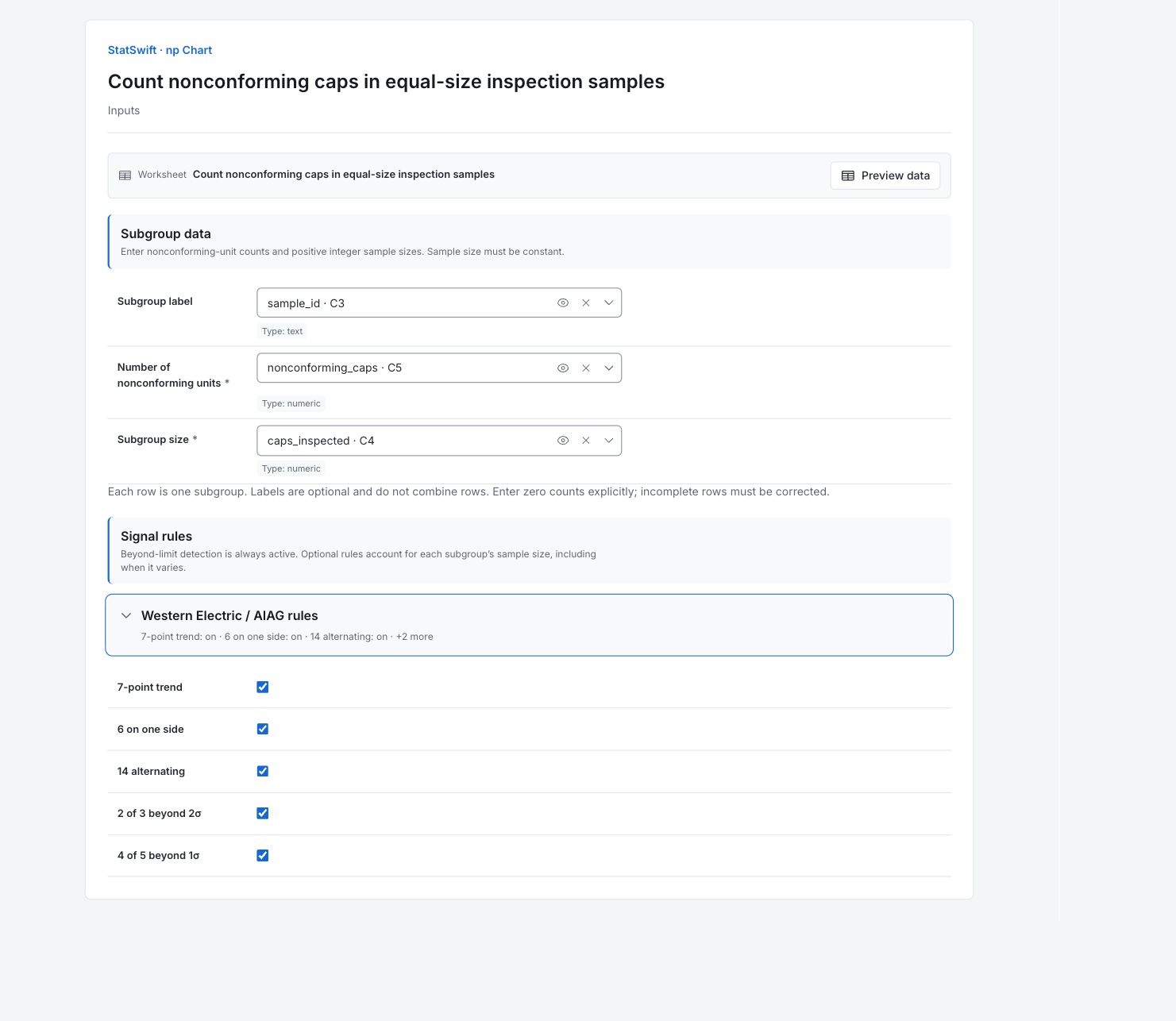
On Inputs, assign sample_id to Subgroup label, nonconforming_caps to Number of nonconforming units, and caps_inspected to Subgroup size, selecting each from the column picker. All sample sizes must remain 200 for this example.
Open Western Electric / AIAG rules. Leave all five optional rules On: 7-point trend, 6 on one side, 14 alternating, 2 of 3 beyond 2σ and 4 of 5 beyond 1σ.
4. Run analysis
Choose Run analysis, then open Results.
5. Interpret results
Understand each point
Each point counts nonconforming caps in a sample of 200. Count a cap once even if it fails several checks. The vertical scale is caps, not percent.
Compare the counts with the limits
The center estimated from these 40 samples is 8.35 nonconforming caps per 200-cap sample. An average can be fractional even though each count is a whole number. CAP35, CAP37 and CAP40 cross the upper limit of 16.836; the lower limit is zero.

Nonconforming caps in each of 40 samples of 200. The vertical scale is a count. View full-size chart (opens in a new tab) Read the highlighted points
Some points are highlighted because of a pattern, even when they are inside the limits. Several rules can flag the same sample, so signal-detail rows are not separate incidents. All samples contain 200 caps; that makes their counts comparable.
Decide what to investigate
Compare CAP35, CAP37 and CAP40 with nearby samples and their inspection records. Check what changed before assigning a cause. If future sample sizes vary, use a p chart to compare proportions.
More details: read each result section
Complete result tables use six significant digits, as in Help.
np chart summary
All 40 samples contain 200 caps. The center, 8.35, is estimated from these samples; it is an average, not a possible individual count or an established long-run baseline. A count of 17 exceeds the upper limit. Use a p chart when sample sizes vary.
| Statistic / setting | Value |
|---|---|
| Subgroups (k) | 40 |
| Average nonconforming count (np̄) | 8.35 |
| Sample size (n) | 200 |
| Beyond-limit detection | On |
| 7-point trend | On |
| 6 on one side | On |
| 14 alternating | On |
| 2 of 3 beyond 2σ | On |
| 4 of 5 beyond 1σ | On |
- The np chart assumes a constant sample size.
np values, control limits and zones
Each row lists the sample’s nonconforming count, constant sample size and limits. Use CAP labels to find the source inspection. A fractional chart center or limit is valid even though actual counts are integers.
| Subgroup | Label | np | CL | LCL | UCL | −1σ | +1σ | −2σ | +2σ | Signals |
|---|---|---|---|---|---|---|---|---|---|---|
| 1 | CAP01 | 3 | 8.35 | 0 | 16.836 | 5.52133 | 11.1787 | 2.69266 | 14.0073 | 6 on one side |
| 2 | CAP02 | 5 | 8.35 | 0 | 16.836 | 5.52133 | 11.1787 | 2.69266 | 14.0073 | 6 on one side |
| 3 | CAP03 | 6 | 8.35 | 0 | 16.836 | 5.52133 | 11.1787 | 2.69266 | 14.0073 | 6 on one side |
| 4 | CAP04 | 8 | 8.35 | 0 | 16.836 | 5.52133 | 11.1787 | 2.69266 | 14.0073 | 6 on one side |
| 5 | CAP05 | 6 | 8.35 | 0 | 16.836 | 5.52133 | 11.1787 | 2.69266 | 14.0073 | 6 on one side |
| 6 | CAP06 | 3 | 8.35 | 0 | 16.836 | 5.52133 | 11.1787 | 2.69266 | 14.0073 | 6 on one side |
| 7 | CAP07 | 12 | 8.35 | 0 | 16.836 | 5.52133 | 11.1787 | 2.69266 | 14.0073 | None |
| 8 | CAP08 | 7 | 8.35 | 0 | 16.836 | 5.52133 | 11.1787 | 2.69266 | 14.0073 | 6 on one side |
| 9 | CAP09 | 5 | 8.35 | 0 | 16.836 | 5.52133 | 11.1787 | 2.69266 | 14.0073 | 6 on one side |
| 10 | CAP10 | 3 | 8.35 | 0 | 16.836 | 5.52133 | 11.1787 | 2.69266 | 14.0073 | 6 on one side |
| 11 | CAP11 | 8 | 8.35 | 0 | 16.836 | 5.52133 | 11.1787 | 2.69266 | 14.0073 | 6 on one side |
| 12 | CAP12 | 2 | 8.35 | 0 | 16.836 | 5.52133 | 11.1787 | 2.69266 | 14.0073 | 6 on one side |
| 13 | CAP13 | 6 | 8.35 | 0 | 16.836 | 5.52133 | 11.1787 | 2.69266 | 14.0073 | 6 on one side |
| 14 | CAP14 | 9 | 8.35 | 0 | 16.836 | 5.52133 | 11.1787 | 2.69266 | 14.0073 | None |
| 15 | CAP15 | 4 | 8.35 | 0 | 16.836 | 5.52133 | 11.1787 | 2.69266 | 14.0073 | None |
| 16 | CAP16 | 8 | 8.35 | 0 | 16.836 | 5.52133 | 11.1787 | 2.69266 | 14.0073 | None |
| 17 | CAP17 | 5 | 8.35 | 0 | 16.836 | 5.52133 | 11.1787 | 2.69266 | 14.0073 | None |
| 18 | CAP18 | 10 | 8.35 | 0 | 16.836 | 5.52133 | 11.1787 | 2.69266 | 14.0073 | None |
| 19 | CAP19 | 4 | 8.35 | 0 | 16.836 | 5.52133 | 11.1787 | 2.69266 | 14.0073 | None |
| 20 | CAP20 | 6 | 8.35 | 0 | 16.836 | 5.52133 | 11.1787 | 2.69266 | 14.0073 | None |
| 21 | CAP21 | 6 | 8.35 | 0 | 16.836 | 5.52133 | 11.1787 | 2.69266 | 14.0073 | None |
| 22 | CAP22 | 10 | 8.35 | 0 | 16.836 | 5.52133 | 11.1787 | 2.69266 | 14.0073 | None |
| 23 | CAP23 | 8 | 8.35 | 0 | 16.836 | 5.52133 | 11.1787 | 2.69266 | 14.0073 | None |
| 24 | CAP24 | 11 | 8.35 | 0 | 16.836 | 5.52133 | 11.1787 | 2.69266 | 14.0073 | None |
| 25 | CAP25 | 6 | 8.35 | 0 | 16.836 | 5.52133 | 11.1787 | 2.69266 | 14.0073 | None |
| 26 | CAP26 | 8 | 8.35 | 0 | 16.836 | 5.52133 | 11.1787 | 2.69266 | 14.0073 | None |
| 27 | CAP27 | 6 | 8.35 | 0 | 16.836 | 5.52133 | 11.1787 | 2.69266 | 14.0073 | None |
| 28 | CAP28 | 10 | 8.35 | 0 | 16.836 | 5.52133 | 11.1787 | 2.69266 | 14.0073 | None |
| 29 | CAP29 | 4 | 8.35 | 0 | 16.836 | 5.52133 | 11.1787 | 2.69266 | 14.0073 | None |
| 30 | CAP30 | 5 | 8.35 | 0 | 16.836 | 5.52133 | 11.1787 | 2.69266 | 14.0073 | None |
| 31 | CAP31 | 12 | 8.35 | 0 | 16.836 | 5.52133 | 11.1787 | 2.69266 | 14.0073 | None |
| 32 | CAP32 | 7 | 8.35 | 0 | 16.836 | 5.52133 | 11.1787 | 2.69266 | 14.0073 | None |
| 33 | CAP33 | 8 | 8.35 | 0 | 16.836 | 5.52133 | 11.1787 | 2.69266 | 14.0073 | None |
| 34 | CAP34 | 13 | 8.35 | 0 | 16.836 | 5.52133 | 11.1787 | 2.69266 | 14.0073 | 6 on one side, 4 of 5 beyond 1σ, 4 of 5 beyond 1σ |
| 35 | CAP35 | 22 | 8.35 | 0 | 16.836 | 5.52133 | 11.1787 | 2.69266 | 14.0073 | Beyond 3σ, 6 on one side, 6 on one side, 2 of 3 beyond 2σ, 4 of 5 beyond 1σ, 4 of 5 beyond 1σ, 4 of 5 beyond 1σ |
| 36 | CAP36 | 14 | 8.35 | 0 | 16.836 | 5.52133 | 11.1787 | 2.69266 | 14.0073 | 6 on one side, 6 on one side, 4 of 5 beyond 1σ, 4 of 5 beyond 1σ, 4 of 5 beyond 1σ, 4 of 5 beyond 1σ |
| 37 | CAP37 | 17 | 8.35 | 0 | 16.836 | 5.52133 | 11.1787 | 2.69266 | 14.0073 | Beyond 3σ, 6 on one side, 6 on one side, 2 of 3 beyond 2σ, 2 of 3 beyond 2σ, 2 of 3 beyond 2σ, 4 of 5 beyond 1σ, 4 of 5 beyond 1σ, 4 of 5 beyond 1σ, 4 of 5 beyond 1σ |
| 38 | CAP38 | 15 | 8.35 | 0 | 16.836 | 5.52133 | 11.1787 | 2.69266 | 14.0073 | 6 on one side, 6 on one side, 2 of 3 beyond 2σ, 2 of 3 beyond 2σ, 2 of 3 beyond 2σ, 4 of 5 beyond 1σ, 4 of 5 beyond 1σ, 4 of 5 beyond 1σ |
| 39 | CAP39 | 9 | 8.35 | 0 | 16.836 | 5.52133 | 11.1787 | 2.69266 | 14.0073 | 6 on one side, 6 on one side |
| 40 | CAP40 | 23 | 8.35 | 0 | 16.836 | 5.52133 | 11.1787 | 2.69266 | 14.0073 | Beyond 3σ, 6 on one side, 2 of 3 beyond 2σ, 4 of 5 beyond 1σ |
Control chart signal details
Each row names an inspection index or label and a rule. Beyond limits identifies a crossing; other rules flag patterns that may stay inside the limits. Several rules may flag the same sample. These entries identify inspections to investigate, not the number of defective caps.
| Index (as returned) | Chart | Rule |
|---|---|---|
| 0 | np | 6 on one side |
| 1 | np | 6 on one side |
| 10 | np | 6 on one side |
| 11 | np | 6 on one side |
| 12 | np | 6 on one side |
| 2 | np | 6 on one side |
| 3 | np | 6 on one side |
| 33 | np | 4 of 5 beyond 1σ |
| 33 | np | 4 of 5 beyond 1σ |
| 33 | np | 6 on one side |
| 34 | np | 2 of 3 beyond 2σ |
| 34 | np | 4 of 5 beyond 1σ |
| 34 | np | 4 of 5 beyond 1σ |
| 34 | np | 4 of 5 beyond 1σ |
| 34 | np | 6 on one side |
| 34 | np | 6 on one side |
| 34 | np | Beyond 3σ |
| 35 | np | 4 of 5 beyond 1σ |
| 35 | np | 4 of 5 beyond 1σ |
| 35 | np | 4 of 5 beyond 1σ |
| 35 | np | 4 of 5 beyond 1σ |
| 35 | np | 6 on one side |
| 35 | np | 6 on one side |
| 36 | np | 2 of 3 beyond 2σ |
| 36 | np | 2 of 3 beyond 2σ |
| 36 | np | 2 of 3 beyond 2σ |
| 36 | np | 4 of 5 beyond 1σ |
| 36 | np | 4 of 5 beyond 1σ |
| 36 | np | 4 of 5 beyond 1σ |
| 36 | np | 4 of 5 beyond 1σ |
| 36 | np | 6 on one side |
| 36 | np | 6 on one side |
| 36 | np | Beyond 3σ |
| 37 | np | 2 of 3 beyond 2σ |
| 37 | np | 2 of 3 beyond 2σ |
| 37 | np | 2 of 3 beyond 2σ |
| 37 | np | 4 of 5 beyond 1σ |
| 37 | np | 4 of 5 beyond 1σ |
| 37 | np | 4 of 5 beyond 1σ |
| 37 | np | 6 on one side |
| 37 | np | 6 on one side |
| 38 | np | 6 on one side |
| 38 | np | 6 on one side |
| 39 | np | 2 of 3 beyond 2σ |
| 39 | np | 4 of 5 beyond 1σ |
| 39 | np | 6 on one side |
| 39 | np | Beyond 3σ |
| 4 | np | 6 on one side |
| 5 | np | 6 on one side |
| 7 | np | 6 on one side |
| 8 | np | 6 on one side |
| 9 | np | 6 on one side |
- Endpoint signal indices start at 0; chart subgroup numbers start at 1.
6. Create a report
Keep the np control chart, summary, sample values and limits, and signal details. State that every sample contains 200 caps and record your investigation of CAP35, CAP37 and CAP40.
Choose Add to report from the completed run. Open Choose individual items and advanced options to select tables and charts, then choose Add to draft. Hidden items stay in the saved analysis.
Name the report and add the purpose of the study and your interpretation. Choose Save, review Preview, then use Export → Download HTML. The example below contains the full selected content, including results beyond one screen.