

Example: batch viscosity
The example records 80 successive adhesive batches, with viscosity measured at 25 °C in mPa·s. The timestamps are local collection times without an assigned timezone.
Download the example data (CSV)This is the same example used in Help. The CSV contains the observations to import.
1. Create the analysis
In the sidebar, open Plots and create an analysis. Name it, select New blank worksheet, then choose Create analysis.
2. Import the data
On Worksheet, choose Import. Select the downloaded CSV or paste its contents. Set the delimiter to Comma, use Decimal dot, and check First row contains column names. Preview the import, then choose Import into worksheet.
3. Assign the input columns
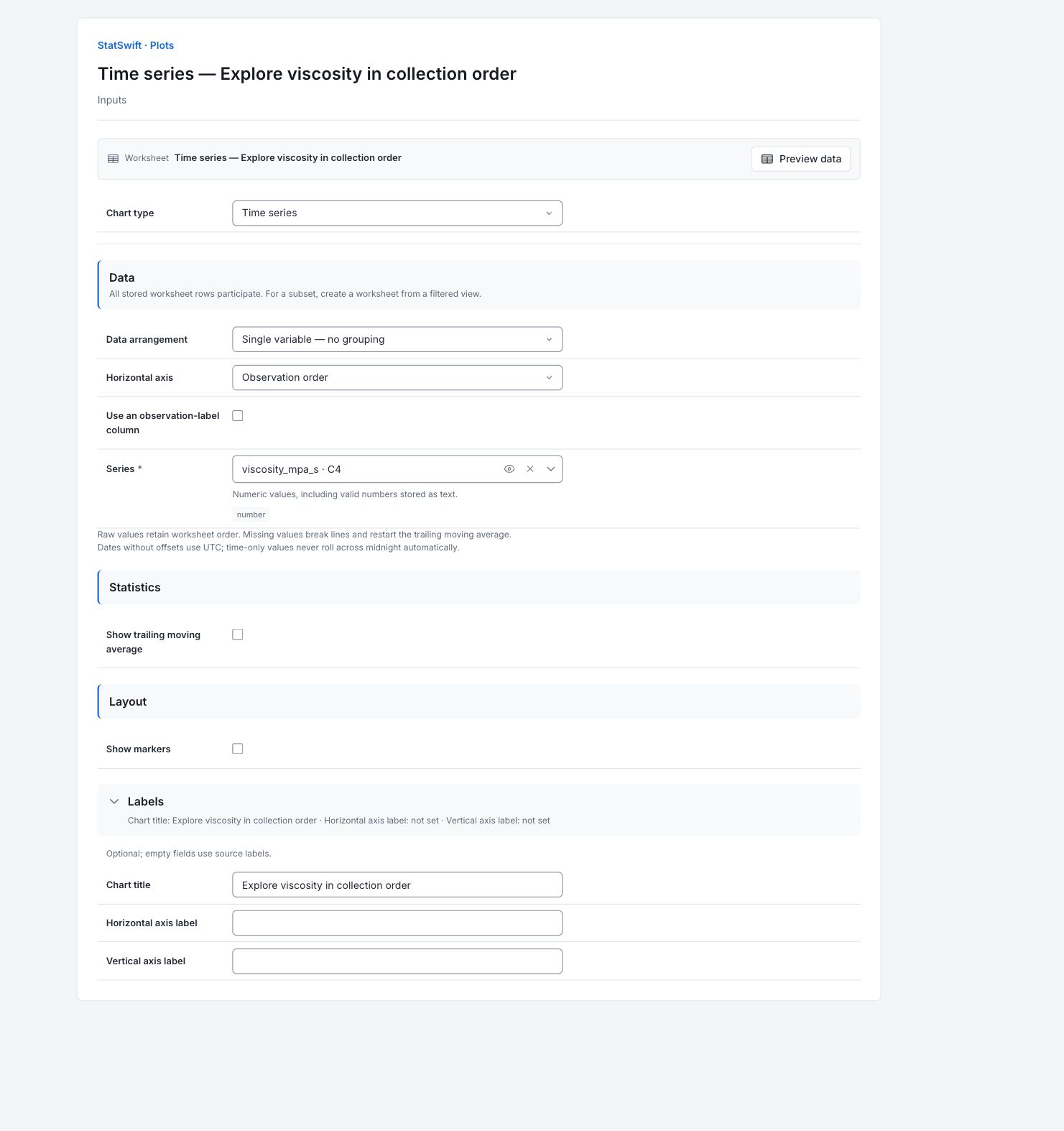
On Inputs, choose Time series in Chart type. In Data arrangement, choose Single variable — no grouping. Set Horizontal axis to Observation order and leave Use an observation-label column unchecked.
Open the column picker for Series and select viscosity_mpa_s. Keep all 80 rows in their supplied order. The chart uses row position, rather than the collected_at timestamps.
4. Set the chart options
Leave Show trailing moving average and Show markers unchecked. The line will connect the original batch readings without smoothing.
Open Labels and enter Explore viscosity in collection order in Chart title. Leave Horizontal axis label and Vertical axis label blank so the source labels are used.
5. Create chart
Choose Create chart, then open Results. Check Data used before comparing the chart with this guide. All stored worksheet rows participate; sorting or filtering the worksheet does not change the analytical sample.
6. Interpret results
Follow the collection order
The horizontal axis is observation order, rather than elapsed time. Each line segment connects two successive batch readings. The vertical axis is viscosity in mPa·s, measured at 25 °C.

Eighty original batch-viscosity readings connected in collection order, without smoothing or limits. View full-size chart (opens in a new tab) Inspect observation 52
Observation 52 is batch ADH052, at 1380.8 mPa·s. Its neighbors are ADH051 (1245.1 mPa·s) and ADH053 (1256.1 mPa·s). Check these measurement and batch records together; their heights do not identify a cause or justify automatic deletion.
Keep the chart’s purpose in mind
This is a time-series line, without smoothing, control limits or customer acceptance limits. Its appearance alone does not establish whether the process is stable.
Choose the next analysis
Preserve collection order and use the I-MR example if a control-chart study is appropriate. Investigate the batch records before deciding whether an unusual reading is a data error or a process change.
More details: read each result section
Complete result tables use six significant digits, as in Help.
Data used
Worksheet rows is 80; Eligible observations across series is 80; Excluded observations is 0. All source rows are used. Check these counts and keep the example’s column assignments when comparing runs. Worksheet sorting and filters do not change the analytical sample.
All stored rows are considered in original order. Worksheet sorting and filters do not change the analytical sample.
| Worksheet rows | Eligible observations across series | Excluded observations |
|---|---|---|
| 80 | 80 | 0 |
Data summary
Series names the measurement or group. Valid and Missing give counts; Mean and Median describe the center. Sample SD describes spread. Minimum and Maximum are the observed ends; Q1 and Q3 enclose the middle half. These summaries describe the captured observations, not acceptance limits.
| Series | Valid | Missing | Mean | Sample SD | Minimum | Q1 | Median | Q3 | Maximum |
|---|---|---|---|---|---|---|---|---|---|
| viscosity_mpa_s | 80 | 0 | 1251.17 | 22.3753 | 1215.2 | 1238.18 | 1246.95 | 1260.48 | 1380.8 |
Connected values
Series names the viscosity column. First worksheet row and Worksheet row locate each reading in collection order; viscosity_mpa_s gives the original value. There are 80 connected values and no moving-average column. Observation 52 is 1380.8 mPa·s.
| Series | First worksheet row (0 = empty period) | Worksheet row | viscosity_mpa_s |
|---|---|---|---|
| viscosity_mpa_s | 1 | 1 | 1260.2 |
| viscosity_mpa_s | 2 | 2 | 1258.6 |
| viscosity_mpa_s | 3 | 3 | 1232.8 |
| viscosity_mpa_s | 4 | 4 | 1250.6 |
| viscosity_mpa_s | 5 | 5 | 1291.7 |
| viscosity_mpa_s | 6 | 6 | 1242.8 |
| viscosity_mpa_s | 7 | 7 | 1272.1 |
| viscosity_mpa_s | 8 | 8 | 1237.6 |
| viscosity_mpa_s | 9 | 9 | 1237 |
| viscosity_mpa_s | 10 | 10 | 1243 |
| viscosity_mpa_s | 11 | 11 | 1238.2 |
| viscosity_mpa_s | 12 | 12 | 1280 |
| viscosity_mpa_s | 13 | 13 | 1250.2 |
| viscosity_mpa_s | 14 | 14 | 1274.8 |
| viscosity_mpa_s | 15 | 15 | 1246.3 |
| viscosity_mpa_s | 16 | 16 | 1232.5 |
| viscosity_mpa_s | 17 | 17 | 1238.1 |
| viscosity_mpa_s | 18 | 18 | 1215.2 |
| viscosity_mpa_s | 19 | 19 | 1244.3 |
| viscosity_mpa_s | 20 | 20 | 1265 |
| viscosity_mpa_s | 21 | 21 | 1252.7 |
| viscosity_mpa_s | 22 | 22 | 1247.9 |
| viscosity_mpa_s | 23 | 23 | 1246.6 |
| viscosity_mpa_s | 24 | 24 | 1245.6 |
| viscosity_mpa_s | 25 | 25 | 1253.9 |
| viscosity_mpa_s | 26 | 26 | 1235.9 |
| viscosity_mpa_s | 27 | 27 | 1253.9 |
| viscosity_mpa_s | 28 | 28 | 1267.6 |
| viscosity_mpa_s | 29 | 29 | 1254.3 |
| viscosity_mpa_s | 30 | 30 | 1234.1 |
| viscosity_mpa_s | 31 | 31 | 1262.3 |
| viscosity_mpa_s | 32 | 32 | 1216.5 |
| viscosity_mpa_s | 33 | 33 | 1245.8 |
| viscosity_mpa_s | 34 | 34 | 1244.4 |
| viscosity_mpa_s | 35 | 35 | 1260.7 |
| viscosity_mpa_s | 36 | 36 | 1267.9 |
| viscosity_mpa_s | 37 | 37 | 1273.9 |
| viscosity_mpa_s | 38 | 38 | 1260.8 |
| viscosity_mpa_s | 39 | 39 | 1283.4 |
| viscosity_mpa_s | 40 | 40 | 1237 |
| viscosity_mpa_s | 41 | 41 | 1241.3 |
| viscosity_mpa_s | 42 | 42 | 1250.3 |
| viscosity_mpa_s | 43 | 43 | 1247.1 |
| viscosity_mpa_s | 44 | 44 | 1218.9 |
| viscosity_mpa_s | 45 | 45 | 1289 |
| viscosity_mpa_s | 46 | 46 | 1241.8 |
| viscosity_mpa_s | 47 | 47 | 1253.6 |
| viscosity_mpa_s | 48 | 48 | 1255 |
| viscosity_mpa_s | 49 | 49 | 1253.4 |
| viscosity_mpa_s | 50 | 50 | 1273.8 |
| viscosity_mpa_s | 51 | 51 | 1245.1 |
| viscosity_mpa_s | 52 | 52 | 1380.8 |
| viscosity_mpa_s | 53 | 53 | 1256.1 |
| viscosity_mpa_s | 54 | 54 | 1248 |
| viscosity_mpa_s | 55 | 55 | 1217 |
| viscosity_mpa_s | 56 | 56 | 1236.9 |
| viscosity_mpa_s | 57 | 57 | 1256.6 |
| viscosity_mpa_s | 58 | 58 | 1285.3 |
| viscosity_mpa_s | 59 | 59 | 1226.2 |
| viscosity_mpa_s | 60 | 60 | 1233.9 |
| viscosity_mpa_s | 61 | 61 | 1263.5 |
| viscosity_mpa_s | 62 | 62 | 1239.4 |
| viscosity_mpa_s | 63 | 63 | 1243.2 |
| viscosity_mpa_s | 64 | 64 | 1218.8 |
| viscosity_mpa_s | 65 | 65 | 1272.6 |
| viscosity_mpa_s | 66 | 66 | 1266.5 |
| viscosity_mpa_s | 67 | 67 | 1246.8 |
| viscosity_mpa_s | 68 | 68 | 1237.6 |
| viscosity_mpa_s | 69 | 69 | 1225.5 |
| viscosity_mpa_s | 70 | 70 | 1268.3 |
| viscosity_mpa_s | 71 | 71 | 1242.2 |
| viscosity_mpa_s | 72 | 72 | 1245.7 |
| viscosity_mpa_s | 73 | 73 | 1252.9 |
| viscosity_mpa_s | 74 | 74 | 1245.3 |
| viscosity_mpa_s | 75 | 75 | 1241.7 |
| viscosity_mpa_s | 76 | 76 | 1260.4 |
| viscosity_mpa_s | 77 | 77 | 1258.7 |
| viscosity_mpa_s | 78 | 78 | 1240.4 |
| viscosity_mpa_s | 79 | 79 | 1230.8 |
| viscosity_mpa_s | 80 | 80 | 1226.7 |
7. Create a report
Keep the native chart and Data used, together with Data summary, Connected values. Record the column assignments and chart options. Include the study context and any checks of unusual observations. Keep the chart’s units and the limitations described in the walkthrough.
Choose Add to report from the completed run. Open Choose individual items and advanced options to select tables and charts, then choose Add to draft. Hidden items stay in the saved analysis.
Name the report and add the purpose of the study and your interpretation. Choose Save, review Preview, then use Export → Download HTML. The example below contains the full selected content, including results beyond one screen.