

Example: length comparator
One operator removes, repositions and measures the same 25.000 mm reference block 50 times in one session. The comparator will be used for spacers specified at 24.950–25.050 mm.
Download the length-comparator example (CSV)This is the same example used in Help. measured_length_mm contains the readings in mm. reference_mm and reference_id describe the reference block; the fixed reference value is entered on Inputs.
1. Create the analysis
In the sidebar, open Measurement systems, choose Cg / Cgk (Type 1), and name the analysis. Select New blank worksheet and Create analysis.
2. Import the data
On Worksheet, choose Import. Select the downloaded file or paste its contents. Set the delimiter to Comma, use Decimal dot, and check First row contains column names. Preview the import, then choose Import into worksheet. Keep every reading.
3. Assign the input column
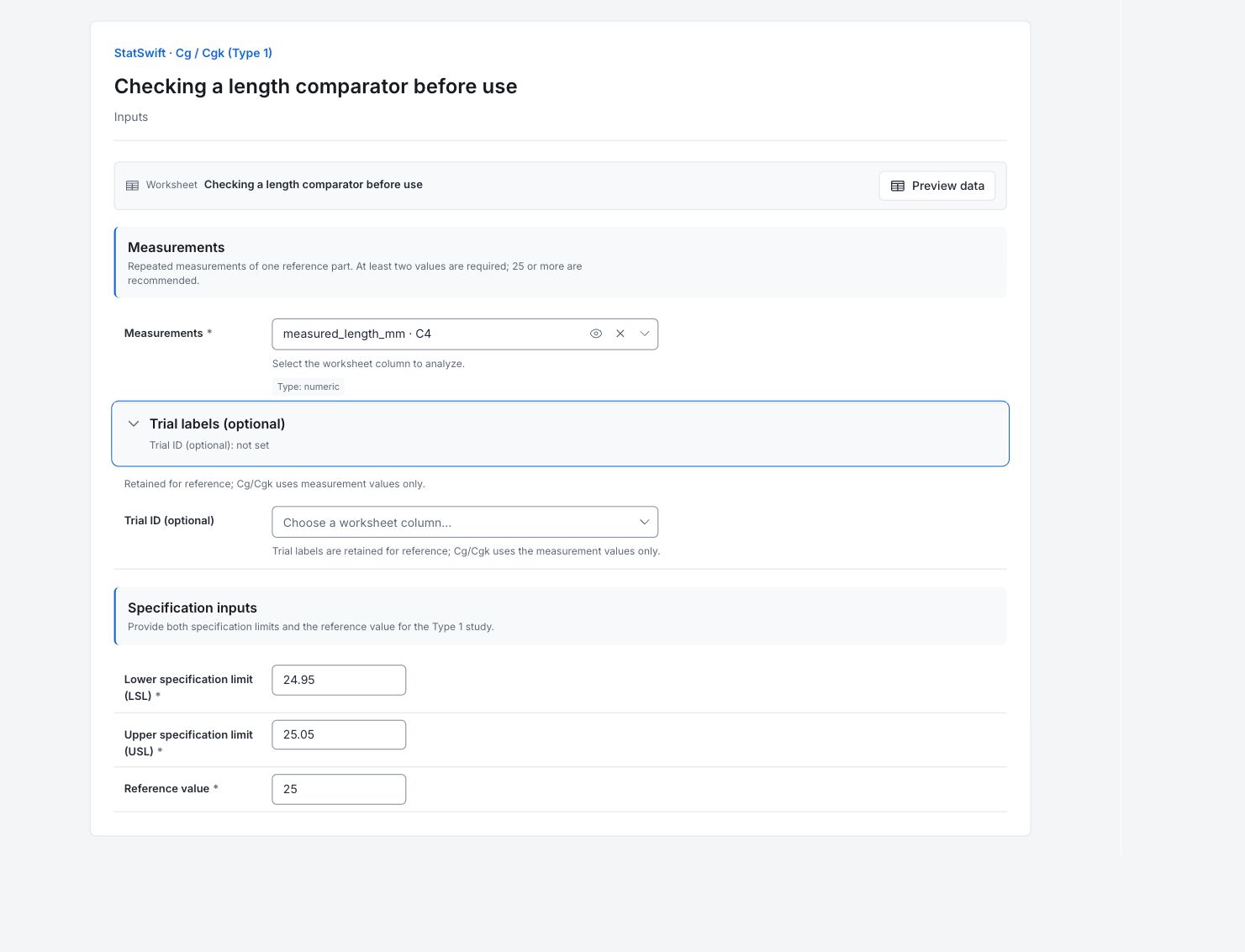
On Inputs, assign measured_length_mm to Measurements, selecting it from the column picker. Leave Trial ID (optional) unassigned.
4. Set the reference and specifications
Enter 24.950 in Lower specification limit (LSL), 25.050 in Upper specification limit (USL), and 25.000 in Reference value. All values use mm. The specification width is 0.100 mm.
5. Run analysis
Choose Run analysis, then open Results.
6. Interpret results
Understand the study
These are 50 repeated measurements of one reference block by one operator. The study separates the scatter of those readings from their average offset relative to 25.000 mm.
Read Cg and Cgk
Cg≈1.982 compares 20% of the 0.100 mm tolerance with six times the repeated-reading SD. Cgk≈1.542 is lower because it also accounts for mean bias from the reference. The 1.33 band is the app’s reporting rule; acceptance must follow your intended use and requirements.
Find the direction of the offset
The mean reading is 25.0022 mm, about 0.00222 mm above the 25.000 mm reference. The comparator reads high in this session. The intermediate table reports absolute bias; use mean minus reference to find the direction.
Keep the conclusion local
The app places Cgk in its ≥1.33 band. This describes one operator, one reference size and one session using a 0.100 mm specification width. Review the reference and measurement conditions, and assess other sizes or operators separately before extending the conclusion.
More details: read each result section
Complete result tables use six significant digits, as in Help.
Gauge capability indices
Cg is 1.982 and Cgk is 1.542. The lower Cgk reflects the reference offset as well as dispersion. The app places Cgk in its ≥1.33 threshold band; this is the Type 1 result at one reference size, not a certification of the entire measurement system.
| Statistic | Value | Formula |
|---|---|---|
| Cg | 1.9821 | Cg = 0.2·TOL / (6·s) |
| Cgk | 1.54208 | Cgk = (0.1·TOL − |x̄ − ref|) / (3·s) |
- Cgk threshold band: ≥ 1.33.
Type 1 study intermediates
Across 50 readings, the mean is 25.0022 mm and sample SD is 0.001682 mm. The mean is 0.00222 mm above the 25.000 mm reference. The table reports the absolute bias, so determine its direction from mean minus reference. The specification width is 0.100 mm.
| Statistic | Value |
|---|---|
| Measurements (n) | 50 |
| Mean (x̄) | 25.0022 |
| Sample standard deviation (s) | 0.00168171 |
| Absolute bias |x̄ − ref| | 0.00222 |
| Tolerance (USL − LSL) | 0.1 |
7. Create a report
Keep Gauge capability indices and Type 1 study intermediates. Record the reference block, the 0.100 mm specification width, the operator and the measurement conditions. Keep the conclusion specific to this reference size and session.
Choose Add to report from the completed run. Open Choose individual items and advanced options to select tables and charts, then choose Add to draft. Hidden items stay in the saved analysis.
Name the report and add the purpose of the study and your interpretation. Choose Save, review Preview, then use Export → Download HTML. The example below contains the full selected content, including results beyond one screen.