

Example: coating durability
The team plans to vary drying temperature, air speed and drying time for coated panels. The face-centered design stays within the entered low/high settings. Abrasion mass loss will be measured in mg; lower loss means less material removed in this test.
Download the factor catalog (CSV)This is the same example used in Help. The CSV lists factor definitions to enter manually on Inputs; importing it does not configure the design. Use Open example in a practice copy in Help to prefill the example settings.
1. Create the workspace
In the sidebar, open Design of Experiments and create an analysis. Name it, select New blank worksheet, then choose Create analysis. The factor catalog is a reference; no measurement data needs to be imported for this task.
2. Choose the design
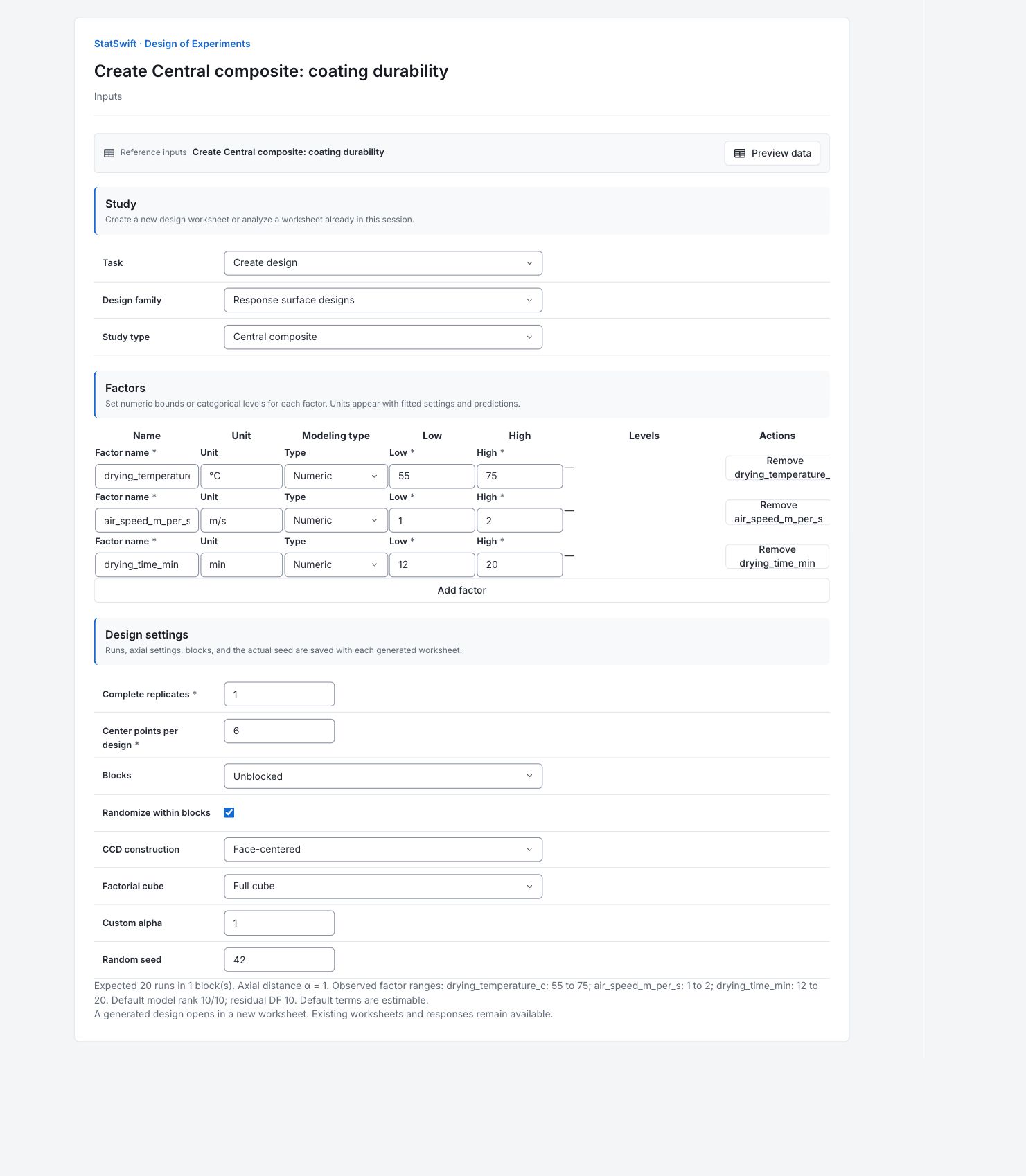
On Inputs, choose Create design for Task and Response surface designs for Design family. Choose Central composite for Study type.
3. Enter the factors
Under Factors, use Add factor or remove a row until there are 3 factors. Keep them in the order below. Set Type to Numeric for every factor.
Enter the Factor name, Unit, Low and High values below.
| Factor | Factor name | Unit | Low | High |
|---|---|---|---|---|
| A | drying_temperature_c | °C | 55 | 75 |
| B | air_speed_m_per_s | m/s | 1 | 2 |
| C | drying_time_min | min | 12 | 20 |
4. Set the run plan
Enter 1 in Complete replicates and 6 in Center points per design. Choose Unblocked for Blocks. Set CCD construction to Face-centered and Factorial cube to Full cube. Enter 1 in Custom alpha. Check Randomize within blocks and enter 42 in Random seed.
The preview should show Expected 20 runs in 1 block(s) and Axial distance α = 1. Here alpha is a design distance, not a statistical significance level.
5. Generate design
Choose Generate design. A new worksheet opens with the randomized run plan and a blank Response 1 column. Open Results to inspect the design summary and complete run sheet. Keep this generated study separate from the recorded analysis example.
6. Interpret results
Check the run plan
Design summary shows 20 runs: eight factorial corners, six face-centered axial points and six center runs, in one block. The plan includes settings needed for a quadratic model. No abrasion mass loss has been measured yet.
Read the first run
Execution order 1 is standard-order run 8, a factorial point. Its settings are 75 °C, 2 m/s air speed and 20 minutes. Follow execution order; standard order identifies where the point belongs in the design.
Understand the axial and center points
An axial point moves one factor to an extreme while the other two stay at their midpoints. Center settings are 65 °C, 1.5 m/s and 16 minutes. Alpha is 1, so the axial settings remain at the entered bounds. Independently prepared center panels help estimate repeat-run variation.
Conduct and record the study
Check that all settings are feasible, then follow the randomized order. Enter each newly measured abrasion loss in Response 1 against its actual panel run. Keep the point types and factor settings with the responses; a generated plan is not evidence of a durable coating.
More details: read each result section
Complete result tables use six significant digits, as in Help.
Design summary
Family identifies the central composite design. Runs is 20: eight factorial corners, six face-centered axial points and six centers. Replicates is 1 and Blocks is 1. Actual seed is 42; retain Generator version to reproduce the plan. Alpha is axial distance in coded units, here 1; it is not a significance level. The Resolution row does not apply to this CCD.
| Statistic | Value |
|---|---|
| Family | Central composite |
| Runs | 20 |
| Base runs | 20 |
| Replicates | 1 |
| Blocks | 1 |
| Alpha | 1 |
| Resolution | — |
| Actual seed | 42 |
| Generator version | doe-v2.1 |
- Unavailable settings are shown as —; the saved design rows remain authoritative.
Factor settings
Each row gives the Factor name, modeling Type, Unit and entered Low and High bounds. All factors here are numeric. A dash under Levels means no additional explicit level list was entered. Midpoints are factor settings for center runs, not measured responses.
| Factor | Type | Unit | Low | High | Levels |
|---|---|---|---|---|---|
| drying_temperature_c | numeric | °C | 55 | 75 | — |
| air_speed_m_per_s | numeric | m/s | 1 | 2 | — |
| drying_time_min | numeric | min | 12 | 20 | — |
Run sheet
All generated runs are shown in execution order. Row ID identifies a run; Standard order identifies its design position; Execution order gives its planned sequence. Block groups runs and Replicate identifies repeated designs. Point type distinguishes factorial, star (axial), edge or center points, as applicable. The remaining columns are actual factor settings in their stated units. The generated worksheet’s Response 1 starts blank; no response values appear in this plan.
| Row ID | Standard order | Execution order | Block | Point type | Replicate | drying_temperature_c | air_speed_m_per_s | drying_time_min |
|---|---|---|---|---|---|---|---|---|
| doe-8 | 8 | 1 | 1 | factorial | 1 | 75 | 2 | 20 |
| doe-13 | 13 | 2 | 1 | star | 1 | 65 | 1.5 | 12 |
| doe-3 | 3 | 3 | 1 | factorial | 1 | 55 | 2 | 12 |
| doe-10 | 10 | 4 | 1 | star | 1 | 75 | 1.5 | 16 |
| doe-15 | 15 | 5 | 1 | center | 1 | 65 | 1.5 | 16 |
| doe-17 | 17 | 6 | 1 | center | 1 | 65 | 1.5 | 16 |
| doe-14 | 14 | 7 | 1 | star | 1 | 65 | 1.5 | 20 |
| doe-20 | 20 | 8 | 1 | center | 1 | 65 | 1.5 | 16 |
| doe-5 | 5 | 9 | 1 | factorial | 1 | 75 | 1 | 12 |
| doe-9 | 9 | 10 | 1 | star | 1 | 55 | 1.5 | 16 |
| doe-12 | 12 | 11 | 1 | star | 1 | 65 | 2 | 16 |
| doe-18 | 18 | 12 | 1 | center | 1 | 65 | 1.5 | 16 |
| doe-19 | 19 | 13 | 1 | center | 1 | 65 | 1.5 | 16 |
| doe-16 | 16 | 14 | 1 | center | 1 | 65 | 1.5 | 16 |
| doe-1 | 1 | 15 | 1 | factorial | 1 | 55 | 1 | 12 |
| doe-7 | 7 | 16 | 1 | factorial | 1 | 75 | 2 | 12 |
| doe-4 | 4 | 17 | 1 | factorial | 1 | 55 | 2 | 20 |
| doe-11 | 11 | 18 | 1 | star | 1 | 65 | 1 | 16 |
| doe-2 | 2 | 19 | 1 | factorial | 1 | 55 | 1 | 20 |
| doe-6 | 6 | 20 | 1 | factorial | 1 | 75 | 1 | 20 |
7. Create a report
Keep Design summary, Factor settings and the complete Run sheet. Record the actual seed, generator version, units and planned execution order. This report documents a design; add measured responses and their analysis separately after conducting the study.
Choose Add to report from the completed run. Open Choose individual items and advanced options to select tables and charts, then choose Add to draft. Hidden items stay in the saved analysis.
Name the report and add the purpose of the study and your interpretation. Choose Save, review Preview, then use Export → Download HTML. The example below contains the full selected content, including results beyond one screen.