

Example: adhesive viscosity
A technician records one viscosity result from each of 80 consecutive adhesive batches. Every sample is tested at 25 °C using the same procedure.
Download the adhesive-viscosity example (CSV)This is the same example used in Help. viscosity_mpa_s contains the readings in mPa·s. batch_id, collected_at and observation_order identify each batch and its place in the sequence.
1. Create the chart workspace
In the sidebar, open Process control, choose I-MR Chart, and name the analysis. Select New blank worksheet and Create analysis.
2. Import the data
On Worksheet, choose Import. Select the downloaded file or paste its contents. Set the delimiter to Comma, use Decimal dot, and check First row contains column names. Preview the import, then choose Import into worksheet. Keep the rows in collection order.
3. Assign the input columns
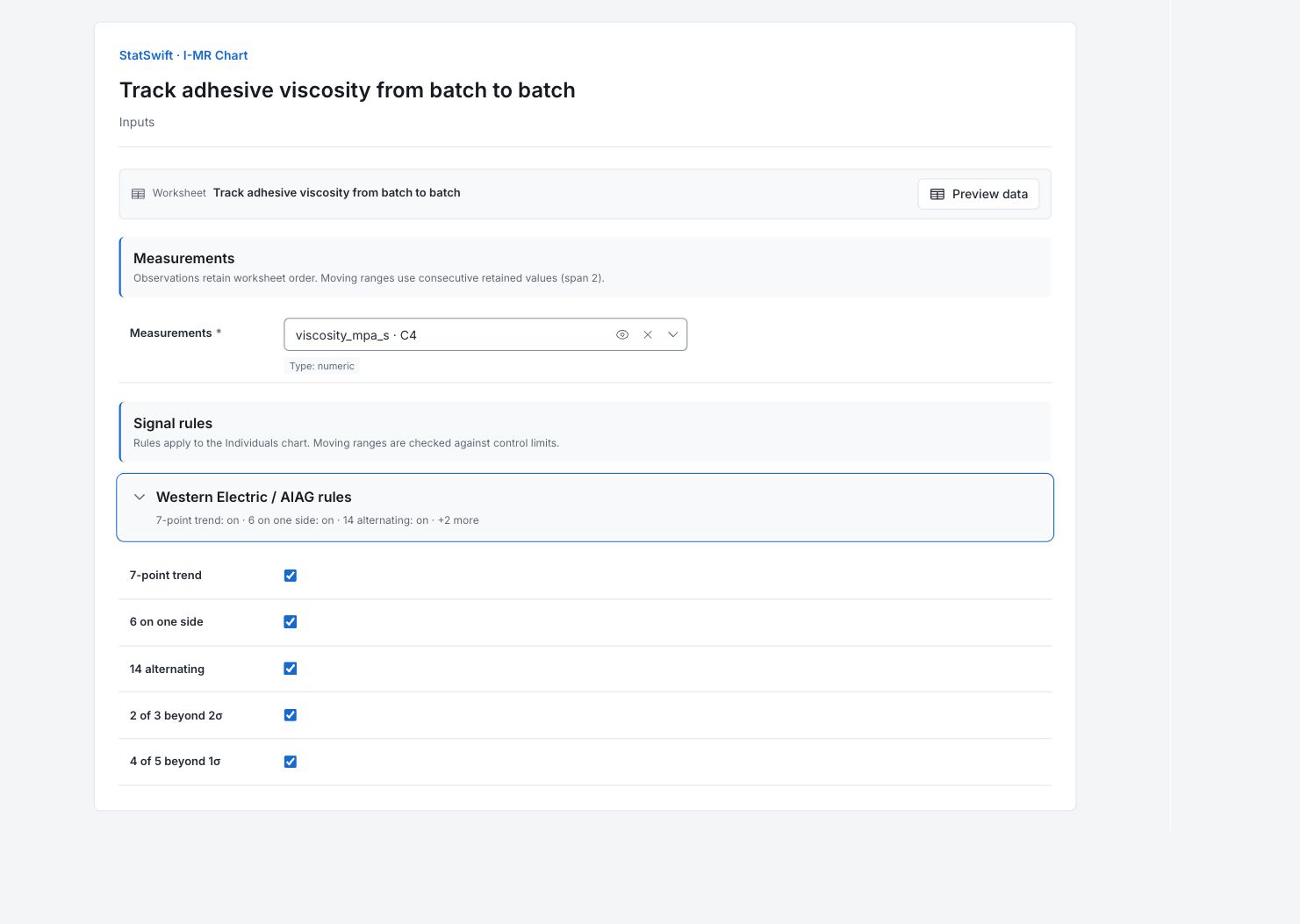
On Inputs, assign viscosity_mpa_s to Measurements, selecting it from the column picker. Keep all 80 readings in collection order. The moving ranges use pairs of consecutive readings.
Open Western Electric / AIAG rules. Leave all five optional rules On: 7-point trend, 6 on one side, 14 alternating, 2 of 3 beyond 2σ and 4 of 5 beyond 1σ.
4. Run analysis
Choose Run analysis, then open Results.
5. Interpret results
Understand each point
Each point on Individuals chart (I) is one batch’s viscosity. Moving range chart (MR) shows the size of the change from the previous batch. The first reading has no moving range.
Check the moving ranges first
The moving ranges at observations 52 and 53 cross the upper limit of 71.994 mPa·s. They show the jump to reading 52 and the return from it. Both changes may belong to the same event.

Adjacent changes in viscosity, in mPa·s. The first reading has no moving range. View full-size chart (opens in a new tab) Find the unusual reading
Observation 52 is batch ADH052 at 1380.8 mPa·s, above the individual upper limit of 1309.775 mPa·s (lower limit 1192.558). Compare its records with observations 51 and 53. The high reading locates an investigation; it does not identify a cause.

Viscosity in mPa·s for 80 batches, in collection order. View full-size chart (opens in a new tab) Decide what to investigate
Check the batch and laboratory records for observations 51–53, including test temperature and measurement conditions. Record what you find before changing the chart limits. In the signal-details table, index 51 refers to chart observation 52; that table starts its indices at 0.
More details: read each result section
Complete result tables use six significant digits, as in Help.
I–MR summary
The 80 observations generate 79 adjacent moving ranges. Three signal entries describe one individual value and two adjacent changes, not three independent incidents.
| Statistic / setting | Value |
|---|---|
| Observations (n) | 80 |
| Mean (X̄) | 1251.17 |
| Average MR | 22.0367 |
| Estimated σ | 19.5361 |
| Signals | 3 |
| 7-point trend | On |
| 6 on one side | On |
| 14 alternating | On |
| 2 of 3 beyond 2σ | On |
| 4 of 5 beyond 1σ | On |
Control limits and zones
Both charts use mPa·s. Limits are estimated from this sequence, including its unusual observation; they are not viscosity specifications.
| Statistic / setting | Value |
|---|---|
| I CL | 1251.17 |
| I LCL | 1192.56 |
| I UCL | 1309.77 |
| MR CL | 22.0367 |
| MR LCL | 0 |
| MR UCL | 71.9939 |
Individual values and moving ranges
Read the individual viscosity, moving range and rules together. The first moving range is unavailable. Locate observation 52 and its neighboring readings in Worksheet; the two adjacent ranges describe the jump and return.
| Observation | I | MR | I signals | MR signals |
|---|---|---|---|---|
| 1 | 1260.2 | — | None | — |
| 2 | 1258.6 | 1.6 | None | None |
| 3 | 1232.8 | 25.8 | None | None |
| 4 | 1250.6 | 17.8 | None | None |
| 5 | 1291.7 | 41.1 | None | None |
| 6 | 1242.8 | 48.9 | None | None |
| 7 | 1272.1 | 29.3 | None | None |
| 8 | 1237.6 | 34.5 | None | None |
| 9 | 1237 | 0.6 | None | None |
| 10 | 1243 | 6 | None | None |
| 11 | 1238.2 | 4.8 | None | None |
| 12 | 1280 | 41.8 | None | None |
| 13 | 1250.2 | 29.8 | None | None |
| 14 | 1274.8 | 24.6 | None | None |
| 15 | 1246.3 | 28.5 | None | None |
| 16 | 1232.5 | 13.8 | None | None |
| 17 | 1238.1 | 5.6 | None | None |
| 18 | 1215.2 | 22.9 | None | None |
| 19 | 1244.3 | 29.1 | None | None |
| 20 | 1265 | 20.7 | None | None |
| 21 | 1252.7 | 12.3 | None | None |
| 22 | 1247.9 | 4.8 | None | None |
| 23 | 1246.6 | 1.3 | None | None |
| 24 | 1245.6 | 1 | None | None |
| 25 | 1253.9 | 8.3 | None | None |
| 26 | 1235.9 | 18 | None | None |
| 27 | 1253.9 | 18 | None | None |
| 28 | 1267.6 | 13.7 | None | None |
| 29 | 1254.3 | 13.3 | None | None |
| 30 | 1234.1 | 20.2 | None | None |
| 31 | 1262.3 | 28.2 | None | None |
| 32 | 1216.5 | 45.8 | None | None |
| 33 | 1245.8 | 29.3 | None | None |
| 34 | 1244.4 | 1.4 | None | None |
| 35 | 1260.7 | 16.3 | None | None |
| 36 | 1267.9 | 7.2 | None | None |
| 37 | 1273.9 | 6 | None | None |
| 38 | 1260.8 | 13.1 | None | None |
| 39 | 1283.4 | 22.6 | None | None |
| 40 | 1237 | 46.4 | None | None |
| 41 | 1241.3 | 4.3 | None | None |
| 42 | 1250.3 | 9 | None | None |
| 43 | 1247.1 | 3.2 | None | None |
| 44 | 1218.9 | 28.2 | None | None |
| 45 | 1289 | 70.1 | None | None |
| 46 | 1241.8 | 47.2 | None | None |
| 47 | 1253.6 | 11.8 | None | None |
| 48 | 1255 | 1.4 | None | None |
| 49 | 1253.4 | 1.6 | None | None |
| 50 | 1273.8 | 20.4 | None | None |
| 51 | 1245.1 | 28.7 | None | None |
| 52 | 1380.8 | 135.7 | Beyond 3σ | Beyond 3σ |
| 53 | 1256.1 | 124.7 | None | Beyond 3σ |
| 54 | 1248 | 8.1 | None | None |
| 55 | 1217 | 31 | None | None |
| 56 | 1236.9 | 19.9 | None | None |
| 57 | 1256.6 | 19.7 | None | None |
| 58 | 1285.3 | 28.7 | None | None |
| 59 | 1226.2 | 59.1 | None | None |
| 60 | 1233.9 | 7.7 | None | None |
| 61 | 1263.5 | 29.6 | None | None |
| 62 | 1239.4 | 24.1 | None | None |
| 63 | 1243.2 | 3.8 | None | None |
| 64 | 1218.8 | 24.4 | None | None |
| 65 | 1272.6 | 53.8 | None | None |
| 66 | 1266.5 | 6.1 | None | None |
| 67 | 1246.8 | 19.7 | None | None |
| 68 | 1237.6 | 9.2 | None | None |
| 69 | 1225.5 | 12.1 | None | None |
| 70 | 1268.3 | 42.8 | None | None |
| 71 | 1242.2 | 26.1 | None | None |
| 72 | 1245.7 | 3.5 | None | None |
| 73 | 1252.9 | 7.2 | None | None |
| 74 | 1245.3 | 7.6 | None | None |
| 75 | 1241.7 | 3.6 | None | None |
| 76 | 1260.4 | 18.7 | None | None |
| 77 | 1258.7 | 1.7 | None | None |
| 78 | 1240.4 | 18.3 | None | None |
| 79 | 1230.8 | 9.6 | None | None |
| 80 | 1226.7 | 4.1 | None | None |
Control chart signal details
Rows name the returned index, chart and rule. The endpoint signal indices start at 0, while the Individuals display labels observations from 1: returned index 51 refers to observation 52. Moving ranges align with the second observation of each pair. Three entries can describe one isolated event.
| Index (as returned) | Chart | Rule |
|---|---|---|
| 51 | I | Beyond 3σ |
| 51 | MR | Beyond 3σ |
| 52 | MR | Beyond 3σ |
- Endpoint signal indices start at 0. I–MR moving-range signals align with the second observation of each pair.
6. Create a report
Keep Individuals chart (I) and Moving range chart (MR), together with the summary, control limits, individual values and signal details. Record what you checked around observation 52.
Choose Add to report from the completed run. Open Choose individual items and advanced options to select tables and charts, then choose Add to draft. Hidden items stay in the saved analysis.
Name the report and add the purpose of the study and your interpretation. Choose Save, review Preview, then use Export → Download HTML. The example below contains the full selected content, including results beyond one screen.