

Example: pouch-seal strength
The example records 16 factorial runs from a pouch-seal study, across two days. Seal strength is measured in N per 15 mm of seal width. Factorial runs combine each factor’s low and high settings. Center runs use midpoint settings and remain in the full DOE example.
Download the example data (CSV)This is the same example used in Help. The CSV contains the observations to import.
1. Create the analysis
In the sidebar, open Plots and create an analysis. Name it, select New blank worksheet, then choose Create analysis.
2. Import the data
On Worksheet, choose Import. Select the downloaded CSV or paste its contents. Set the delimiter to Comma, use Decimal dot, and check First row contains column names. Preview the import, then choose Import into worksheet.
3. Assign the input columns
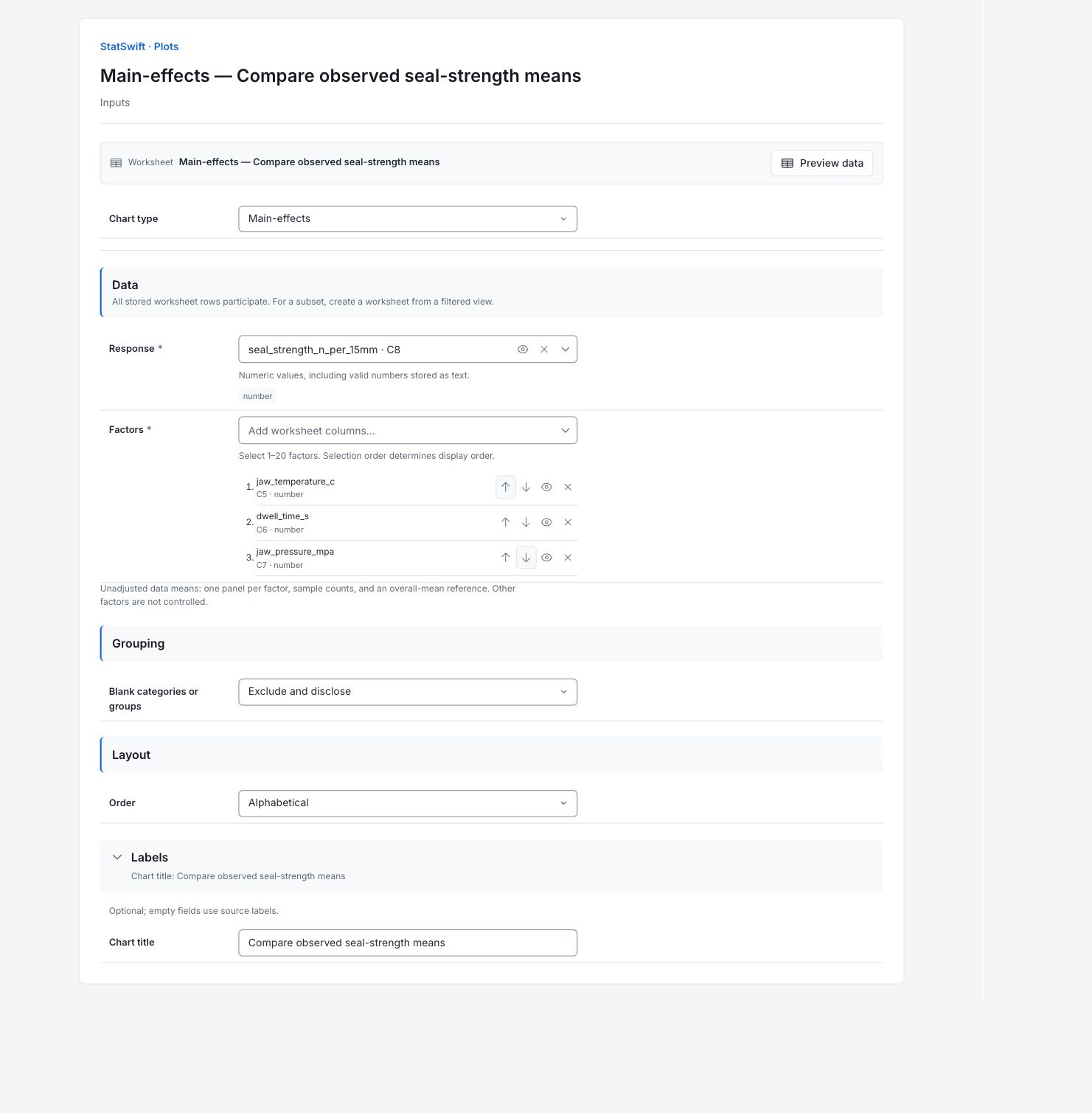
On Inputs, choose Main-effects in Chart type. Open the column picker for Response and select seal_strength_n_per_15mm.
For Factors, select jaw_temperature_c, dwell_time_s and jaw_pressure_mpa, in that order. Use the up and down arrows to correct their order if needed. The three panels will compare temperature, dwell time and pressure.
4. Set the chart options
In Layout, choose Alphabetical for Order. Keep Blank categories or groups at Exclude and disclose. Use the downloaded 16-row chart subset; the six center runs remain in the full DOE example and are not part of this chart.
Open Labels and enter Compare observed seal-strength means in Chart title.
5. Create chart
Choose Create chart, then open Results. Check Data used before comparing the chart with this guide. All stored worksheet rows participate; sorting or filtering the worksheet does not change the analytical sample.
6. Interpret results
Read the factor means
Each panel compares the two levels of one factor, averaging over the other factors and both days. The horizontal reference is the overall mean, 22.935 N/15 mm. Each factor level contains eight runs. The chart uses the 16 factorial runs, leaving six center runs in the full DOE example.
Compare temperature
Mean strength is 19.9525 N/15 mm at 150 °C and 25.9175 N/15 mm at 170 °C, a difference of 5.965. This is the largest observed mean contrast among the three panels.

Observed seal-strength means at 150 and 170 °C, averaging dwell time, pressure and day. Observed means averaged over other factor levels and days; no model adjustment. View full-size chart (opens in a new tab) Compare dwell time
Mean strength is 20.9413 N/15 mm at 0.8 second dwell and 24.9288 N/15 mm at 1.2 seconds. This averages both temperature levels and both pressures.

Observed seal-strength means at 0.8 and 1.2 second dwell, averaging temperature, pressure and day. Observed means averaged over other factor levels and days; no model adjustment. View full-size chart (opens in a new tab) Compare pressure
Mean strength is 22.3125 N/15 mm at 0.25 MPa and 23.5575 N/15 mm at 0.35 MPa. The smaller contrast is not, by itself, evidence that pressure has no effect.

Observed seal-strength means at 0.25 and 0.35 MPa pressure, averaging temperature, dwell time and day. Observed means averaged over other factor levels and days; no model adjustment. View full-size chart (opens in a new tab) Choose the next analysis
Read the temperature–dwell interaction chart before treating a mean contrast as the same at every setting. Use the full DOE example for model estimates and significance tests, including day effects and center runs. These panels alone do not prove an optimal recipe.
More details: read each result section
Complete result tables use six significant digits, as in Help.
Data used
Worksheet rows is 16; Eligible observations across series is 16; Excluded observations is 0. The source file is the 16-run factorial subset. Six center runs remain in the full DOE dataset; they were not excluded by this calculation. Worksheet sorting and filters do not change the analytical sample.
All stored rows are considered in original order. Worksheet sorting and filters do not change the analytical sample.
| Worksheet rows | Eligible observations across series | Excluded observations |
|---|---|---|
| 16 | 16 | 0 |
Observed factor means
Factor and Level identify a setting. N is eight runs for each level. Mean is the observed strength at that level, averaging over the other factors and days. Overall mean is 22.935 N/15 mm across the 16 runs. These are data summaries, not fitted model coefficients.
| Factor | Level | N | Mean | Overall mean |
|---|---|---|---|---|
| jaw_temperature_c | 150 | 8 | 19.9525 | 22.935 |
| jaw_temperature_c | 170 | 8 | 25.9175 | 22.935 |
| dwell_time_s | 0.8 | 8 | 20.9413 | 22.935 |
| dwell_time_s | 1.2 | 8 | 24.9288 | 22.935 |
| jaw_pressure_mpa | 0.25 | 8 | 22.3125 | 22.935 |
| jaw_pressure_mpa | 0.35 | 8 | 23.5575 | 22.935 |
7. Create a report
Keep the native charts and Data used, together with Observed factor means. Record the column assignments and chart options. State that the chart uses 16 factorial runs and shows observed means. Use the full DOE analysis when discussing model effects, interaction or an operating setting.
Choose Add to report from the completed run. Open Choose individual items and advanced options to select tables and charts, then choose Add to draft. Hidden items stay in the saved analysis.
Name the report and add the purpose of the study and your interpretation. Choose Save, review Preview, then use Export → Download HTML. The example below contains the full selected content, including results beyond one screen.